<?xml version="1.0" encoding="utf-8"?>
<feed xmlns="http://www.w3.org/2005/Atom">
    <title>aas.sh</title>
    <link href="https://aas.sh/atom.xml" rel="self" />
    <link href="https://aas.sh" />
    <id>https://aas.sh/atom.xml</id>
    <author>
        <name>Ashley Rose</name>
        
    </author>
    <updated>2022-11-20T00:00:00Z</updated>
    <entry>
    <title>Notakto: A Haskell game with Apecs and Raylib</title>
    <link href="https://aas.sh/blog/notakto-a-haskell-game-with-apecs-and-raylib/index.html" />
    <id>https://aas.sh/blog/notakto-a-haskell-game-with-apecs-and-raylib/index.html</id>
    <published>2022-11-20T00:00:00Z</published>
    <updated>2022-11-20T00:00:00Z</updated>
    <summary type="html"><![CDATA[<div class="gitrepo" data-header="Notakto">
<p>A link to the repository can be found <a href="https://github.com/Ashe/Notakto/">here</a>.</p>
</div>
<h1 id="previously-on-apecs">Previously on Apecs</h1>
<p>Roughly 4 years ago, I wrote the post <a href="/blog/making-a-game-with-haskell-and-apecs/">An introduction to game development to game development in Haskell using Apecs</a>. I like to think it was one of my most well-received blog posts <a href="https://github.com/jonascarpay/apecs#links">considering it is featured on the Apecs repository itself</a>, as well as being a common topic across emails and communications I receive.</p>
<p><a href="https://hackage.haskell.org/package/apecs">Apecs</a> is a ‘fast <a href="https://en.wikipedia.org/wiki/Entity_component_system">Entity-Component-System</a> library for game programming’ written in <a href="https://www.haskell.org/">Haskell</a>. It is by far one of the best ECS implementations I’ve used and also happens to be my favourite way of structuring games when using Haskell.</p>
<p>However, enough time has passed (4 years!) that some of the tricks and methods used in that blog post are old enough to confuse beginners. Since that was never my intention, I thought I’d make a new blog post about it!</p>
<h1 id="about-this-post">About this post</h1>
<p>This post is going to be a little bit different. Whereas normally I’d finish a project and write a post about it, in this post I want to write it as I go along! Each time I finish implement something substantial, I’m going to add to this post so that I can really capture more of the development process.</p>
<p>This may have a few side-effects, however. Firstly, code we write near the beginning may change towards the end. If I make a simple mistake (such as a syntax improvement), I’ll simply swap it out for the superior. But I want the big decisions I make to be written about so that if I later decide against it I can articulate properly why in the post.</p>
<p>My blog has support for both projects and blog posts; this post is a blog post since it is capturing a moment in time, like a photograph. The associated project for this page will be the formal write-up for how the game works, but this will act more as a portfolio piece than as a tutorial. This is a bit of an experiment for me, so please let me know how you think it goes!</p>
<h1 id="introduction">Introduction</h1>
<h2 id="what-is-the-ecs-pattern">What is the ECS pattern?</h2>
<p>As the name suggests, the ECS pattern is divided into three parts: entities, components and systems. These parts work together to form the foundations of your game’s architecture.</p>
<ul>
<li><p><strong>Entity —</strong> Alone, an entity is just a unique identifier, such as a simple integer value. They aren’t very useful by themselves!</p></li>
<li><p><strong>Component —</strong> Data, essentially. Anything that has data you need to store between frames, such as position, velocity, health or gold. Each component is attached to an entity in some way — some games have just a big database where an entity is just an integer used as a look-up key, whereas others (who probably would be using <a href="https://en.wikipedia.org/wiki/Object-oriented_programming">object oriented programming</a>) might compose component lists within the entity class itself.</p></li>
<li><p><strong>System —</strong> The magic part that a lot of people miss out on! A system is simple: it iterates through entities and updates their components in some way. A player movement system might cherry-pick the player’s entity and update the velocity component with respect to whatever keys are held on the keyboard; a movement system would then iterate through <em>all</em> entities with positions and velocities and update their positions accordingly. If you can break the logic of your game into systems then things become a lot simpler and safer.</p></li>
</ul>
<p>It was through ECS that I began to understand how modern game engines work (no thanks to you, university!) since having a greater appreciation for how games can be architected gave me an insight that couldn’t be taught through anything other experience. That isn’t to say that game engines all use ECS, in fact most of them don’t since they want to write their own systems (rendering, physics, scripting etc) that <em>you</em> then use and may or may not customise. Also, they probably don’t implement entities and components in the same way; both <a href="https://unity.com/">Unity</a> and <a href="https://www.unrealengine.com/en-US">Unreal</a> engines allow for logic to be placed in their components whereas the ECS pattern encourages components to be purely data.</p>
<h2 id="what-is-raylib">What is Raylib?</h2>
<p>One thing we haven’t mentioned yet is that this project will be using <a href="https://www.raylib.com/">Raylib</a> for the rendering side of things. I’ve always wanted to learn more about Raylib, and my chance came when I found the <a href="https://hackage.haskell.org/package/h-raylib">Haskell bindings</a> released recently.</p>
<p>We won’t spend too much time talking about Raylib, in fact I’m using it purely because it’s a really easy way to get things on-screen. The documentation style surprises me a bit, with a preference for documenting the source code rather than an online version of the API. That said, for our purposes the <a href="https://www.raylib.com/cheatsheet/cheatsheet.html">cheatsheet</a> is an excellent resource for just understanding what functions Raylib provides us with and what arguments they take.</p>
<h2 id="what-is-notakto">What is Notakto?</h2>
<p><a href="https://en.wikipedia.org/wiki/Notakto">Notakto</a> is a variant of tic-tac-toe in which both players play using ‘crosses’ as their markers across multiple tic-tac-toe boards. Three crosses in a row on any board will ‘kill’ it, meaning that the board can no longer be played on. When there is only one board remaining, the player who kills it is considered the loser, meaning that to win you have to get yourself in a position where you force the other person to get three-in-a-row on the final board. It is still a solveable game like regular tic-tac-toe, but the stratagies involve enough effort that you will probably not find many people who can figure them out on their own.</p>
<p>Why did I chose to make Notakto? There’s a beauty in making a game where the rules are already well-defined since there is already a definition of ‘done’ — I know what I’m working towards and the project has scope, a perfect scenario for an experimental tutorial!</p>
<p>And with that, it’s 10:00 am, let’s begin our journey!</p>
<h1 id="getting-started">Getting started</h1>
<h2 id="initial-commit">Initial commit</h2>
<div class="gitrepo" data-header="Notakto">
<p>I will be committing as I go, so even though this blog post may be revised for cleaner reading, the repository will always tell the full story. Each section will have a permalink to the commit I was at so that you can see how the project evolves. I won’t be detailing every single change in this blog post, so if you really are following along you may need to check the repository and fill the blanks in yourself.</p>
<p>A link to the repository’s first commit can be found <a href="https://github.com/Ashe/Notakto/commit/de4a61b47d2da17644e5709f52f1fd5c89bb632c">here</a>.</p>
</div>
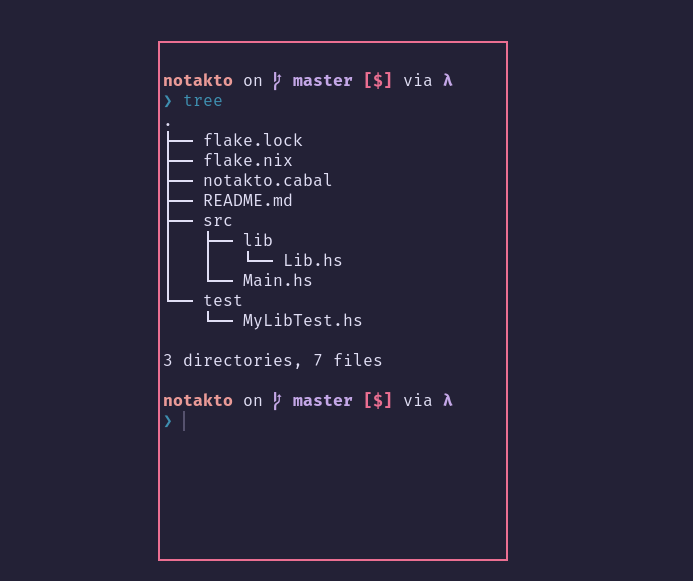
<div class="figure" data-image="https://res.cloudinary.com/aas-sh/image/upload/v1668334893/blog/2022/11/13-11-2022_10_20_31_ywlsij.png" data-caption="The folder structure of the initial commit." data-source="Notakto" data-sourceUrl="https://github.com/Ashe/Notakto/commit/de4a61b47d2da17644e5709f52f1fd5c89bb632c">

</div>
<p>Here we go! I’ve just pushed an initial commit with my standard Haskell bits and bobs. I always like making a library and separating executable-only code from the game itself, meaning that if we wanted multiple executables that handle the game setup in different ways (i.e. terminal or GUI) then we can. I’ve also got a testing folder, maybe we’ll write some tests as we go, who knows?</p>
<p>You may also notice that I am using <a href="https://nixos.org/">Nix</a> to build and run this project, so you should just be able to use <code>nix run</code> to run the project at any point in time. If you want to work in this repository, you can use <code>nix develop</code> to get your development environment set up.</p>
<p>At this point in time, running the project should print <code>Hello, Notakto</code>.</p>
<h2 id="introducing-libraries">Introducing libraries</h2>
<p>After setting up the repository, my next step with any project is adding the libraries I know I’ll be using and getting a modified example running to demonstrate that things are working correctly. Lets begin by updating our cabal file to include the <code>h-raylib</code> and <code>apecs</code>.</p>
<pre class="cabal"><code>library
  exposed-modules:  Lib
  hs-source-dirs:   src/lib
  build-depends:
    base,
    apecs,
    h-raylib
  default-language: Haskell2010</code></pre>
<h2 id="single-file-example">Single file example</h2>
<h3 id="imports-options-and-extensions">Imports, options and extensions</h3>
<p>Now we can try and use our dependencies by modifying an example! Thankfully, <code>h-raylib</code> supplies us with a <a href="https://github.com/Anut-py/h-raylib/tree/606936336922dea13517abf4d136f17b162efcc1/examples/first-person-camera">first-person-camera example</a>, and I already have some Apecs examples from the <a href="https://github.com/Ashe/SimpleRoguelike.hs/">project</a> featured in my <a href="https://aas.sh/blog/making-a-game-with-haskell-and-apecs/">previous post</a>!</p>
<div class="sourceCode" id="cb2"><pre class="sourceCode hs"><code class="sourceCode haskell"><span id="cb2-1"><a href="#cb2-1" aria-hidden="true" tabindex="-1"></a><span class="ot">{-# OPTIONS -Wall #-}</span></span>
<span id="cb2-2"><a href="#cb2-2" aria-hidden="true" tabindex="-1"></a><span class="ot">{-# LANGUAGE FlexibleInstances #-}</span></span>
<span id="cb2-3"><a href="#cb2-3" aria-hidden="true" tabindex="-1"></a><span class="ot">{-# LANGUAGE MultiParamTypeClasses #-}</span></span>
<span id="cb2-4"><a href="#cb2-4" aria-hidden="true" tabindex="-1"></a><span class="ot">{-# LANGUAGE TemplateHaskell #-}</span></span>
<span id="cb2-5"><a href="#cb2-5" aria-hidden="true" tabindex="-1"></a><span class="ot">{-# LANGUAGE TypeFamilies #-}</span></span>
<span id="cb2-6"><a href="#cb2-6" aria-hidden="true" tabindex="-1"></a></span>
<span id="cb2-7"><a href="#cb2-7" aria-hidden="true" tabindex="-1"></a><span class="kw">module</span> <span class="dt">Lib</span> (main) <span class="kw">where</span></span>
<span id="cb2-8"><a href="#cb2-8" aria-hidden="true" tabindex="-1"></a></span>
<span id="cb2-9"><a href="#cb2-9" aria-hidden="true" tabindex="-1"></a><span class="kw">import</span> <span class="dt">Control.Monad</span> (unless)</span>
<span id="cb2-10"><a href="#cb2-10" aria-hidden="true" tabindex="-1"></a></span>
<span id="cb2-11"><a href="#cb2-11" aria-hidden="true" tabindex="-1"></a><span class="kw">import</span> <span class="dt">Apecs</span></span>
<span id="cb2-12"><a href="#cb2-12" aria-hidden="true" tabindex="-1"></a></span>
<span id="cb2-13"><a href="#cb2-13" aria-hidden="true" tabindex="-1"></a><span class="kw">import</span> <span class="kw">qualified</span> <span class="dt">Raylib</span> <span class="kw">as</span> <span class="dt">RL</span></span>
<span id="cb2-14"><a href="#cb2-14" aria-hidden="true" tabindex="-1"></a><span class="kw">import</span> <span class="kw">qualified</span> <span class="dt">Raylib.Colors</span> <span class="kw">as</span> <span class="dt">RL</span></span>
<span id="cb2-15"><a href="#cb2-15" aria-hidden="true" tabindex="-1"></a><span class="kw">import</span> <span class="kw">qualified</span> <span class="dt">Raylib.Constants</span> <span class="kw">as</span> <span class="dt">RL</span></span>
<span id="cb2-16"><a href="#cb2-16" aria-hidden="true" tabindex="-1"></a><span class="kw">import</span> <span class="kw">qualified</span> <span class="dt">Raylib.Types</span> <span class="kw">as</span> <span class="dt">RL</span></span>
<span id="cb2-17"><a href="#cb2-17" aria-hidden="true" tabindex="-1"></a><span class="kw">import</span> <span class="dt">Raylib.Types</span> (<span class="dt">Vector3</span> (..))</span></code></pre></div>
<p>Here is how our <code>Lib</code> module is setup now. We’re still working in one file to keep it simple, so it’s okay for things to be messy.</p>
<ul>
<li>I use the <code>-Wall</code> language option just to make sure we’re ironing out warnings we go — personal prefence.</li>
<li>The language extensions you see are all used by Apecs (or at least, the example made use of them). I know for a fact that <code>TemplateHaskell</code> is used as an easy way of building a <code>World</code> type for use throughout the application.</li>
<li><code>Lib</code> only needs to export <code>main</code> for now, but if we ever want to export a configuration data type that our client can provide then this is where we’d put it.</li>
<li>I try to structure my includes with my ‘Haskell libraries’ at the top (i.e. things that aren’t specific to my project), followed by blocks of imports for my dependencies:
<ul>
<li>Apecs has quite a nice API; it doesn’t get messy if you just import it in its entirety and it almost feels like it’s part of the language.</li>
<li>Raylib has a <em>lot</em> of things going on (again, refer to the <a href="https://www.raylib.com/cheatsheet/cheatsheet.html">cheatsheet</a>, so I’ve <code>qualified</code> it. Normally I’d explicitly write every function I use, however for this tutorial I’m going to use qualifications so that you can easily tell when something is a Raylib thing and when it’s something else.
<ul>
<li>I made an exception for <code>Raylib.Types</code> — certain types are quite commonly used throughout the project and so rather than typing <code>RL.Vector3</code> constantly I instead explicitly imported it so that we can use it without restraint.</li>
</ul></li>
</ul></li>
</ul>
<h3 id="creating-and-initialising-a-world">Creating and initialising a World</h3>
<p>Next up is creating our <code>World</code>. In Apecs, the <code>World</code> is a type built specifically for your components to live in; that’s why <code>TemplateHaskell</code> is used to automatically write the code that glues your components together. The <code>initWorld</code> function is also a result of this template, which is why you might find it hard to find the <code>World</code> type and <code>initWorld</code> in the <a href="https://hackage.haskell.org/package/apecs"><code>apecs</code> documentation</a>.</p>
<div class="sourceCode" id="cb3"><pre class="sourceCode hs"><code class="sourceCode haskell"><span id="cb3-1"><a href="#cb3-1" aria-hidden="true" tabindex="-1"></a><span class="co">-- Define a component, a Camera</span></span>
<span id="cb3-2"><a href="#cb3-2" aria-hidden="true" tabindex="-1"></a><span class="kw">newtype</span> <span class="dt">Camera</span> <span class="ot">=</span> <span class="dt">Camera</span> <span class="dt">RL.Camera3D</span></span>
<span id="cb3-3"><a href="#cb3-3" aria-hidden="true" tabindex="-1"></a></span>
<span id="cb3-4"><a href="#cb3-4" aria-hidden="true" tabindex="-1"></a><span class="co">-- Create a world featuring the lonely Camera component</span></span>
<span id="cb3-5"><a href="#cb3-5" aria-hidden="true" tabindex="-1"></a>makeWorldAndComponents <span class="st">&quot;World&quot;</span> [&#39;<span class="dt">&#39;Camera</span>]</span>
<span id="cb3-6"><a href="#cb3-6" aria-hidden="true" tabindex="-1"></a></span>
<span id="cb3-7"><a href="#cb3-7" aria-hidden="true" tabindex="-1"></a><span class="co">-- Initialise our world in the main function, and give it to our game&#39;s systems</span></span>
<span id="cb3-8"><a href="#cb3-8" aria-hidden="true" tabindex="-1"></a><span class="ot">main ::</span> <span class="dt">IO</span> ()</span>
<span id="cb3-9"><a href="#cb3-9" aria-hidden="true" tabindex="-1"></a>main <span class="ot">=</span> initWorld <span class="op">&gt;&gt;=</span> runSystem (initialise <span class="op">&gt;&gt;</span> run <span class="op">&gt;&gt;</span> terminate)</span></code></pre></div>
<p>The big important function here is <code>makeWorldAndComponents</code>. In Apecs, there are multiple template-Haskell functions you can use to create your <code>World</code> and associated components:</p>
<ul>
<li><code>makeWorld</code> takes your components and constructs your <code>World</code> and component associations, but it doesn’t assume anything about your component’s storage mechanisms.</li>
<li><code>makeWorldAndComponents</code> calls <code>makeWorld</code>, but then also calls <code>makeMapComponents</code> which takes all of your components and defines <code>Component</code> instances with a <code>Map</code> store. In simple terms, it sets up your components with the most common storage mechanism, <code>Map</code>.</li>
</ul>
<p>In this tutorial, I’ll be using <code>makeWorldAndComponents</code> to keep things simple, but if you ever want components that have specific constraints you might want to consider <code>makeWorld</code> and defining your mechanisms manually like I did <a href="/blog/making-a-game-with-haskell-and-apecs/#creating-components">in my previous post</a>.</p>
<div class="note" data-header="Manual storage definitions" data-caption="For more information, [check out the documentation](https://hackage.haskell.org/package/apecs-0.9.4/docs/Apecs-Stores.html) and maybe even [my previous post](/blog/making-a-game-with-haskell-and-apecs/#creating-components).">
<p>You probably want to use <code>makeWorld</code> if you want to be cool so that you have full control. Here’s how components would look if you want things to be done manually:</p>
<div class="sourceCode" id="cb4"><pre class="sourceCode hs"><code class="sourceCode haskell"><span id="cb4-1"><a href="#cb4-1" aria-hidden="true" tabindex="-1"></a><span class="co">-- &#39;Map&#39; storage: standard storage where any entity can have one</span></span>
<span id="cb4-2"><a href="#cb4-2" aria-hidden="true" tabindex="-1"></a><span class="co">-- e.g. Every entity may have a name</span></span>
<span id="cb4-3"><a href="#cb4-3" aria-hidden="true" tabindex="-1"></a><span class="kw">newtype</span> <span class="dt">Name</span> <span class="ot">=</span> <span class="dt">Name</span> <span class="dt">String</span> <span class="kw">deriving</span> <span class="dt">Show</span></span>
<span id="cb4-4"><a href="#cb4-4" aria-hidden="true" tabindex="-1"></a><span class="kw">instance</span> <span class="dt">Component</span> <span class="dt">Name</span> <span class="kw">where</span> <span class="kw">type</span> <span class="dt">Storage</span> <span class="dt">Name</span> <span class="ot">=</span> <span class="dt">Map</span> <span class="dt">Name</span></span>
<span id="cb4-5"><a href="#cb4-5" aria-hidden="true" tabindex="-1"></a></span>
<span id="cb4-6"><a href="#cb4-6" aria-hidden="true" tabindex="-1"></a><span class="co">-- &#39;Unique&#39; storage: only one entity can have this component at maximum</span></span>
<span id="cb4-7"><a href="#cb4-7" aria-hidden="true" tabindex="-1"></a><span class="co">-- e.g. Only zero or one entities can be marked as a player at any given time</span></span>
<span id="cb4-8"><a href="#cb4-8" aria-hidden="true" tabindex="-1"></a><span class="kw">data</span> <span class="dt">Player</span> <span class="ot">=</span> <span class="dt">Player</span></span>
<span id="cb4-9"><a href="#cb4-9" aria-hidden="true" tabindex="-1"></a><span class="kw">instance</span> <span class="dt">Component</span> <span class="dt">Player</span> <span class="kw">where</span> <span class="kw">type</span> <span class="dt">Storage</span> <span class="dt">Player</span> <span class="ot">=</span> <span class="dt">Unique</span> <span class="dt">Player</span></span>
<span id="cb4-10"><a href="#cb4-10" aria-hidden="true" tabindex="-1"></a></span>
<span id="cb4-11"><a href="#cb4-11" aria-hidden="true" tabindex="-1"></a><span class="co">-- &#39;Global&#39; storage: exactly one component exists for the lifetime of the game</span></span>
<span id="cb4-12"><a href="#cb4-12" aria-hidden="true" tabindex="-1"></a><span class="co">-- e.g. There only needs to be one definition of the game&#39;s configuration</span></span>
<span id="cb4-13"><a href="#cb4-13" aria-hidden="true" tabindex="-1"></a><span class="co">-- Note that querying for this on ANY entity will yield the global one,</span></span>
<span id="cb4-14"><a href="#cb4-14" aria-hidden="true" tabindex="-1"></a><span class="co">-- effectively sharing the component between all entities</span></span>
<span id="cb4-15"><a href="#cb4-15" aria-hidden="true" tabindex="-1"></a><span class="co">-- Also note that globals need instances for Monoid and Semigroup</span></span>
<span id="cb4-16"><a href="#cb4-16" aria-hidden="true" tabindex="-1"></a><span class="kw">data</span> <span class="dt">Config</span> <span class="ot">=</span> <span class="dt">Config</span> <span class="dt">String</span> <span class="dt">Int</span></span>
<span id="cb4-17"><a href="#cb4-17" aria-hidden="true" tabindex="-1"></a><span class="kw">instance</span> <span class="dt">Monoid</span> <span class="dt">Config</span> <span class="kw">where</span> <span class="fu">mempty</span> <span class="ot">=</span> <span class="dt">Config</span> <span class="st">&quot;Foo&quot;</span> <span class="dv">0</span></span>
<span id="cb4-18"><a href="#cb4-18" aria-hidden="true" tabindex="-1"></a><span class="kw">instance</span> <span class="dt">Semigroup</span> <span class="dt">Config</span> <span class="kw">where</span> (<span class="op">&lt;&gt;</span>) <span class="ot">=</span> <span class="fu">mappend</span></span>
<span id="cb4-19"><a href="#cb4-19" aria-hidden="true" tabindex="-1"></a><span class="kw">instance</span> <span class="dt">Component</span> <span class="dt">Config</span> <span class="kw">where</span> <span class="kw">type</span> <span class="dt">Storage</span> <span class="dt">Config</span> <span class="ot">=</span> <span class="dt">Global</span> <span class="dt">Config</span></span></code></pre></div>
<p>So even though I’m going to be lazy on this post so I can say ‘make a new component’, I really do encourage people reading this to <strong>try and use <code>makeWorld</code> instead</strong>.</p>
</div>
<p>So, what are the <code>initialise</code>, <code>run</code> and <code>terminate</code> systems? Well, they are just functions with the type <code>System World ()</code>!</p>
<ul>
<li><code>System</code> is an Apecs type defining a system, one of the parts of the ECS pattern. Note that <code>System w a</code> is mapped to <code>SystemT w IO a</code> under the hood; it’s just a convenience type.</li>
<li><code>World</code> is our world type created by template haskell in the above snippet.</li>
<li><code>()</code> is the absence of type; we aren’t expecting these systems to return anything, so these particular functions are only for executing side effects.</li>
</ul>
<p>Let’s first look at <code>initialise</code>:</p>
<div class="sourceCode" id="cb5"><pre class="sourceCode hs"><code class="sourceCode haskell"><span id="cb5-1"><a href="#cb5-1" aria-hidden="true" tabindex="-1"></a><span class="co">-- Simple system, doesn&#39;t return anything</span></span>
<span id="cb5-2"><a href="#cb5-2" aria-hidden="true" tabindex="-1"></a><span class="ot">initialise ::</span> <span class="dt">System</span> <span class="dt">World</span> ()</span>
<span id="cb5-3"><a href="#cb5-3" aria-hidden="true" tabindex="-1"></a></span>
<span id="cb5-4"><a href="#cb5-4" aria-hidden="true" tabindex="-1"></a><span class="co">-- We&#39;re in the &#39;System&#39; monad, use &#39;do&#39; to compose side effects</span></span>
<span id="cb5-5"><a href="#cb5-5" aria-hidden="true" tabindex="-1"></a>initialise <span class="ot">=</span> <span class="kw">do</span></span>
<span id="cb5-6"><a href="#cb5-6" aria-hidden="true" tabindex="-1"></a></span>
<span id="cb5-7"><a href="#cb5-7" aria-hidden="true" tabindex="-1"></a>  <span class="co">-- Define a Raylib 3D perspective camera and name it &#39;camera&#39;</span></span>
<span id="cb5-8"><a href="#cb5-8" aria-hidden="true" tabindex="-1"></a>  <span class="kw">let</span> camera <span class="ot">=</span> <span class="dt">RL.Camera3D</span> (<span class="dt">Vector3</span> <span class="dv">0</span> <span class="dv">1</span> <span class="dv">0</span>) (<span class="dt">Vector3</span> <span class="dv">2</span> <span class="dv">1</span> <span class="dv">1</span>) (<span class="dt">Vector3</span> <span class="dv">0</span> <span class="dv">1</span> <span class="dv">0</span>) <span class="dv">70</span></span>
<span id="cb5-9"><a href="#cb5-9" aria-hidden="true" tabindex="-1"></a>        RL.cameraProjection&#39;perspective</span>
<span id="cb5-10"><a href="#cb5-10" aria-hidden="true" tabindex="-1"></a></span>
<span id="cb5-11"><a href="#cb5-11" aria-hidden="true" tabindex="-1"></a>  <span class="co">-- Create a global entity with our camera component</span></span>
<span id="cb5-12"><a href="#cb5-12" aria-hidden="true" tabindex="-1"></a>  <span class="co">-- &#39;set&#39; is an apecs function for setting a component&#39;s state on a given entity</span></span>
<span id="cb5-13"><a href="#cb5-13" aria-hidden="true" tabindex="-1"></a>  <span class="co">-- &#39;global&#39; refers to the singular and unique global entity of the game</span></span>
<span id="cb5-14"><a href="#cb5-14" aria-hidden="true" tabindex="-1"></a>  <span class="co">-- &#39;Camera&#39; refers to the constructor for our component which contains a RL.3DCamera</span></span>
<span id="cb5-15"><a href="#cb5-15" aria-hidden="true" tabindex="-1"></a>  set global <span class="op">$</span> <span class="dt">Camera</span> camera</span>
<span id="cb5-16"><a href="#cb5-16" aria-hidden="true" tabindex="-1"></a></span>
<span id="cb5-17"><a href="#cb5-17" aria-hidden="true" tabindex="-1"></a>  <span class="co">-- The &#39;System&#39; monad has IO, remember &#39;System w a = SystemT w IO a&#39;!</span></span>
<span id="cb5-18"><a href="#cb5-18" aria-hidden="true" tabindex="-1"></a>  liftIO <span class="op">$</span> <span class="kw">do</span></span>
<span id="cb5-19"><a href="#cb5-19" aria-hidden="true" tabindex="-1"></a></span>
<span id="cb5-20"><a href="#cb5-20" aria-hidden="true" tabindex="-1"></a>    <span class="co">-- Now we can compose side effects for IO, which is what h-raylib uses</span></span>
<span id="cb5-21"><a href="#cb5-21" aria-hidden="true" tabindex="-1"></a>    RL.initWindow <span class="dv">1920</span> <span class="dv">1080</span> <span class="st">&quot;App&quot;</span></span>
<span id="cb5-22"><a href="#cb5-22" aria-hidden="true" tabindex="-1"></a>    RL.setTargetFPS <span class="dv">60</span></span>
<span id="cb5-23"><a href="#cb5-23" aria-hidden="true" tabindex="-1"></a>    RL.setCameraMode camera RL.cameraMode&#39;firstPerson</span></code></pre></div>
<p>The biggest takeaway from the above snippet is to remember that just because we’re in Apecs-land doesn’t mean that we’re constrained to only using Apecs functions. <code>System</code> is a <code>type</code> constructor for <code>SystemT</code>, which <code>apecs</code> documentation explains:</p>
<blockquote>
<p>A <code>SystemT</code> is a newtype around <code>ReaderT w m a</code>, where <code>w</code> is the game world variable. Systems serve to:</p>
<ul>
<li>Allow type-based lookup of a component’s store through <code>getStore</code>.</li>
<li>Lift side effects into their host Monad.</li>
</ul>
</blockquote>
<p>We can do <code>IO</code> 🎉 Before we continue though, let’s look into <code>terminate</code>, since it’s good practice to always write in programming to always write <code>delete</code> where there’s <code>new</code>, or a <em>destructor</em> whenever you write a <em>constructor</em>. We have made our window, so let’s handle closing it before we forget:</p>
<div class="sourceCode" id="cb6"><pre class="sourceCode hs"><code class="sourceCode haskell"><span id="cb6-1"><a href="#cb6-1" aria-hidden="true" tabindex="-1"></a><span class="co">-- When terminate is called, just close the window</span></span>
<span id="cb6-2"><a href="#cb6-2" aria-hidden="true" tabindex="-1"></a><span class="ot">terminate ::</span> <span class="dt">System</span> <span class="dt">World</span> ()</span>
<span id="cb6-3"><a href="#cb6-3" aria-hidden="true" tabindex="-1"></a>terminate <span class="ot">=</span> liftIO RL.closeWindow</span></code></pre></div>
<p>This is a short and sweet one!</p>
<div class="help" data-header="Why didn&#39;t we just manage the window in main?">
<p>The question on your mind might be <em>“why did we need to do this in a <code>System</code>?”</em> The answer to that lies in the names: <code>initialise</code> and <code>terminate</code>. Yes, the Raylib specific stuff could be done purely in <code>IO</code> without Apecs getting involved, but this is constraining.</p>
<p>What if we want to store the want to load and save data using a file when the application opens and closes? What if we need to correct the state of the game before we enter the game loop, or after it’s concluded? So long as we’re in a <code>System</code>, we have access to all the components in the <code>World</code>; exiting back into <code>IO</code> removes this ability and so I prefer to use <code>liftIO</code> within <code>System</code> to get the best of both worlds.</p>
</div>
<h3 id="updating-and-rendering">Updating and rendering</h3>
<p>We aren’t quite done with our single-file example since we have one remaining undefined function: <code>run</code>. Let’s dive in:</p>
<div class="sourceCode" id="cb7"><pre class="sourceCode hs"><code class="sourceCode haskell"><span id="cb7-1"><a href="#cb7-1" aria-hidden="true" tabindex="-1"></a><span class="ot">run ::</span> <span class="dt">System</span> <span class="dt">World</span> ()</span>
<span id="cb7-2"><a href="#cb7-2" aria-hidden="true" tabindex="-1"></a>run <span class="ot">=</span> <span class="kw">do</span></span>
<span id="cb7-3"><a href="#cb7-3" aria-hidden="true" tabindex="-1"></a>  update</span>
<span id="cb7-4"><a href="#cb7-4" aria-hidden="true" tabindex="-1"></a>  render</span>
<span id="cb7-5"><a href="#cb7-5" aria-hidden="true" tabindex="-1"></a>  shouldClose <span class="ot">&lt;-</span> liftIO RL.windowShouldClose</span>
<span id="cb7-6"><a href="#cb7-6" aria-hidden="true" tabindex="-1"></a>  unless shouldClose run</span></code></pre></div>
<p>Hang on a moment, this is a <strong>game loop</strong>! So in <code>main</code>, we had <code>initialise &gt;&gt; run &gt;&gt; terminate</code>, you can now see that the reason the program doesn’t terminate immediately is because <code>run</code> is hogging the thread and infinitely looping until told otherwise!</p>
<p>So what are <code>update</code> and <code>render</code>? Well, when you are in a monad be it <code>IO</code> or <code>System</code>, you can easily call functions of the same monadic type to compose side effects. You could pretty much substitute <code>update</code> and <code>render</code> for their contents and everything will work the same; this is a way of breaking things up. I like updating the game and then rendering the result. We can split these two steps into as many more steps as we need, but for our single file example they are singular systems that just handle the entire game.</p>
<div class="sourceCode" id="cb8"><pre class="sourceCode hs"><code class="sourceCode haskell"><span id="cb8-1"><a href="#cb8-1" aria-hidden="true" tabindex="-1"></a><span class="co">-- Simple system</span></span>
<span id="cb8-2"><a href="#cb8-2" aria-hidden="true" tabindex="-1"></a><span class="ot">update ::</span> <span class="dt">System</span> <span class="dt">World</span> ()</span>
<span id="cb8-3"><a href="#cb8-3" aria-hidden="true" tabindex="-1"></a>update <span class="ot">=</span> <span class="kw">do</span></span>
<span id="cb8-4"><a href="#cb8-4" aria-hidden="true" tabindex="-1"></a></span>
<span id="cb8-5"><a href="#cb8-5" aria-hidden="true" tabindex="-1"></a>  <span class="co">-- Retrieve the camera component from the global entity (c is a RL.Camera3D)</span></span>
<span id="cb8-6"><a href="#cb8-6" aria-hidden="true" tabindex="-1"></a>  <span class="dt">Camera</span> c <span class="ot">&lt;-</span> get global</span>
<span id="cb8-7"><a href="#cb8-7" aria-hidden="true" tabindex="-1"></a></span>
<span id="cb8-8"><a href="#cb8-8" aria-hidden="true" tabindex="-1"></a>  <span class="co">-- Update the camera and store the updated version in c&#39;</span></span>
<span id="cb8-9"><a href="#cb8-9" aria-hidden="true" tabindex="-1"></a>  <span class="co">-- Also note the use of liftIO to dip into the IO monad to allow the use of raylib</span></span>
<span id="cb8-10"><a href="#cb8-10" aria-hidden="true" tabindex="-1"></a>  c&#39; <span class="ot">&lt;-</span> liftIO <span class="op">$</span> RL.updateCamera c</span>
<span id="cb8-11"><a href="#cb8-11" aria-hidden="true" tabindex="-1"></a></span>
<span id="cb8-12"><a href="#cb8-12" aria-hidden="true" tabindex="-1"></a>  <span class="co">-- Replace the global entity&#39;s Camera with a new one containing the updated camera</span></span>
<span id="cb8-13"><a href="#cb8-13" aria-hidden="true" tabindex="-1"></a>  set global <span class="op">$</span> <span class="dt">Camera</span> c&#39;</span></code></pre></div>
<p>I was a bit alarmed at first at how small this function is — where is the input handling? Where’s the movement speed definitions and all the other things we expect to see in a first-person game? Well it looks like Raylib is has some very plug-and-play style functions, which is nice to see when playing around. I’m sure anyone looking to make an FPS will be able to roll their own movement system, but for us we’ll be removing this pretty quickly since funnily enough Notakto is not a competitor to <a href="https://www.callofduty.com/uk/en/">Call of Duty</a>.</p>
<div class="sourceCode" id="cb9"><pre class="sourceCode hs"><code class="sourceCode haskell"><span id="cb9-1"><a href="#cb9-1" aria-hidden="true" tabindex="-1"></a><span class="ot">render ::</span> <span class="dt">System</span> <span class="dt">World</span> ()</span>
<span id="cb9-2"><a href="#cb9-2" aria-hidden="true" tabindex="-1"></a>render <span class="ot">=</span> <span class="kw">do</span></span>
<span id="cb9-3"><a href="#cb9-3" aria-hidden="true" tabindex="-1"></a>  <span class="dt">Camera</span> camera <span class="ot">&lt;-</span> get global</span>
<span id="cb9-4"><a href="#cb9-4" aria-hidden="true" tabindex="-1"></a>  liftIO <span class="op">$</span> <span class="kw">do</span></span>
<span id="cb9-5"><a href="#cb9-5" aria-hidden="true" tabindex="-1"></a>    RL.beginDrawing</span>
<span id="cb9-6"><a href="#cb9-6" aria-hidden="true" tabindex="-1"></a>    RL.clearBackground RL.black</span>
<span id="cb9-7"><a href="#cb9-7" aria-hidden="true" tabindex="-1"></a>    RL.drawFPS <span class="dv">10</span> <span class="dv">20</span></span>
<span id="cb9-8"><a href="#cb9-8" aria-hidden="true" tabindex="-1"></a>    RL.beginMode3D camera</span>
<span id="cb9-9"><a href="#cb9-9" aria-hidden="true" tabindex="-1"></a>    RL.drawGrid <span class="dv">10</span> <span class="dv">1</span></span>
<span id="cb9-10"><a href="#cb9-10" aria-hidden="true" tabindex="-1"></a>    RL.drawCircle3D (<span class="dt">Vector3</span> <span class="dv">2</span> <span class="dv">1</span> <span class="dv">1</span>) <span class="dv">2</span> (<span class="dt">Vector3</span> <span class="dv">0</span> <span class="dv">1</span> <span class="dv">0</span>) <span class="dv">0</span> RL.white</span>
<span id="cb9-11"><a href="#cb9-11" aria-hidden="true" tabindex="-1"></a>    RL.drawLine3D (<span class="dt">Vector3</span> <span class="dv">3</span> <span class="dv">0</span> <span class="dv">1</span>) (<span class="dt">Vector3</span> <span class="dv">1</span> <span class="dv">2</span> <span class="dv">1</span>) RL.white</span>
<span id="cb9-12"><a href="#cb9-12" aria-hidden="true" tabindex="-1"></a>    RL.drawLine3D (<span class="dt">Vector3</span> <span class="dv">3</span> <span class="dv">2</span> <span class="dv">1</span>) (<span class="dt">Vector3</span> <span class="dv">1</span> <span class="dv">0</span> <span class="dv">1</span>) RL.white</span>
<span id="cb9-13"><a href="#cb9-13" aria-hidden="true" tabindex="-1"></a>    RL.drawCubeWiresV (<span class="dt">Vector3</span> (<span class="op">-</span><span class="dv">2</span>) <span class="dv">1</span> <span class="dv">0</span>) (<span class="dt">Vector3</span> <span class="dv">1</span> <span class="dv">2</span> <span class="dv">1</span>) RL.white</span>
<span id="cb9-14"><a href="#cb9-14" aria-hidden="true" tabindex="-1"></a>    RL.endMode3D</span>
<span id="cb9-15"><a href="#cb9-15" aria-hidden="true" tabindex="-1"></a>    RL.endDrawing</span></code></pre></div>
<p>The <code>render</code> system is very straightforward. We grab our camera out of our Apecs <code>World</code> and then use it in the <code>IO</code> monad to help Raylib render the world. I won’t go into much detail here.</p>
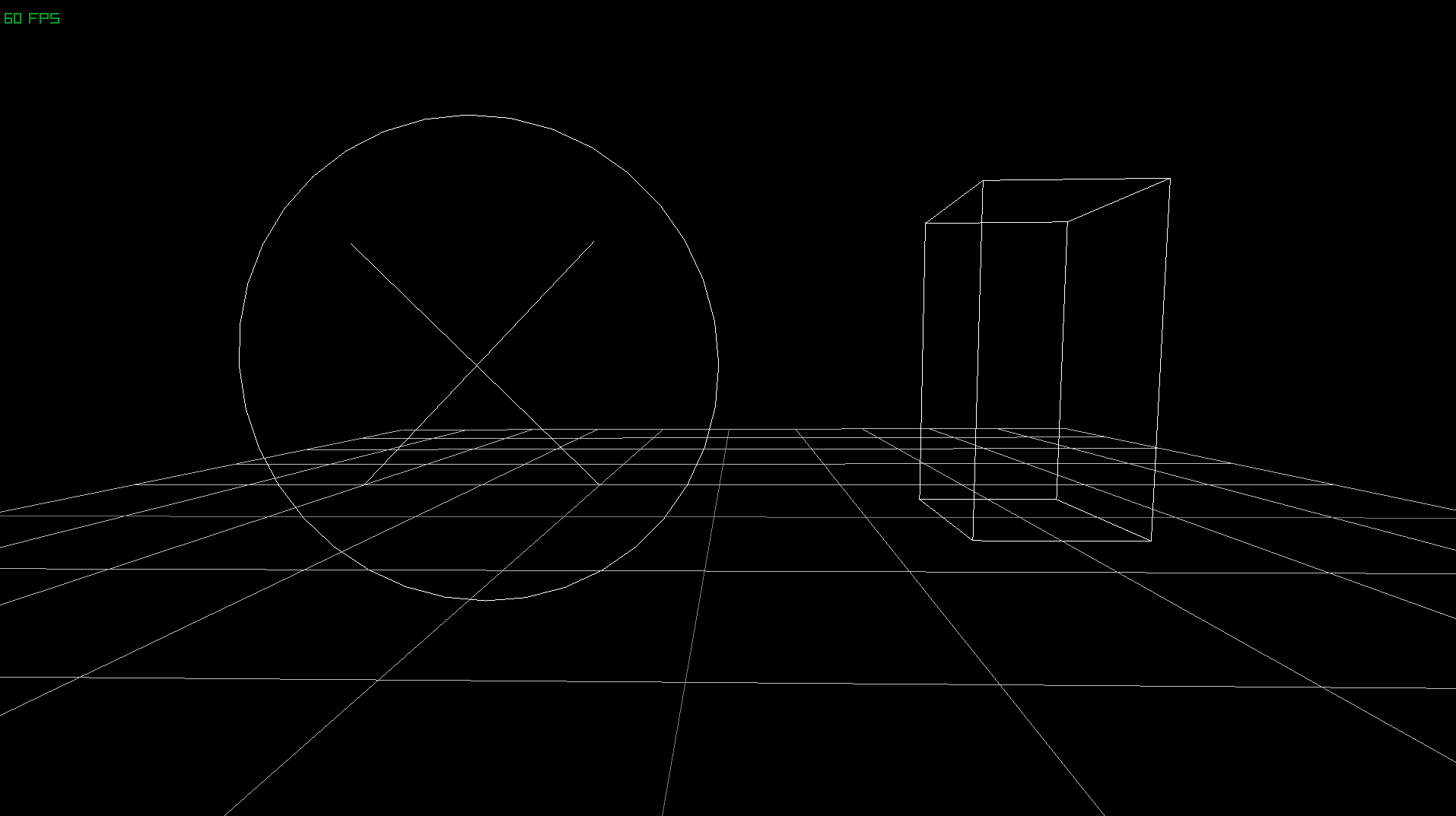
<p>After what feels like an eternity (it has taken me 2 hours to write this!), here’s our single file example up and running! Time for a toilet break and a glass of water!</p>
<div class="figure" data-image="https://res.cloudinary.com/aas-sh/image/upload/v1668335749/blog/2022/11/13-11-2022_10_35_33_e1xmdy.png" data-caption="Screenshot of the single file example running." data-source="Notakto" data-sourceUrl="https://github.com/Ashe/Notakto/commit/4442c8145630604719a6baef13cfbc1814cee3d8">

</div>
<div class="gitrepo" data-header="Notakto">
<p>A link to the corresponding commit for the previous section can be found <a href="https://github.com/Ashe/Notakto/commit/4442c8145630604719a6baef13cfbc1814cee3d8">here</a>.</p>
</div>
<h1 id="visualising-the-state-of-the-game">Visualising the state of the game</h1>
<h2 id="what-should-be-an-entity">What should be an entity?</h2>
<p>I believe that the next step of this project is to visualise the boards and the marks placed upon them. In terms of priority, I want to get the visuals set up first otherwise testing the game is going to be a pain, but in order to get that done we need to create a basic representation of state!</p>
<p>So, representations of state — <code>data</code> types! Let’s make some new types to represent things we’ll need in our game! But wait.. Do you hear alarm bells?</p>
<div class="danger" data-header="Don&#39;t rush!">
<p>While it’s all fun and games to get experimental and start playing around with Haskell’s wonderful type system, sometimes we can get bogged down in actually using these types and trying to make them work.</p>
<p>Let’s take a moment to appreciate the blank slate we have right now and come up with at least a hypothesis for how things should be laid out.</p>
</div>
<p>After heeding that warning, let’s create an action plan. What should consist of an entity in our game? More specifically, should the boards themselves be entities? Should the marks that players place be entities? One could argue that both the board itself and the crosses placed could be entities. I disagree; I believe that the crosses don’t really make sense without the context of a board, and so there’d be little use in having an entity representing each cross in isolation (it might even make things more confusing trying to figure out which board each cross is on).</p>
<div class="caption" data-caption="A table describing my plan for entities in Notakto." data-source="Notakto" data-sourceUrl="https://github.com/Ashe/Notakto/commit/a3b46dcf14195d42f566720360e6d030c157cdbd">
<table>
<colgroup>
<col style="width: 14%" />
<col style="width: 71%" />
</colgroup>
<thead>
<tr>
<th style="text-align: center;">Thing</th>
<th style="text-align: center;">Is Entity?</th>
<th style="text-align: center;">Reasoning</th>
</tr>
</thead>
<tbody>
<tr>
<td style="text-align: center;">Player</td>
<td style="text-align: center;">Maybe</td>
<td style="text-align: center;">The player won’t have much data of their own; they can be represented elsewhere. If it turns out we want things like customisable player names and colours then they could become entities.</td>
</tr>
<tr>
<td style="text-align: center;">‘Game’</td>
<td style="text-align: center;">Global</td>
<td style="text-align: center;">The global entity can contain a component with the information for who’s turn it is (either player one or player two).</td>
</tr>
<tr>
<td style="text-align: center;">Cross</td>
<td style="text-align: center;">No</td>
<td style="text-align: center;">Crosses don’t have much of their own data other than their location, which is dependent on the board. Standard Haskell data types will suffice. If they were their own entity, we could potentially have more than nine crosses assigned to a signle board.</td>
</tr>
<tr>
<td style="text-align: center;">Board</td>
<td style="text-align: center;">Yes</td>
<td style="text-align: center;">Boards contain the state of crosses placed on them, as well as whether they are ‘dead’ or not. Their state will need to be rendered.</td>
</tr>
</tbody>
</table>
</div>
<p>I believe that’s all we need to think about to get started; let’s do some programming.</p>
<h2 id="the-types-module">The Types module</h2>
<p>A single-file example is nice, but is only going to impede us going forward; let’s make a new module containing all of our components and miscellaneous types: <code>Types.hs</code>!</p>
<div class="sourceCode" id="cb10"><pre class="sourceCode hs"><code class="sourceCode haskell"><span id="cb10-1"><a href="#cb10-1" aria-hidden="true" tabindex="-1"></a><span class="ot">{-# OPTIONS -Wall #-}</span></span>
<span id="cb10-2"><a href="#cb10-2" aria-hidden="true" tabindex="-1"></a><span class="ot">{-# LANGUAGE FlexibleInstances #-}</span></span>
<span id="cb10-3"><a href="#cb10-3" aria-hidden="true" tabindex="-1"></a><span class="ot">{-# LANGUAGE MultiParamTypeClasses #-}</span></span>
<span id="cb10-4"><a href="#cb10-4" aria-hidden="true" tabindex="-1"></a><span class="ot">{-# LANGUAGE TemplateHaskell #-}</span></span>
<span id="cb10-5"><a href="#cb10-5" aria-hidden="true" tabindex="-1"></a><span class="ot">{-# LANGUAGE TypeFamilies #-}</span></span>
<span id="cb10-6"><a href="#cb10-6" aria-hidden="true" tabindex="-1"></a></span>
<span id="cb10-7"><a href="#cb10-7" aria-hidden="true" tabindex="-1"></a><span class="kw">module</span> <span class="dt">Types</span> (</span>
<span id="cb10-8"><a href="#cb10-8" aria-hidden="true" tabindex="-1"></a>  <span class="dt">World</span>,</span>
<span id="cb10-9"><a href="#cb10-9" aria-hidden="true" tabindex="-1"></a>  initWorld,</span>
<span id="cb10-10"><a href="#cb10-10" aria-hidden="true" tabindex="-1"></a>  <span class="dt">Camera</span> (<span class="op">..</span>),</span>
<span id="cb10-11"><a href="#cb10-11" aria-hidden="true" tabindex="-1"></a>) <span class="kw">where</span></span>
<span id="cb10-12"><a href="#cb10-12" aria-hidden="true" tabindex="-1"></a></span>
<span id="cb10-13"><a href="#cb10-13" aria-hidden="true" tabindex="-1"></a><span class="kw">import</span> <span class="dt">Apecs</span></span>
<span id="cb10-14"><a href="#cb10-14" aria-hidden="true" tabindex="-1"></a></span>
<span id="cb10-15"><a href="#cb10-15" aria-hidden="true" tabindex="-1"></a><span class="kw">import</span> <span class="kw">qualified</span> <span class="dt">Raylib.Types</span> <span class="kw">as</span> <span class="dt">RL</span></span>
<span id="cb10-16"><a href="#cb10-16" aria-hidden="true" tabindex="-1"></a></span>
<span id="cb10-17"><a href="#cb10-17" aria-hidden="true" tabindex="-1"></a><span class="kw">newtype</span> <span class="dt">Camera</span> <span class="ot">=</span> <span class="dt">Camera</span> <span class="dt">RL.Camera3D</span></span>
<span id="cb10-18"><a href="#cb10-18" aria-hidden="true" tabindex="-1"></a></span>
<span id="cb10-19"><a href="#cb10-19" aria-hidden="true" tabindex="-1"></a>makeWorldAndComponents <span class="st">&quot;World&quot;</span> [&#39;<span class="dt">&#39;Camera</span>]</span></code></pre></div>
<p>So I’ve moved all language extensions into this new file, since they’re only relevant for the <code>World</code> initialisation code. We now have a cleaner space to declare new data types, and since components <em>should</em> be simple, we should be fine to place them all in here for the duration of this project.</p>
<h2 id="the-boardcomponent">The BoardComponent</h2>
<p>In the previous section, we asked the question “what should be an entity?” Now that we know of some certain entities, we now need to think about what components we might like to attach. The one I’m most interested in right now is a representation of a board, the standard tic-tac-toe battle ground.</p>
<div class="sourceCode" id="cb11"><pre class="sourceCode hs"><code class="sourceCode haskell"><span id="cb11-1"><a href="#cb11-1" aria-hidden="true" tabindex="-1"></a><span class="co">-----------</span></span>
<span id="cb11-2"><a href="#cb11-2" aria-hidden="true" tabindex="-1"></a><span class="co">-- Types --</span></span>
<span id="cb11-3"><a href="#cb11-3" aria-hidden="true" tabindex="-1"></a><span class="co">-----------</span></span>
<span id="cb11-4"><a href="#cb11-4" aria-hidden="true" tabindex="-1"></a></span>
<span id="cb11-5"><a href="#cb11-5" aria-hidden="true" tabindex="-1"></a><span class="kw">data</span> <span class="dt">Cell</span> <span class="ot">=</span> <span class="dt">Empty</span> <span class="op">|</span> <span class="dt">Filled</span> <span class="kw">deriving</span> (<span class="dt">Show</span>, <span class="dt">Eq</span>)</span>
<span id="cb11-6"><a href="#cb11-6" aria-hidden="true" tabindex="-1"></a></span>
<span id="cb11-7"><a href="#cb11-7" aria-hidden="true" tabindex="-1"></a><span class="co">----------------</span></span>
<span id="cb11-8"><a href="#cb11-8" aria-hidden="true" tabindex="-1"></a><span class="co">-- Components --</span></span>
<span id="cb11-9"><a href="#cb11-9" aria-hidden="true" tabindex="-1"></a><span class="co">----------------</span></span>
<span id="cb11-10"><a href="#cb11-10" aria-hidden="true" tabindex="-1"></a></span>
<span id="cb11-11"><a href="#cb11-11" aria-hidden="true" tabindex="-1"></a><span class="kw">newtype</span> <span class="dt">CameraComponent</span> <span class="ot">=</span> <span class="dt">Camera</span> <span class="dt">RL.Camera3D</span></span>
<span id="cb11-12"><a href="#cb11-12" aria-hidden="true" tabindex="-1"></a></span>
<span id="cb11-13"><a href="#cb11-13" aria-hidden="true" tabindex="-1"></a></span>
<span id="cb11-14"><a href="#cb11-14" aria-hidden="true" tabindex="-1"></a><span class="kw">data</span> <span class="dt">BoardComponent</span> <span class="ot">=</span> <span class="dt">Board</span> {</span>
<span id="cb11-15"><a href="#cb11-15" aria-hidden="true" tabindex="-1"></a><span class="ot">  _tl ::</span> <span class="dt">Cell</span>,<span class="ot"> _tc ::</span> <span class="dt">Cell</span>,<span class="ot"> _tr ::</span> <span class="dt">Cell</span>,</span>
<span id="cb11-16"><a href="#cb11-16" aria-hidden="true" tabindex="-1"></a><span class="ot">  _ml ::</span> <span class="dt">Cell</span>,<span class="ot"> _mc ::</span> <span class="dt">Cell</span>,<span class="ot"> _mr ::</span> <span class="dt">Cell</span>,</span>
<span id="cb11-17"><a href="#cb11-17" aria-hidden="true" tabindex="-1"></a><span class="ot">  _bl ::</span> <span class="dt">Cell</span>,<span class="ot"> _bc ::</span> <span class="dt">Cell</span>,<span class="ot"> _br ::</span> <span class="dt">Cell</span></span>
<span id="cb11-18"><a href="#cb11-18" aria-hidden="true" tabindex="-1"></a>} <span class="kw">deriving</span> (<span class="dt">Show</span>, <span class="dt">Eq</span>)</span>
<span id="cb11-19"><a href="#cb11-19" aria-hidden="true" tabindex="-1"></a></span>
<span id="cb11-20"><a href="#cb11-20" aria-hidden="true" tabindex="-1"></a>makeWorldAndComponents <span class="st">&quot;World&quot;</span> [&#39;<span class="dt">&#39;CameraComponent</span>, &#39;<span class="dt">&#39;BoardComponent</span>]</span></code></pre></div>
<p>This will do for now I think, no need to get too fancy. One thing I’d like to draw your attention to is the separation of standard types and types that are used as components — components are the things you’ll be operating on when using Apecs, so try to organise your code in a way which makes sense to you. I’ve appended <code>Component</code> to my component types, but I’ve omitted it from my data constructors so I don’t have to type it out as much.</p>
<p>Now go back to <code>Lib.hs</code> and fix any errors we have and ensure things still run. Let’s also create an entity with <code>BoardComponent</code>s to represent a singular board while we’re at it!</p>
<div class="sourceCode" id="cb12"><pre class="sourceCode hs"><code class="sourceCode haskell"><span id="cb12-1"><a href="#cb12-1" aria-hidden="true" tabindex="-1"></a><span class="ot">initialise ::</span> <span class="dt">System</span> <span class="dt">World</span> ()</span>
<span id="cb12-2"><a href="#cb12-2" aria-hidden="true" tabindex="-1"></a>initialise <span class="ot">=</span> <span class="kw">do</span></span>
<span id="cb12-3"><a href="#cb12-3" aria-hidden="true" tabindex="-1"></a></span>
<span id="cb12-4"><a href="#cb12-4" aria-hidden="true" tabindex="-1"></a>      <span class="co">-- Update location of camera so we can look at origin</span></span>
<span id="cb12-5"><a href="#cb12-5" aria-hidden="true" tabindex="-1"></a>  <span class="kw">let</span> camera <span class="ot">=</span> <span class="dt">RL.Camera3D</span> (<span class="dt">Vector3</span> <span class="dv">0</span> <span class="dv">1</span> <span class="dv">6</span>) (<span class="dt">Vector3</span> <span class="dv">0</span> <span class="dv">1</span> <span class="dv">0</span>) (<span class="dt">Vector3</span> <span class="dv">0</span> <span class="dv">1</span> <span class="dv">0</span>) <span class="dv">90</span></span>
<span id="cb12-6"><a href="#cb12-6" aria-hidden="true" tabindex="-1"></a>        RL.cameraProjection&#39;perspective</span>
<span id="cb12-7"><a href="#cb12-7" aria-hidden="true" tabindex="-1"></a></span>
<span id="cb12-8"><a href="#cb12-8" aria-hidden="true" tabindex="-1"></a>      <span class="co">-- Define what a blank board looks like</span></span>
<span id="cb12-9"><a href="#cb12-9" aria-hidden="true" tabindex="-1"></a>      newBoard <span class="ot">=</span> <span class="dt">Board</span> <span class="dt">Empty</span> <span class="dt">Empty</span> <span class="dt">Empty</span> <span class="dt">Empty</span> <span class="dt">Empty</span> <span class="dt">Empty</span> <span class="dt">Empty</span> <span class="dt">Empty</span> <span class="dt">Empty</span></span>
<span id="cb12-10"><a href="#cb12-10" aria-hidden="true" tabindex="-1"></a></span>
<span id="cb12-11"><a href="#cb12-11" aria-hidden="true" tabindex="-1"></a>  set global <span class="op">$</span> <span class="dt">Camera</span> camera</span>
<span id="cb12-12"><a href="#cb12-12" aria-hidden="true" tabindex="-1"></a></span>
<span id="cb12-13"><a href="#cb12-13" aria-hidden="true" tabindex="-1"></a>  <span class="co">-- Create a new entity with a blank board</span></span>
<span id="cb12-14"><a href="#cb12-14" aria-hidden="true" tabindex="-1"></a>  <span class="co">-- Note: if you want the return value, omit &#39;_&#39;</span></span>
<span id="cb12-15"><a href="#cb12-15" aria-hidden="true" tabindex="-1"></a>  newEntity_ newBoard</span>
<span id="cb12-16"><a href="#cb12-16" aria-hidden="true" tabindex="-1"></a></span>
<span id="cb12-17"><a href="#cb12-17" aria-hidden="true" tabindex="-1"></a>  liftIO <span class="op">$</span> <span class="kw">do</span></span>
<span id="cb12-18"><a href="#cb12-18" aria-hidden="true" tabindex="-1"></a>    RL.initWindow <span class="dv">1920</span> <span class="dv">1080</span> <span class="st">&quot;App&quot;</span></span>
<span id="cb12-19"><a href="#cb12-19" aria-hidden="true" tabindex="-1"></a>    RL.setTargetFPS <span class="dv">60</span></span>
<span id="cb12-20"><a href="#cb12-20" aria-hidden="true" tabindex="-1"></a>    RL.setCameraMode camera RL.cameraMode&#39;firstPerson</span></code></pre></div>
<h2 id="rendering">Rendering</h2>
<p>Now that we have some data floating around cyberspace it’s time to prove that we do indeed have some state by trying to visualise it. Now for the sake of fun, I’m going to <strong>continue to use the first-person camera</strong>. If this was any other project I’d throw it out the window, but it gives us an event handling system built as well as a great opportunity to experience Notakto in 3D! Throwing it away right now would just create a detour since we can use it in the short term to explore our world.</p>
<div class="help" data-header="What if I want to do 2D?">
<p>If you’re planning to use this project as a springboard for a 2D project, you might be thinking of splintering off here and doing some exploration with Raylib’s 2D camera. I have to say that it doesn’t look too scary, so maybe this would be a good point for you to take a break and play around with it. We will be using cubes and 3D shapes to represent our boards in 3D space, so you’ll have to translate things as you go. If you want to continue using 3D, I’m sure it wouldn’t take long to switch it out for 2D later down the line.</p>
<p>If you choose to split off now, good luck!</p>
</div>
<p>Once again, I’m going to make a new module: <code>Rendering.hs</code>. This module is going to import <code>Types</code> and be imported by our main <code>Lib</code> module. This module will house all the dirty Raylib rendering things so that our main file can be more gameplay-focused. I’ve also moved the <code>render</code> function into this module so that we only have to export a single function for the entire module.</p>
<div class="sourceCode" id="cb13"><pre class="sourceCode hs"><code class="sourceCode haskell"><span id="cb13-1"><a href="#cb13-1" aria-hidden="true" tabindex="-1"></a><span class="kw">module</span> <span class="dt">Rendering</span> (</span>
<span id="cb13-2"><a href="#cb13-2" aria-hidden="true" tabindex="-1"></a>  render</span>
<span id="cb13-3"><a href="#cb13-3" aria-hidden="true" tabindex="-1"></a>) <span class="kw">where</span></span>
<span id="cb13-4"><a href="#cb13-4" aria-hidden="true" tabindex="-1"></a></span>
<span id="cb13-5"><a href="#cb13-5" aria-hidden="true" tabindex="-1"></a><span class="kw">import</span> <span class="dt">Apecs</span></span>
<span id="cb13-6"><a href="#cb13-6" aria-hidden="true" tabindex="-1"></a></span>
<span id="cb13-7"><a href="#cb13-7" aria-hidden="true" tabindex="-1"></a><span class="kw">import</span> <span class="kw">qualified</span> <span class="dt">Raylib</span> <span class="kw">as</span> <span class="dt">RL</span></span>
<span id="cb13-8"><a href="#cb13-8" aria-hidden="true" tabindex="-1"></a><span class="kw">import</span> <span class="kw">qualified</span> <span class="dt">Raylib.Colors</span> <span class="kw">as</span> <span class="dt">RL</span></span>
<span id="cb13-9"><a href="#cb13-9" aria-hidden="true" tabindex="-1"></a><span class="kw">import</span> <span class="kw">qualified</span> <span class="dt">Raylib.Constants</span> <span class="kw">as</span> <span class="dt">RL</span></span>
<span id="cb13-10"><a href="#cb13-10" aria-hidden="true" tabindex="-1"></a><span class="kw">import</span> <span class="kw">qualified</span> <span class="dt">Raylib.Types</span> <span class="kw">as</span> <span class="dt">RL</span></span>
<span id="cb13-11"><a href="#cb13-11" aria-hidden="true" tabindex="-1"></a><span class="kw">import</span> <span class="dt">Raylib.Types</span> (<span class="dt">Vector3</span> (..))</span>
<span id="cb13-12"><a href="#cb13-12" aria-hidden="true" tabindex="-1"></a></span>
<span id="cb13-13"><a href="#cb13-13" aria-hidden="true" tabindex="-1"></a><span class="kw">import</span> <span class="dt">Types</span></span>
<span id="cb13-14"><a href="#cb13-14" aria-hidden="true" tabindex="-1"></a></span>
<span id="cb13-15"><a href="#cb13-15" aria-hidden="true" tabindex="-1"></a></span>
<span id="cb13-16"><a href="#cb13-16" aria-hidden="true" tabindex="-1"></a><span class="ot">render ::</span> <span class="dt">System</span> <span class="dt">World</span> ()</span>
<span id="cb13-17"><a href="#cb13-17" aria-hidden="true" tabindex="-1"></a>render <span class="ot">=</span> <span class="kw">do</span></span>
<span id="cb13-18"><a href="#cb13-18" aria-hidden="true" tabindex="-1"></a>  <span class="dt">Camera</span> camera <span class="ot">&lt;-</span> get global</span>
<span id="cb13-19"><a href="#cb13-19" aria-hidden="true" tabindex="-1"></a>  liftIO <span class="op">$</span> <span class="kw">do</span></span>
<span id="cb13-20"><a href="#cb13-20" aria-hidden="true" tabindex="-1"></a>    RL.beginDrawing</span>
<span id="cb13-21"><a href="#cb13-21" aria-hidden="true" tabindex="-1"></a>    RL.clearBackground RL.black</span>
<span id="cb13-22"><a href="#cb13-22" aria-hidden="true" tabindex="-1"></a>    RL.drawFPS <span class="dv">10</span> <span class="dv">20</span></span>
<span id="cb13-23"><a href="#cb13-23" aria-hidden="true" tabindex="-1"></a>    RL.beginMode3D camera</span>
<span id="cb13-24"><a href="#cb13-24" aria-hidden="true" tabindex="-1"></a>    RL.drawGrid <span class="dv">10</span> <span class="dv">1</span></span>
<span id="cb13-25"><a href="#cb13-25" aria-hidden="true" tabindex="-1"></a></span>
<span id="cb13-26"><a href="#cb13-26" aria-hidden="true" tabindex="-1"></a>  <span class="co">-- Our systems are sandwiched between the &#39;begin&#39; and &#39;end&#39; functions</span></span>
<span id="cb13-27"><a href="#cb13-27" aria-hidden="true" tabindex="-1"></a>  renderBoards</span>
<span id="cb13-28"><a href="#cb13-28" aria-hidden="true" tabindex="-1"></a></span>
<span id="cb13-29"><a href="#cb13-29" aria-hidden="true" tabindex="-1"></a>  liftIO <span class="op">$</span> <span class="kw">do</span></span>
<span id="cb13-30"><a href="#cb13-30" aria-hidden="true" tabindex="-1"></a>    RL.endMode3D</span>
<span id="cb13-31"><a href="#cb13-31" aria-hidden="true" tabindex="-1"></a>    RL.endDrawing</span>
<span id="cb13-32"><a href="#cb13-32" aria-hidden="true" tabindex="-1"></a></span>
<span id="cb13-33"><a href="#cb13-33" aria-hidden="true" tabindex="-1"></a></span>
<span id="cb13-34"><a href="#cb13-34" aria-hidden="true" tabindex="-1"></a><span class="ot">renderBoards ::</span> <span class="dt">System</span> <span class="dt">World</span> ()</span>
<span id="cb13-35"><a href="#cb13-35" aria-hidden="true" tabindex="-1"></a>renderBoards <span class="ot">=</span> <span class="fu">undefined</span></span></code></pre></div>
<p>Time to get creative! We need to draw some array of cubes and shapes to visualise the board! Our use of <code>RL.drawGrid</code> means we can visualise the units of the world — the grid is spaced such that each cell is 1 unit by 1 unit. Now we just need to draw 4 cuboids to mock out a hash symbol.</p>
<div class="sourceCode" id="cb14"><pre class="sourceCode hs"><code class="sourceCode haskell"><span id="cb14-1"><a href="#cb14-1" aria-hidden="true" tabindex="-1"></a><span class="co">-- Those experienced with monads can probably guess what cmapM_ does</span></span>
<span id="cb14-2"><a href="#cb14-2" aria-hidden="true" tabindex="-1"></a><span class="ot">renderBoards ::</span> <span class="dt">System</span> <span class="dt">World</span> ()</span>
<span id="cb14-3"><a href="#cb14-3" aria-hidden="true" tabindex="-1"></a>renderBoards <span class="ot">=</span> cmapM_ renderBoard</span>
<span id="cb14-4"><a href="#cb14-4" aria-hidden="true" tabindex="-1"></a></span>
<span id="cb14-5"><a href="#cb14-5" aria-hidden="true" tabindex="-1"></a><span class="co">-- The signature of this function also qualifies as a condition, only the</span></span>
<span id="cb14-6"><a href="#cb14-6" aria-hidden="true" tabindex="-1"></a><span class="co">-- entities that satisfy said condition will have this function mapped onto them</span></span>
<span id="cb14-7"><a href="#cb14-7" aria-hidden="true" tabindex="-1"></a><span class="co">-- In short, only entities with a BoardComponent get rendered via this function</span></span>
<span id="cb14-8"><a href="#cb14-8" aria-hidden="true" tabindex="-1"></a><span class="ot">renderBoard ::</span> <span class="dt">BoardComponent</span> <span class="ot">-&gt;</span> <span class="dt">System</span> <span class="dt">World</span> ()</span>
<span id="cb14-9"><a href="#cb14-9" aria-hidden="true" tabindex="-1"></a>renderBoard b <span class="ot">=</span> liftIO <span class="op">$</span> <span class="kw">do</span></span>
<span id="cb14-10"><a href="#cb14-10" aria-hidden="true" tabindex="-1"></a>  RL.drawCube (<span class="dt">Vector3</span> <span class="fl">0.5</span>    <span class="fl">1.5</span> <span class="dv">0</span>) t <span class="dv">3</span> t RL.white</span>
<span id="cb14-11"><a href="#cb14-11" aria-hidden="true" tabindex="-1"></a>  RL.drawCube (<span class="dt">Vector3</span> (<span class="op">-</span><span class="fl">0.5</span>) <span class="fl">1.5</span> <span class="dv">0</span>) t <span class="dv">3</span> t RL.white</span>
<span id="cb14-12"><a href="#cb14-12" aria-hidden="true" tabindex="-1"></a>  RL.drawCube (<span class="dt">Vector3</span> <span class="dv">0</span> <span class="dv">1</span> <span class="dv">0</span>) <span class="dv">3</span> t t RL.white</span>
<span id="cb14-13"><a href="#cb14-13" aria-hidden="true" tabindex="-1"></a>  RL.drawCube (<span class="dt">Vector3</span> <span class="dv">0</span> <span class="dv">2</span> <span class="dv">0</span>) <span class="dv">3</span> t t RL.white</span>
<span id="cb14-14"><a href="#cb14-14" aria-hidden="true" tabindex="-1"></a></span>
<span id="cb14-15"><a href="#cb14-15" aria-hidden="true" tabindex="-1"></a>  <span class="co">-- &#39;t&#39; is the thickness here</span></span>
<span id="cb14-16"><a href="#cb14-16" aria-hidden="true" tabindex="-1"></a>  <span class="kw">where</span> t <span class="ot">=</span> <span class="fl">0.05</span></span></code></pre></div>
<p>The key takeaway here is <code>cmapM_</code>. Let’s quickly recap the other variants so that we can deduce what this does (I’m going to shorten the type signatures a bit here):</p>
<blockquote>
<div class="sourceCode" id="cb15"><pre class="sourceCode hs"><code class="sourceCode haskell"><span id="cb15-1"><a href="#cb15-1" aria-hidden="true" tabindex="-1"></a><span class="ot">cmap ::</span> (cx <span class="ot">-&gt;</span> cy) <span class="ot">-&gt;</span> <span class="dt">System</span> w ()</span></code></pre></div>
</blockquote>
<p>This function maps a standard, non-monadic function onto all entities with <code>cx</code>. What is <code>cx</code> you might ask? Well I shortened the type signature for the blog (sorry) but it’s a polymorphic parameter representing a bundle of components. Apecs leverages Haskell’s type system to intelligently select all entities that meet the criteria for <code>cx</code>. A singular type is one of the simplest forms of using this function; notice how our <code>renderBoard</code> function <em>requires</em> a parameter of <code>BoardComponent</code>. We can actually specify more than just a single component, and Apecs will use that group as <code>cx</code>. Similarly, <code>cy</code> is a group of components to be output.</p>
<blockquote>
<div class="sourceCode" id="cb16"><pre class="sourceCode hs"><code class="sourceCode haskell"><span id="cb16-1"><a href="#cb16-1" aria-hidden="true" tabindex="-1"></a><span class="ot">cmapM ::</span> (cx <span class="ot">-&gt;</span> <span class="dt">System</span> w cy) <span class="ot">-&gt;</span> <span class="dt">System</span> w ()</span></code></pre></div>
</blockquote>
<p>This function is very similar to <code>cmap</code> with one exception — the function mapped onto entities returns a composable side-effect of the <code>System</code> monad, which also means <em>access to <code>IO</code></em> as well as other Apecs functions. You will typically use <code>pure &lt;your components&gt;</code> to return things. Appending <code>M</code> to a function to denote the presence of a monad is very common in Haskell.</p>
<blockquote>
<div class="sourceCode" id="cb17"><pre class="sourceCode hs"><code class="sourceCode haskell"><span id="cb17-1"><a href="#cb17-1" aria-hidden="true" tabindex="-1"></a><span class="ot">cmapM_ ::</span> (cx <span class="ot">-&gt;</span> <span class="dt">System</span> w ()) <span class="ot">-&gt;</span> <span class="dt">System</span> w ()</span></code></pre></div>
</blockquote>
<p>Once again, very similar, except this time to <code>cmapM</code>. We still have access to monads, except the function we map onto entities no longer produces a <code>cy</code>. This means that the function you’re mapping onto your entities is there to only produce side-effects. In the case of <code>renderBoards</code>, we want to map a monad function to our entities, but we don’t need to return anything, so <code>cmapM_</code> is used.</p>
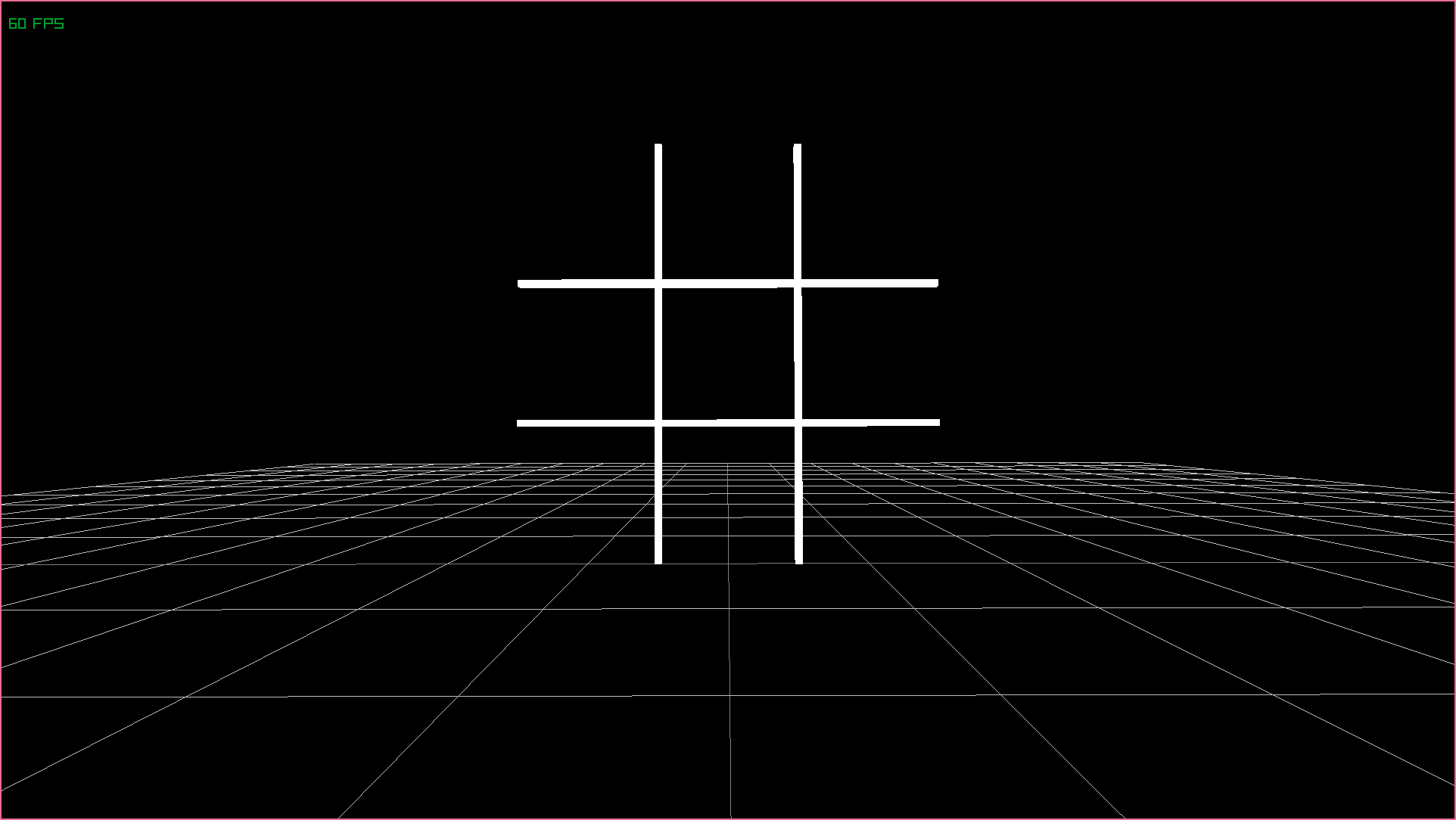
<p>After all of that, we have our first board rendered!</p>
<div class="figure" data-image="https://res.cloudinary.com/aas-sh/image/upload/v1668352718/blog/2022/11/13-11-2022_15_18_24_lfwnkh.png" data-caption="Screenshot of our first board being rendered in 3D space." data-source="Notakto" data-sourceUrl="https://github.com/Ashe/Notakto/commit/a3b46dcf14195d42f566720360e6d030c157cdbd">

</div>
<p>What does this tell us? Well, if we had no entities in the game that contained a <code>BoardComponent</code>, this arrangement of sticks wouldn’t appear in the world at all! We have correctly defined, initialised, stored, read and visualised state, even on a very basic level!</p>
<p>There are some things however that this doesn’t tell us:</p>
<ul>
<li>It won’t tell us <strong>how many</strong> boards there are, they all render on top of each other.</li>
<li>It won’t show us <strong>the state of the board</strong>, since we aren’t rendering crosses yet.</li>
<li>It won’t help us realise <strong>why we should love the game of Notakto</strong>.</li>
</ul>
<h2 id="multiple-boards">Multiple boards</h2>
<p>Let’s address this issue of not being able to see multiple boards. There’s two ways I can think of for going about this:</p>
<ul>
<li>We could create a new component representing the origin of the board in 3D space.</li>
<li>We could count the number of boards and distribute them evenly along the x-axis.</li>
</ul>
<p>Honestly, we’ll probably end up doing option one eventually, but because I like the idea of boards being automatically arranged I’m going to go with option 2 for now. I think the end game is a mixture of both approaches, where we automatically generate positions for each board, for instance in a circle or something.</p>
<div class="sourceCode" id="cb18"><pre class="sourceCode hs"><code class="sourceCode haskell"><span id="cb18-1"><a href="#cb18-1" aria-hidden="true" tabindex="-1"></a><span class="ot">renderBoards ::</span> <span class="dt">System</span> <span class="dt">World</span> ()</span>
<span id="cb18-2"><a href="#cb18-2" aria-hidden="true" tabindex="-1"></a>renderBoards <span class="ot">=</span> <span class="kw">do</span></span>
<span id="cb18-3"><a href="#cb18-3" aria-hidden="true" tabindex="-1"></a></span>
<span id="cb18-4"><a href="#cb18-4" aria-hidden="true" tabindex="-1"></a>  <span class="co">-- Now we count how many entities have a BoardComponent using cfold</span></span>
<span id="cb18-5"><a href="#cb18-5" aria-hidden="true" tabindex="-1"></a>  numBoards <span class="ot">&lt;-</span> cfold (\c (<span class="dt">Board</span>{}) <span class="ot">-&gt;</span> c <span class="op">+</span> <span class="dv">1</span>) <span class="dv">0</span></span>
<span id="cb18-6"><a href="#cb18-6" aria-hidden="true" tabindex="-1"></a></span>
<span id="cb18-7"><a href="#cb18-7" aria-hidden="true" tabindex="-1"></a>  <span class="co">-- We provide the count to renderBoard</span></span>
<span id="cb18-8"><a href="#cb18-8" aria-hidden="true" tabindex="-1"></a>  <span class="co">-- Also, we want to FOLD now, since we&#39;re iterating through boards</span></span>
<span id="cb18-9"><a href="#cb18-9" aria-hidden="true" tabindex="-1"></a>  cfoldM_ (renderBoard numBoards) <span class="dv">0</span></span>
<span id="cb18-10"><a href="#cb18-10" aria-hidden="true" tabindex="-1"></a></span>
<span id="cb18-11"><a href="#cb18-11" aria-hidden="true" tabindex="-1"></a></span>
<span id="cb18-12"><a href="#cb18-12" aria-hidden="true" tabindex="-1"></a><span class="co">-- We now know the total number of boards as well as the current board</span></span>
<span id="cb18-13"><a href="#cb18-13" aria-hidden="true" tabindex="-1"></a><span class="ot">renderBoard ::</span> <span class="dt">Int</span> <span class="ot">-&gt;</span> <span class="dt">Int</span> <span class="ot">-&gt;</span> <span class="dt">BoardComponent</span> <span class="ot">-&gt;</span> <span class="dt">System</span> <span class="dt">World</span> <span class="dt">Int</span></span>
<span id="cb18-14"><a href="#cb18-14" aria-hidden="true" tabindex="-1"></a>renderBoard total i b <span class="ot">=</span> liftIO <span class="op">$</span> <span class="kw">do</span></span>
<span id="cb18-15"><a href="#cb18-15" aria-hidden="true" tabindex="-1"></a></span>
<span id="cb18-16"><a href="#cb18-16" aria-hidden="true" tabindex="-1"></a>  <span class="co">-- Each of our cubes are now offset using a function we define below</span></span>
<span id="cb18-17"><a href="#cb18-17" aria-hidden="true" tabindex="-1"></a>  RL.drawCube (addVectors origin <span class="op">$</span> <span class="dt">Vector3</span> <span class="fl">0.5</span>    <span class="dv">0</span> <span class="dv">0</span>) t <span class="dv">3</span> t RL.white</span>
<span id="cb18-18"><a href="#cb18-18" aria-hidden="true" tabindex="-1"></a>  RL.drawCube (addVectors origin <span class="op">$</span> <span class="dt">Vector3</span> (<span class="op">-</span><span class="fl">0.5</span>) <span class="dv">0</span> <span class="dv">0</span>) t <span class="dv">3</span> t RL.white</span>
<span id="cb18-19"><a href="#cb18-19" aria-hidden="true" tabindex="-1"></a>  RL.drawCube (addVectors origin <span class="op">$</span> <span class="dt">Vector3</span> <span class="dv">0</span> <span class="fl">0.5</span> <span class="dv">0</span>) <span class="dv">3</span> t t RL.white</span>
<span id="cb18-20"><a href="#cb18-20" aria-hidden="true" tabindex="-1"></a>  RL.drawCube (addVectors origin <span class="op">$</span> <span class="dt">Vector3</span> <span class="dv">0</span> (<span class="op">-</span><span class="fl">0.5</span>) <span class="dv">0</span>) <span class="dv">3</span> t t RL.white</span>
<span id="cb18-21"><a href="#cb18-21" aria-hidden="true" tabindex="-1"></a></span>
<span id="cb18-22"><a href="#cb18-22" aria-hidden="true" tabindex="-1"></a>  <span class="co">-- Return the next index (so we can track progress through iteration)</span></span>
<span id="cb18-23"><a href="#cb18-23" aria-hidden="true" tabindex="-1"></a>  <span class="fu">pure</span> <span class="op">$</span> i <span class="op">+</span> <span class="dv">1</span></span>
<span id="cb18-24"><a href="#cb18-24" aria-hidden="true" tabindex="-1"></a></span>
<span id="cb18-25"><a href="#cb18-25" aria-hidden="true" tabindex="-1"></a>  <span class="co">-- Determine the origin of the board (4.5 = length of board (3) + padding (1.5))</span></span>
<span id="cb18-26"><a href="#cb18-26" aria-hidden="true" tabindex="-1"></a>  <span class="kw">where</span> offset <span class="ot">=</span> <span class="fu">fromIntegral</span> (total <span class="op">-</span> <span class="dv">1</span>) <span class="op">*</span> <span class="fl">0.5</span></span>
<span id="cb18-27"><a href="#cb18-27" aria-hidden="true" tabindex="-1"></a>        origin <span class="ot">=</span> <span class="dt">Vector3</span> (<span class="dt">CFloat</span> (<span class="fu">fromIntegral</span> i <span class="op">-</span> offset) <span class="op">*</span> <span class="fl">4.5</span>) <span class="fl">1.5</span> <span class="dv">0</span></span>
<span id="cb18-28"><a href="#cb18-28" aria-hidden="true" tabindex="-1"></a></span>
<span id="cb18-29"><a href="#cb18-29" aria-hidden="true" tabindex="-1"></a>        <span class="co">-- Convenience function for adding a vector to the origin, used above</span></span>
<span id="cb18-30"><a href="#cb18-30" aria-hidden="true" tabindex="-1"></a>        offset p <span class="ot">=</span> addVectors p <span class="op">$</span> <span class="dt">Vector3</span> (<span class="dt">CFloat</span> origin) <span class="dv">0</span> <span class="dv">0</span></span>
<span id="cb18-31"><a href="#cb18-31" aria-hidden="true" tabindex="-1"></a>        t <span class="ot">=</span> <span class="fl">0.05</span></span>
<span id="cb18-32"><a href="#cb18-32" aria-hidden="true" tabindex="-1"></a></span>
<span id="cb18-33"><a href="#cb18-33" aria-hidden="true" tabindex="-1"></a></span>
<span id="cb18-34"><a href="#cb18-34" aria-hidden="true" tabindex="-1"></a><span class="co">-- Raylib bindings need love; we need to make a function for adding vectors</span></span>
<span id="cb18-35"><a href="#cb18-35" aria-hidden="true" tabindex="-1"></a><span class="ot">addVectors ::</span> <span class="dt">Vector3</span> <span class="ot">-&gt;</span> <span class="dt">Vector3</span> <span class="ot">-&gt;</span> <span class="dt">Vector3</span></span>
<span id="cb18-36"><a href="#cb18-36" aria-hidden="true" tabindex="-1"></a>addVectors a b <span class="ot">=</span> <span class="dt">Vector3</span></span>
<span id="cb18-37"><a href="#cb18-37" aria-hidden="true" tabindex="-1"></a>    (vector3&#39;x a <span class="op">+</span> vector3&#39;x b)</span>
<span id="cb18-38"><a href="#cb18-38" aria-hidden="true" tabindex="-1"></a>    (vector3&#39;y a <span class="op">+</span> vector3&#39;y b)</span>
<span id="cb18-39"><a href="#cb18-39" aria-hidden="true" tabindex="-1"></a>    (vector3&#39;z a <span class="op">+</span> vector3&#39;z b)</span></code></pre></div>
<p>The biggest change we’ve made here is the use of <code>cfold</code> and <code>cfoldM_</code>. Our first use of <code>cfold</code> is given a pure function that doesn’t use monads, therefore we use <code>cfold</code>. The second one does use monads, and since we don’t care about a return value we use <code>cfoldM_</code>. Folding is a generic way of doing things like accumulation or filtering; you iterate through the list as well as another parameter, be it a ‘count’, ‘total’ or an entirely different list. In this case, we used folds to firstly count the number of entities satisfying a condition (whether they had a <code>BoardComponent</code>), then we used another fold to iterate through the same set of entities, except this time we used the iteration value (<code>index</code>) as a way of knowing how far through we are, kind of like a <code>for</code> loop in imperative languages.</p>
<div class="warning" data-header="Using the entity ID">
<p>An entity is just a wrapper for an integer value; in theory you could just use the entity’s ID itself to work out where the boards need to go. However, this will become problematic if you initialise other entities before or in the middle of your boards, as now your boards’ IDs won’t be sequential in the way you expect!</p>
</div>
<p>With that out of the way, let’s instantiate more entities!</p>
<div class="sourceCode" id="cb19"><pre class="sourceCode hs"><code class="sourceCode haskell"><span id="cb19-1"><a href="#cb19-1" aria-hidden="true" tabindex="-1"></a><span class="co">-- Let&#39;s make 3 boards!</span></span>
<span id="cb19-2"><a href="#cb19-2" aria-hidden="true" tabindex="-1"></a>newEntity_ newBoard</span>
<span id="cb19-3"><a href="#cb19-3" aria-hidden="true" tabindex="-1"></a>newEntity_ newBoard</span>
<span id="cb19-4"><a href="#cb19-4" aria-hidden="true" tabindex="-1"></a>newEntity_ newBoard</span></code></pre></div>
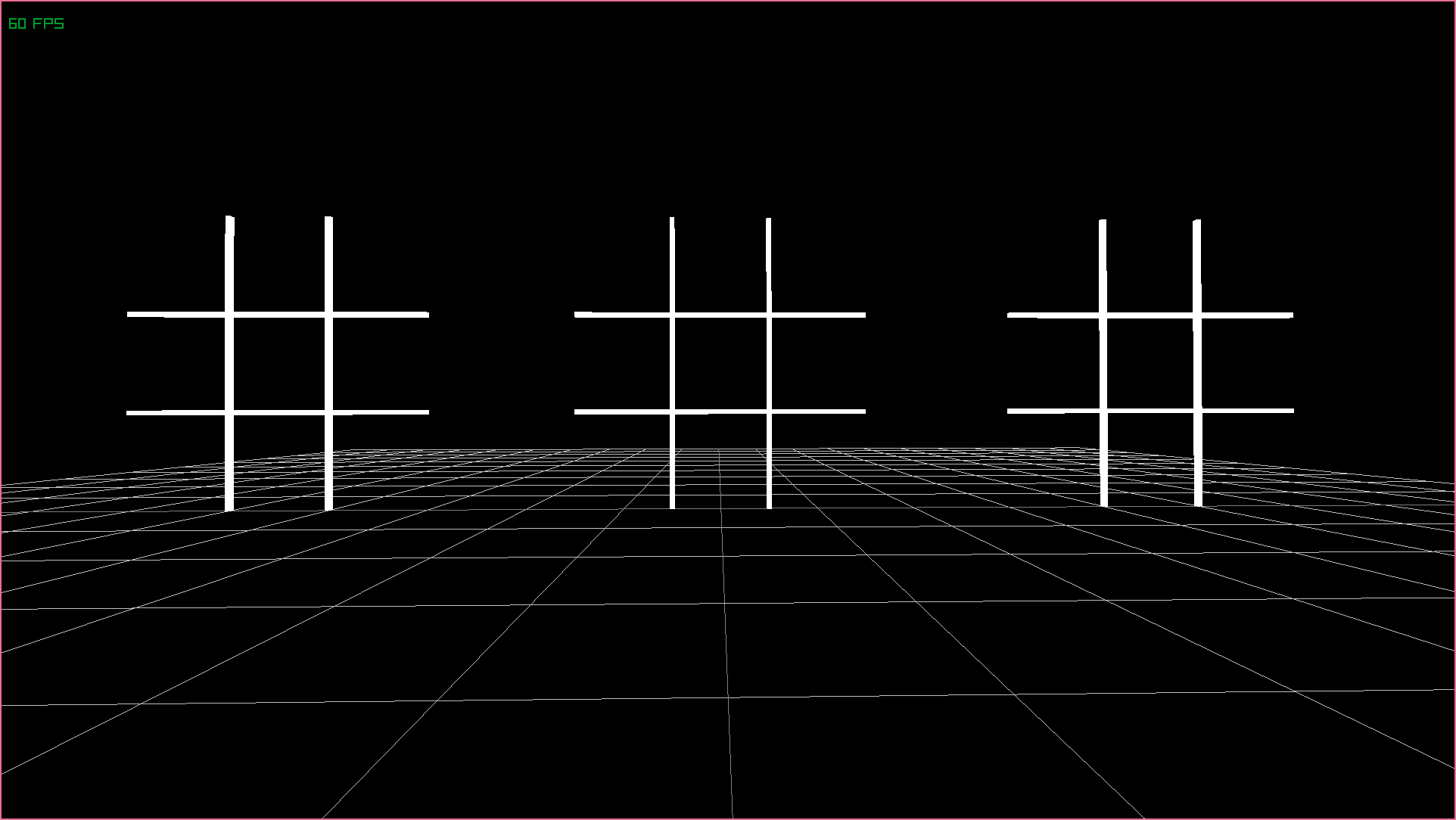
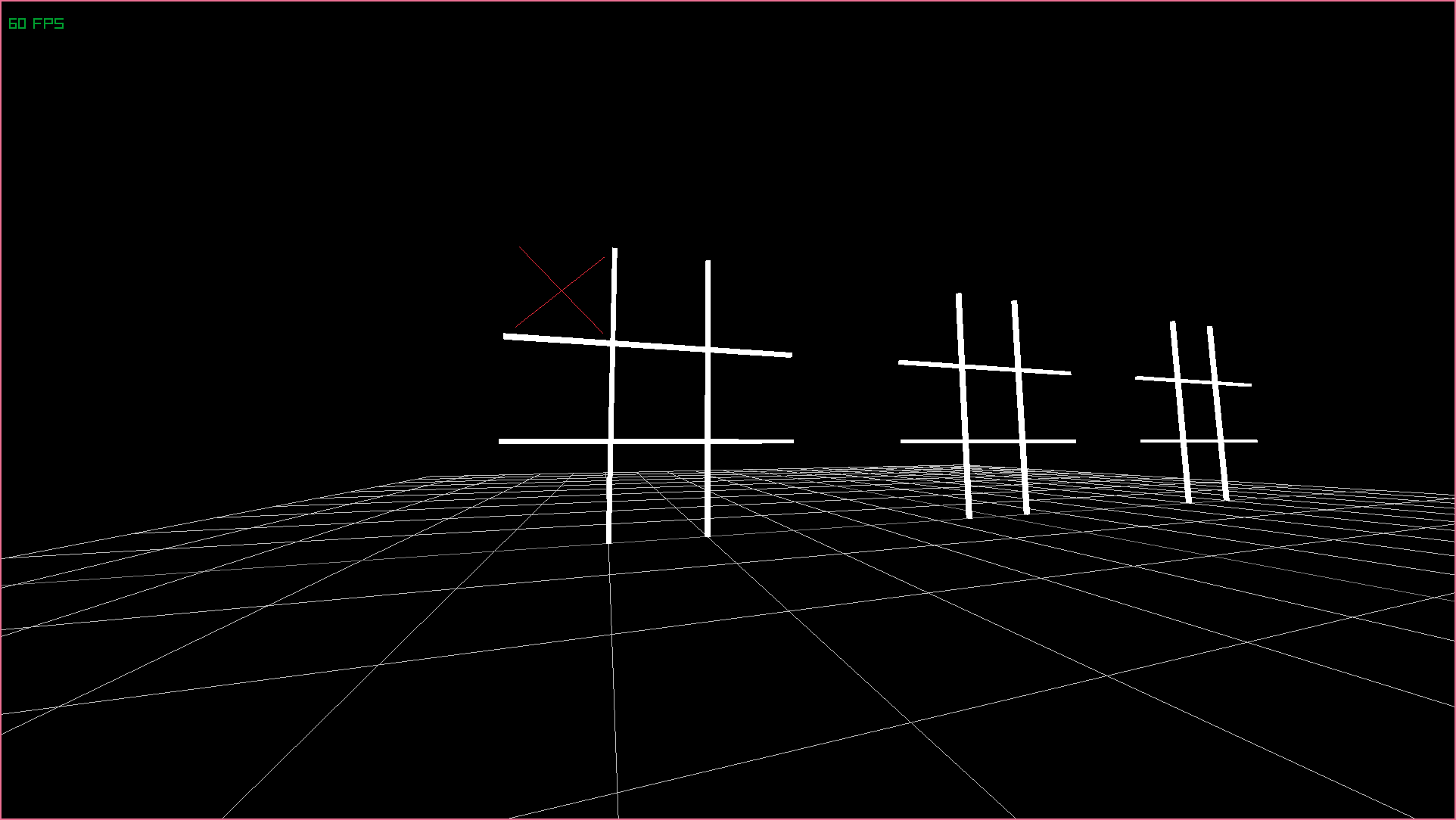
<p>Objective complete! Even though the components of each of these boards have the exact same state, the fact that there are multiple entities now reveals itself visually!</p>
<div class="figure" data-image="https://res.cloudinary.com/aas-sh/image/upload/v1668357984/blog/2022/11/13-11-2022_16_46_16_g6uf5j.png" data-caption="Now we can render as many boards as we like, distributed along the x-axis." data-source="Notakto" data-sourceUrl="https://github.com/Ashe/Notakto/commit/a3b46dcf14195d42f566720360e6d030c157cdbd">

</div>
<h2 id="board-state">Board state</h2>
<p>Time for the final piece of the puzzle: rendering a representation of what marks have been placed on each board! We’re almost there, I promise. This is more of the same kind of stuff.</p>
<div class="sourceCode" id="cb20"><pre class="sourceCode hs"><code class="sourceCode haskell"><span id="cb20-1"><a href="#cb20-1" aria-hidden="true" tabindex="-1"></a><span class="ot">renderBoard ::</span> <span class="dt">Int</span> <span class="ot">-&gt;</span> <span class="dt">Int</span> <span class="ot">-&gt;</span> <span class="dt">BoardComponent</span> <span class="ot">-&gt;</span> <span class="dt">System</span> <span class="dt">World</span> <span class="dt">Int</span></span>
<span id="cb20-2"><a href="#cb20-2" aria-hidden="true" tabindex="-1"></a>renderBoard total i b <span class="ot">=</span> <span class="kw">do</span></span>
<span id="cb20-3"><a href="#cb20-3" aria-hidden="true" tabindex="-1"></a></span>
<span id="cb20-4"><a href="#cb20-4" aria-hidden="true" tabindex="-1"></a>  <span class="co">-- Render crosses as part of renderBoard</span></span>
<span id="cb20-5"><a href="#cb20-5" aria-hidden="true" tabindex="-1"></a>  <span class="co">-- We provide the origin value as well as the component</span></span>
<span id="cb20-6"><a href="#cb20-6" aria-hidden="true" tabindex="-1"></a>  renderCrosses origin b</span>
<span id="cb20-7"><a href="#cb20-7" aria-hidden="true" tabindex="-1"></a></span>
<span id="cb20-8"><a href="#cb20-8" aria-hidden="true" tabindex="-1"></a>  liftIO <span class="op">$</span> <span class="kw">do</span></span>
<span id="cb20-9"><a href="#cb20-9" aria-hidden="true" tabindex="-1"></a>    RL.drawCube (addVectors origin <span class="op">$</span> <span class="dt">Vector3</span> <span class="fl">0.5</span>    <span class="dv">0</span> <span class="dv">0</span>) t <span class="dv">3</span> t RL.white</span>
<span id="cb20-10"><a href="#cb20-10" aria-hidden="true" tabindex="-1"></a>    <span class="co">-- &lt;...&gt;</span></span>
<span id="cb20-11"><a href="#cb20-11" aria-hidden="true" tabindex="-1"></a></span>
<span id="cb20-12"><a href="#cb20-12" aria-hidden="true" tabindex="-1"></a><span class="co">-- Given an origin, render a cross for each cell</span></span>
<span id="cb20-13"><a href="#cb20-13" aria-hidden="true" tabindex="-1"></a><span class="ot">renderCrosses ::</span> <span class="dt">Vector3</span> <span class="ot">-&gt;</span> <span class="dt">BoardComponent</span> <span class="ot">-&gt;</span> <span class="dt">System</span> <span class="dt">World</span> ()</span>
<span id="cb20-14"><a href="#cb20-14" aria-hidden="true" tabindex="-1"></a>renderCrosses origin b <span class="ot">=</span> <span class="kw">do</span></span>
<span id="cb20-15"><a href="#cb20-15" aria-hidden="true" tabindex="-1"></a></span>
<span id="cb20-16"><a href="#cb20-16" aria-hidden="true" tabindex="-1"></a>  <span class="co">-- This function&#39;s job is to geometrically define what &#39;top left&#39; etc means</span></span>
<span id="cb20-17"><a href="#cb20-17" aria-hidden="true" tabindex="-1"></a>  renderCross origin (<span class="op">-</span><span class="dv">1</span>)   <span class="dv">1</span>  (_tl b)</span>
<span id="cb20-18"><a href="#cb20-18" aria-hidden="true" tabindex="-1"></a>  renderCross origin   <span class="dv">0</span>    <span class="dv">1</span>  (_tc b)</span>
<span id="cb20-19"><a href="#cb20-19" aria-hidden="true" tabindex="-1"></a>  renderCross origin   <span class="dv">1</span>    <span class="dv">1</span>  (_tr b)</span>
<span id="cb20-20"><a href="#cb20-20" aria-hidden="true" tabindex="-1"></a>  renderCross origin (<span class="op">-</span><span class="dv">1</span>)   <span class="dv">0</span>  (_ml b)</span>
<span id="cb20-21"><a href="#cb20-21" aria-hidden="true" tabindex="-1"></a>  renderCross origin   <span class="dv">0</span>    <span class="dv">0</span>  (_mc b)</span>
<span id="cb20-22"><a href="#cb20-22" aria-hidden="true" tabindex="-1"></a>  renderCross origin   <span class="dv">1</span>    <span class="dv">0</span>  (_mr b)</span>
<span id="cb20-23"><a href="#cb20-23" aria-hidden="true" tabindex="-1"></a>  renderCross origin (<span class="op">-</span><span class="dv">1</span>) (<span class="op">-</span><span class="dv">1</span>) (_bl b)</span>
<span id="cb20-24"><a href="#cb20-24" aria-hidden="true" tabindex="-1"></a>  renderCross origin   <span class="dv">0</span>  (<span class="op">-</span><span class="dv">1</span>) (_bc b)</span>
<span id="cb20-25"><a href="#cb20-25" aria-hidden="true" tabindex="-1"></a>  renderCross origin   <span class="dv">1</span>  (<span class="op">-</span><span class="dv">1</span>) (_br b)</span>
<span id="cb20-26"><a href="#cb20-26" aria-hidden="true" tabindex="-1"></a></span>
<span id="cb20-27"><a href="#cb20-27" aria-hidden="true" tabindex="-1"></a></span>
<span id="cb20-28"><a href="#cb20-28" aria-hidden="true" tabindex="-1"></a><span class="co">-- Now we have an origin as well as a horizontal + vertical offset and a cell</span></span>
<span id="cb20-29"><a href="#cb20-29" aria-hidden="true" tabindex="-1"></a><span class="ot">renderCross ::</span> <span class="dt">Vector3</span> <span class="ot">-&gt;</span> <span class="dt">Float</span> <span class="ot">-&gt;</span> <span class="dt">Float</span> <span class="ot">-&gt;</span> <span class="dt">Cell</span> <span class="ot">-&gt;</span> <span class="dt">System</span> <span class="dt">World</span> ()</span>
<span id="cb20-30"><a href="#cb20-30" aria-hidden="true" tabindex="-1"></a></span>
<span id="cb20-31"><a href="#cb20-31" aria-hidden="true" tabindex="-1"></a><span class="co">-- If the cell is empty, we just do nothing (pure nothingness, pretty metal!)</span></span>
<span id="cb20-32"><a href="#cb20-32" aria-hidden="true" tabindex="-1"></a>renderCross _ _ _ <span class="dt">Empty</span> <span class="ot">=</span> <span class="fu">pure</span> ()</span>
<span id="cb20-33"><a href="#cb20-33" aria-hidden="true" tabindex="-1"></a></span>
<span id="cb20-34"><a href="#cb20-34" aria-hidden="true" tabindex="-1"></a><span class="co">-- If the cell is filled, we render a cross</span></span>
<span id="cb20-35"><a href="#cb20-35" aria-hidden="true" tabindex="-1"></a>renderCross origin i j <span class="dt">Filled</span> <span class="ot">=</span> liftIO <span class="op">$</span> <span class="kw">do</span></span>
<span id="cb20-36"><a href="#cb20-36" aria-hidden="true" tabindex="-1"></a></span>
<span id="cb20-37"><a href="#cb20-37" aria-hidden="true" tabindex="-1"></a>  <span class="co">-- We simply draw 2 lines, bottom left to top right...</span></span>
<span id="cb20-38"><a href="#cb20-38" aria-hidden="true" tabindex="-1"></a>  RL.drawLine3D (f (<span class="op">-</span><span class="fl">0.4</span>) (<span class="op">-</span><span class="fl">0.4</span>)) (f <span class="fl">0.4</span> <span class="fl">0.4</span>) RL.red</span>
<span id="cb20-39"><a href="#cb20-39" aria-hidden="true" tabindex="-1"></a></span>
<span id="cb20-40"><a href="#cb20-40" aria-hidden="true" tabindex="-1"></a>  <span class="co">-- ... and then bottom right to top left</span></span>
<span id="cb20-41"><a href="#cb20-41" aria-hidden="true" tabindex="-1"></a>  RL.drawLine3D (f <span class="fl">0.4</span> (<span class="op">-</span><span class="fl">0.4</span>)) (f (<span class="op">-</span><span class="fl">0.4</span>) <span class="fl">0.4</span>) RL.red</span>
<span id="cb20-42"><a href="#cb20-42" aria-hidden="true" tabindex="-1"></a></span>
<span id="cb20-43"><a href="#cb20-43" aria-hidden="true" tabindex="-1"></a>  <span class="co">-- We have some helper values here, center being the center of the cell</span></span>
<span id="cb20-44"><a href="#cb20-44" aria-hidden="true" tabindex="-1"></a>  <span class="co">-- calculated using the origin and offsets</span></span>
<span id="cb20-45"><a href="#cb20-45" aria-hidden="true" tabindex="-1"></a>  <span class="kw">where</span> center <span class="ot">=</span> addVectors origin <span class="op">$</span> <span class="dt">Vector3</span> (<span class="dt">CFloat</span> i) (<span class="dt">CFloat</span> j) <span class="dv">0</span></span>
<span id="cb20-46"><a href="#cb20-46" aria-hidden="true" tabindex="-1"></a></span>
<span id="cb20-47"><a href="#cb20-47" aria-hidden="true" tabindex="-1"></a>        <span class="co">-- As well as a helper function to create start and end points</span></span>
<span id="cb20-48"><a href="#cb20-48" aria-hidden="true" tabindex="-1"></a>        f x y <span class="ot">=</span> addVectors center <span class="op">$</span> <span class="dt">Vector3</span> x y <span class="dv">0</span></span></code></pre></div>
<p>Ready to test it out? Let’s ammend our initialisation for one of the boards:</p>
<div class="sourceCode" id="cb21"><pre class="sourceCode hs"><code class="sourceCode haskell"><span id="cb21-1"><a href="#cb21-1" aria-hidden="true" tabindex="-1"></a>  newEntity_ <span class="op">$</span> <span class="dt">Board</span></span>
<span id="cb21-2"><a href="#cb21-2" aria-hidden="true" tabindex="-1"></a>    <span class="dt">Filled</span> <span class="dt">Empty</span> <span class="dt">Empty</span></span>
<span id="cb21-3"><a href="#cb21-3" aria-hidden="true" tabindex="-1"></a>    <span class="dt">Empty</span> <span class="dt">Empty</span> <span class="dt">Empty</span></span>
<span id="cb21-4"><a href="#cb21-4" aria-hidden="true" tabindex="-1"></a>    <span class="dt">Empty</span> <span class="dt">Empty</span> <span class="dt">Empty</span></span>
<span id="cb21-5"><a href="#cb21-5" aria-hidden="true" tabindex="-1"></a>  newEntity_ newBoard</span>
<span id="cb21-6"><a href="#cb21-6" aria-hidden="true" tabindex="-1"></a>  newEntity_ newBoard</span></code></pre></div>
<p>And now we see that the first board has the top-left cell filled! We can now visualise both the amount of boards and the content of each one! Chapter over!</p>
<div class="figure" data-image="https://res.cloudinary.com/aas-sh/image/upload/v1668362726/blog/2022/11/13-11-2022_18_05_04_kqweul.png" data-caption="We can now visualise the state of each board." data-source="Notakto" data-sourceUrl="https://github.com/Ashe/Notakto/commit/a3b46dcf14195d42f566720360e6d030c157cdbd">

</div>
<div class="gitrepo" data-header="Notakto">
<p>A link to the corresponding commit for the previous section can be found <a href="https://github.com/Ashe/Notakto/commit/a3b46dcf14195d42f566720360e6d030c157cdbd">here</a>.</p>
</div>
<h1 id="making-moves">Making moves</h1>
<h2 id="preparing-the-raycast">Preparing the raycast</h2>
<p>Okay, it’s time to speed up and do some gameplay code. In order to make moves, players will need to shoot a ray out from the camera into the boards so that they can precisely specify where they want to place their cross. Let’s start by adding a new component responsible for storing the player’s current aim. We don’t have to give it a default value as it’ll be written during our update frame anyway.</p>
<div class="sourceCode" id="cb22"><pre class="sourceCode hs"><code class="sourceCode haskell"><span id="cb22-1"><a href="#cb22-1" aria-hidden="true" tabindex="-1"></a><span class="co">-- New component to add (Types.hs) and add to World</span></span>
<span id="cb22-2"><a href="#cb22-2" aria-hidden="true" tabindex="-1"></a><span class="kw">newtype</span> <span class="dt">PlayerAimComponent</span> <span class="ot">=</span> <span class="dt">Aim</span> <span class="dt">RL.Ray</span></span>
<span id="cb22-3"><a href="#cb22-3" aria-hidden="true" tabindex="-1"></a></span>
<span id="cb22-4"><a href="#cb22-4" aria-hidden="true" tabindex="-1"></a></span>
<span id="cb22-5"><a href="#cb22-5" aria-hidden="true" tabindex="-1"></a><span class="co">-- New update system to add (Lib.hs) and be called from update system</span></span>
<span id="cb22-6"><a href="#cb22-6" aria-hidden="true" tabindex="-1"></a><span class="ot">handlePlayerAim ::</span> <span class="dt">System</span> <span class="dt">World</span> ()</span>
<span id="cb22-7"><a href="#cb22-7" aria-hidden="true" tabindex="-1"></a>handlePlayerAim <span class="ot">=</span> <span class="kw">do</span></span>
<span id="cb22-8"><a href="#cb22-8" aria-hidden="true" tabindex="-1"></a></span>
<span id="cb22-9"><a href="#cb22-9" aria-hidden="true" tabindex="-1"></a>  <span class="co">-- Determine window size so that we can cast from center of screen</span></span>
<span id="cb22-10"><a href="#cb22-10" aria-hidden="true" tabindex="-1"></a>  windowWidth <span class="ot">&lt;-</span> liftIO RL.getScreenWidth</span>
<span id="cb22-11"><a href="#cb22-11" aria-hidden="true" tabindex="-1"></a>  windowHeight <span class="ot">&lt;-</span> liftIO RL.getScreenHeight</span>
<span id="cb22-12"><a href="#cb22-12" aria-hidden="true" tabindex="-1"></a></span>
<span id="cb22-13"><a href="#cb22-13" aria-hidden="true" tabindex="-1"></a>  <span class="op">-</span> <span class="dt">Retrieve</span> the camera (will have just been updated)</span>
<span id="cb22-14"><a href="#cb22-14" aria-hidden="true" tabindex="-1"></a>  <span class="dt">Camera</span> camera <span class="ot">&lt;-</span> get global</span>
<span id="cb22-15"><a href="#cb22-15" aria-hidden="true" tabindex="-1"></a></span>
<span id="cb22-16"><a href="#cb22-16" aria-hidden="true" tabindex="-1"></a>  <span class="co">-- Create a ray to be cast later</span></span>
<span id="cb22-17"><a href="#cb22-17" aria-hidden="true" tabindex="-1"></a>  ray <span class="ot">&lt;-</span> liftIO <span class="op">$</span> RL.getMouseRay (<span class="dt">RL.Vector2</span></span>
<span id="cb22-18"><a href="#cb22-18" aria-hidden="true" tabindex="-1"></a>    (<span class="dt">CFloat</span> <span class="op">$</span> <span class="fu">fromIntegral</span> windowWidth <span class="op">/</span> <span class="dv">2</span>)</span>
<span id="cb22-19"><a href="#cb22-19" aria-hidden="true" tabindex="-1"></a>    (<span class="dt">CFloat</span> <span class="op">$</span> <span class="fu">fromIntegral</span> windowHeight <span class="op">/</span> <span class="dv">2</span>)) camera</span>
<span id="cb22-20"><a href="#cb22-20" aria-hidden="true" tabindex="-1"></a>  set global <span class="op">$</span> <span class="dt">Aim</span> ray</span>
<span id="cb22-21"><a href="#cb22-21" aria-hidden="true" tabindex="-1"></a></span>
<span id="cb22-22"><a href="#cb22-22" aria-hidden="true" tabindex="-1"></a></span>
<span id="cb22-23"><a href="#cb22-23" aria-hidden="true" tabindex="-1"></a><span class="co">-- New render system to add (Rendering.hs) and be called from render system</span></span>
<span id="cb22-24"><a href="#cb22-24" aria-hidden="true" tabindex="-1"></a><span class="ot">renderAimRay ::</span> <span class="dt">System</span> <span class="dt">World</span> ()</span>
<span id="cb22-25"><a href="#cb22-25" aria-hidden="true" tabindex="-1"></a>renderAimRay <span class="ot">=</span> <span class="kw">do</span></span>
<span id="cb22-26"><a href="#cb22-26" aria-hidden="true" tabindex="-1"></a></span>
<span id="cb22-27"><a href="#cb22-27" aria-hidden="true" tabindex="-1"></a>  <span class="co">-- Retrieve player aim component</span></span>
<span id="cb22-28"><a href="#cb22-28" aria-hidden="true" tabindex="-1"></a>  <span class="dt">Aim</span> ray <span class="ot">&lt;-</span> get global</span>
<span id="cb22-29"><a href="#cb22-29" aria-hidden="true" tabindex="-1"></a></span>
<span id="cb22-30"><a href="#cb22-30" aria-hidden="true" tabindex="-1"></a>  <span class="co">-- Determine endpoints of a line to draw</span></span>
<span id="cb22-31"><a href="#cb22-31" aria-hidden="true" tabindex="-1"></a>  <span class="co">-- Note that we slightly offset the start location since we are drawing</span></span>
<span id="cb22-32"><a href="#cb22-32" aria-hidden="true" tabindex="-1"></a>  <span class="co">-- from the camera, and if we didn&#39;t offset then the line would appear</span></span>
<span id="cb22-33"><a href="#cb22-33" aria-hidden="true" tabindex="-1"></a>  <span class="co">-- as a dot!</span></span>
<span id="cb22-34"><a href="#cb22-34" aria-hidden="true" tabindex="-1"></a>  <span class="kw">let</span> lineStart <span class="ot">=</span> addVectors (RL.ray&#39;position ray) (<span class="dt">Vector3</span> <span class="dv">0</span> (<span class="op">-</span><span class="fl">0.05</span>) <span class="dv">0</span>)</span>
<span id="cb22-35"><a href="#cb22-35" aria-hidden="true" tabindex="-1"></a>      lineEnd <span class="ot">=</span> addVectors (RL.ray&#39;position ray) <span class="op">$</span></span>
<span id="cb22-36"><a href="#cb22-36" aria-hidden="true" tabindex="-1"></a>        multiplyVector (RL.ray&#39;direction ray) <span class="dv">10</span></span>
<span id="cb22-37"><a href="#cb22-37" aria-hidden="true" tabindex="-1"></a></span>
<span id="cb22-38"><a href="#cb22-38" aria-hidden="true" tabindex="-1"></a>  <span class="co">-- Render the line</span></span>
<span id="cb22-39"><a href="#cb22-39" aria-hidden="true" tabindex="-1"></a>  liftIO <span class="op">$</span> RL.drawLine3D lineStart lineEnd RL.yellow</span>
<span id="cb22-40"><a href="#cb22-40" aria-hidden="true" tabindex="-1"></a></span>
<span id="cb22-41"><a href="#cb22-41" aria-hidden="true" tabindex="-1"></a></span>
<span id="cb22-42"><a href="#cb22-42" aria-hidden="true" tabindex="-1"></a><span class="co">-- New utility function</span></span>
<span id="cb22-43"><a href="#cb22-43" aria-hidden="true" tabindex="-1"></a><span class="ot">multiplyVector ::</span> <span class="dt">Vector3</span> <span class="ot">-&gt;</span> <span class="dt">Float</span> <span class="ot">-&gt;</span> <span class="dt">Vector3</span></span>
<span id="cb22-44"><a href="#cb22-44" aria-hidden="true" tabindex="-1"></a>multiplyVector a b <span class="ot">=</span> <span class="kw">let</span> b&#39; <span class="ot">=</span> <span class="dt">CFloat</span> b <span class="kw">in</span> <span class="dt">Vector3</span></span>
<span id="cb22-45"><a href="#cb22-45" aria-hidden="true" tabindex="-1"></a>  (vector3&#39;x a <span class="op">*</span> b&#39;)</span>
<span id="cb22-46"><a href="#cb22-46" aria-hidden="true" tabindex="-1"></a>  (vector3&#39;y a <span class="op">*</span> b&#39;)</span>
<span id="cb22-47"><a href="#cb22-47" aria-hidden="true" tabindex="-1"></a>  (vector3&#39;z a <span class="op">*</span> b&#39;)</span></code></pre></div>
<p>We have momentum now! We haven’t done anything gameplay related really yet, but we’re blasting through the basics and now we’re ready to try and cherry-pick a cell from a board. This yellow line will be really helpful for making sure that the selected cell we’re going to calculate is in the approximate area of the ray.</p>
<p>This is where having each cross as its own entity has a benefit; each cross could easily check if it the raycast strikes it and our picking system would be done in a matter of minutes. However, the drawbacks of this is the task of connecting it back to the board and making changes to the game state. Instead, we’re going to see if the raycast collides with the board, and use the position it strikes the board to determine which cell the player is aiming at.</p>
<div class="gitrepo" data-header="Notakto">
<p>A link to the corresponding commit for the previous section can be found <a href="https://github.com/Ashe/Notakto/commit/3b1bd1d954704106d42eee6415969daedb731575">here</a>.</p>
</div>
<h2 id="identifying-the-looked-at-cell">Identifying the looked-at cell</h2>
<p>I knew it was coming; the problem with writing the blog post as I go means that I get stuff wrong. I initially thought it would be a good idea to simply count the entities and render the board in a position dependent on it’s index, however this is just going to be so annoying to calculate each time. That’s okay though, as both Haskell and Apecs are really easy to experiment with and try new things. Here’s a quick correction to our project:</p>
<div class="sourceCode" id="cb23"><pre class="sourceCode hs"><code class="sourceCode haskell"><span id="cb23-1"><a href="#cb23-1" aria-hidden="true" tabindex="-1"></a><span class="co">-- New component for tracking positions in 3D space</span></span>
<span id="cb23-2"><a href="#cb23-2" aria-hidden="true" tabindex="-1"></a><span class="kw">newtype</span> <span class="dt">PositionComponent</span> <span class="ot">=</span> <span class="dt">Position</span> <span class="dt">RL.Vector3</span> <span class="kw">deriving</span> (<span class="dt">Show</span>, <span class="dt">Eq</span>)</span>
<span id="cb23-3"><a href="#cb23-3" aria-hidden="true" tabindex="-1"></a></span>
<span id="cb23-4"><a href="#cb23-4" aria-hidden="true" tabindex="-1"></a></span>
<span id="cb23-5"><a href="#cb23-5" aria-hidden="true" tabindex="-1"></a><span class="co">-- Initialisation system for automatically creating n boards across the x axis</span></span>
<span id="cb23-6"><a href="#cb23-6" aria-hidden="true" tabindex="-1"></a><span class="co">-- Note: Thanks to our position component, you could create all sorts of patterns!</span></span>
<span id="cb23-7"><a href="#cb23-7" aria-hidden="true" tabindex="-1"></a><span class="ot">createBoards ::</span> <span class="dt">Int</span> <span class="ot">-&gt;</span> <span class="dt">System</span> <span class="dt">World</span> ()</span>
<span id="cb23-8"><a href="#cb23-8" aria-hidden="true" tabindex="-1"></a>createBoards n <span class="ot">=</span> <span class="kw">do</span></span>
<span id="cb23-9"><a href="#cb23-9" aria-hidden="true" tabindex="-1"></a></span>
<span id="cb23-10"><a href="#cb23-10" aria-hidden="true" tabindex="-1"></a>  <span class="co">-- forM_ is standard library, it&#39;s equivalent to flip mapM</span></span>
<span id="cb23-11"><a href="#cb23-11" aria-hidden="true" tabindex="-1"></a>  <span class="co">-- Also notice that to create an entity with multiple components we use a tuple</span></span>
<span id="cb23-12"><a href="#cb23-12" aria-hidden="true" tabindex="-1"></a>  forM_ positions <span class="op">$</span> \p <span class="ot">-&gt;</span> newEntity_ (newBoard, <span class="dt">Position</span> p)</span>
<span id="cb23-13"><a href="#cb23-13" aria-hidden="true" tabindex="-1"></a>  <span class="kw">where</span> newBoard <span class="ot">=</span> <span class="dt">Board</span> <span class="dt">Empty</span> <span class="dt">Empty</span> <span class="dt">Empty</span> <span class="dt">Empty</span> <span class="dt">Empty</span> <span class="dt">Empty</span> <span class="dt">Empty</span> <span class="dt">Empty</span> <span class="dt">Empty</span></span>
<span id="cb23-14"><a href="#cb23-14" aria-hidden="true" tabindex="-1"></a></span>
<span id="cb23-15"><a href="#cb23-15" aria-hidden="true" tabindex="-1"></a>        <span class="co">-- List comprehension to dynamically generate a list of x coordinates</span></span>
<span id="cb23-16"><a href="#cb23-16" aria-hidden="true" tabindex="-1"></a>        positions <span class="ot">=</span> [<span class="dt">Vector3</span> x&#39; <span class="fl">1.5</span> <span class="dv">0</span> <span class="op">|</span> x <span class="ot">&lt;-</span> [<span class="dv">0</span><span class="op">..</span>n <span class="op">-</span> <span class="dv">1</span>],</span>
<span id="cb23-17"><a href="#cb23-17" aria-hidden="true" tabindex="-1"></a>          <span class="kw">let</span> x&#39; <span class="ot">=</span> (<span class="fu">fromIntegral</span> x <span class="op">-</span> (<span class="fu">fromIntegral</span> (n <span class="op">-</span> <span class="dv">1</span>) <span class="op">/</span> <span class="dv">2</span>)) <span class="op">*</span> <span class="fl">4.5</span>]</span>
<span id="cb23-18"><a href="#cb23-18" aria-hidden="true" tabindex="-1"></a></span>
<span id="cb23-19"><a href="#cb23-19" aria-hidden="true" tabindex="-1"></a></span>
<span id="cb23-20"><a href="#cb23-20" aria-hidden="true" tabindex="-1"></a><span class="co">-- Forget cfoldM_, we&#39;re back to cmapM_</span></span>
<span id="cb23-21"><a href="#cb23-21" aria-hidden="true" tabindex="-1"></a><span class="ot">renderBoards ::</span> <span class="dt">System</span> <span class="dt">World</span> ()</span>
<span id="cb23-22"><a href="#cb23-22" aria-hidden="true" tabindex="-1"></a>renderBoards <span class="ot">=</span> cmapM_ renderBoard</span>
<span id="cb23-23"><a href="#cb23-23" aria-hidden="true" tabindex="-1"></a></span>
<span id="cb23-24"><a href="#cb23-24" aria-hidden="true" tabindex="-1"></a></span>
<span id="cb23-25"><a href="#cb23-25" aria-hidden="true" tabindex="-1"></a><span class="co">-- Notice the tuple - this is how you select entities that contain both components</span></span>
<span id="cb23-26"><a href="#cb23-26" aria-hidden="true" tabindex="-1"></a><span class="co">-- Note: You can use the &#39;Not&#39; type to ensure the entity DOES NOT have that type</span></span>
<span id="cb23-27"><a href="#cb23-27" aria-hidden="true" tabindex="-1"></a><span class="ot">renderBoard ::</span> (<span class="dt">BoardComponent</span>, <span class="dt">PositionComponent</span>) <span class="ot">-&gt;</span> <span class="dt">System</span> <span class="dt">World</span> ()</span>
<span id="cb23-28"><a href="#cb23-28" aria-hidden="true" tabindex="-1"></a>renderBoard (b, <span class="dt">Position</span> p) <span class="ot">=</span> <span class="kw">do</span></span>
<span id="cb23-29"><a href="#cb23-29" aria-hidden="true" tabindex="-1"></a>  renderCrosses p b</span>
<span id="cb23-30"><a href="#cb23-30" aria-hidden="true" tabindex="-1"></a>  liftIO <span class="op">$</span> <span class="kw">do</span></span>
<span id="cb23-31"><a href="#cb23-31" aria-hidden="true" tabindex="-1"></a>    RL.drawCube (addVectors p <span class="op">$</span> <span class="dt">Vector3</span> <span class="fl">0.5</span>    <span class="dv">0</span> <span class="dv">0</span>) t <span class="dv">3</span> t RL.white</span>
<span id="cb23-32"><a href="#cb23-32" aria-hidden="true" tabindex="-1"></a>    RL.drawCube (addVectors p <span class="op">$</span> <span class="dt">Vector3</span> (<span class="op">-</span><span class="fl">0.5</span>) <span class="dv">0</span> <span class="dv">0</span>) t <span class="dv">3</span> t RL.white</span>
<span id="cb23-33"><a href="#cb23-33" aria-hidden="true" tabindex="-1"></a>    RL.drawCube (addVectors p <span class="op">$</span> <span class="dt">Vector3</span> <span class="dv">0</span> <span class="fl">0.5</span> <span class="dv">0</span>) <span class="dv">3</span> t t RL.white</span>
<span id="cb23-34"><a href="#cb23-34" aria-hidden="true" tabindex="-1"></a>    RL.drawCube (addVectors p <span class="op">$</span> <span class="dt">Vector3</span> <span class="dv">0</span> (<span class="op">-</span><span class="fl">0.5</span>) <span class="dv">0</span>) <span class="dv">3</span> t t RL.white</span>
<span id="cb23-35"><a href="#cb23-35" aria-hidden="true" tabindex="-1"></a>  <span class="kw">where</span> t <span class="ot">=</span> <span class="fl">0.05</span></span></code></pre></div>
<p>This is where things get tricky… I’ve actually had to file a <a href="https://github.com/Anut-py/h-raylib/issues/5">bug report</a> since the raycasting and collision of Raylib don’t seem to be working great. It seems that data that we’re receiving isn’t what we expect and is slightly unreliable unless we do some IO before accessing it. Raylib wasn’t written in Haskell, and so even though our programming can easily be reasoned about, there’s a bit of a grey area where bindings to libraries written in other languages are. For now though, I’m just going to pretend the bug doesn’t exist and try to implement more of the program.</p>
<p>Before we continue, we need to ask ourselves what we actually want to do. Right now, my goal is to make it so that when you aim at a cell, we see a ‘ghost’ of a cross that will appear if you hit the left mouse button. The biggest question is, how do we want to store this bit of state?</p>
<ol type="1">
<li>We could change our <code>Cell</code> type to be either <code>Empty | Filled | Chosen</code>, however that will require us to make sure that only one cell is chosen at most, which is more work.</li>
<li>We could specify a new variable on the <code>BoardComponent</code> to keep track on which cell is chosen, but that would mean that we could have multiple chosen cells across multiple boards.</li>
<li>We could update the <code>PlayerAimComponent</code> to contain both the ray and the looked-at cell — while this would work, it would be assuming that we’re only interested in players looking at cells, and wouldn’t be very good if your game had multiple things players could interact with.</li>
<li>We could try to avoid writing state altogether, but this would mean that every cell will need to crunch the numbers to work out if you’re looking at it <em>every rendering loop</em>. This would also mean that we have to test cells in isolation, meaning that there could be a situation where you’re technically looking at multiple cells at once.</li>
</ol>
<p>Isn’t gamedev fun? I believe that I’m going to go for <strong>option 3</strong>. Note that if you were doing a look-at system in a different type of game, you’d most likely just record which <code>Entity</code> you’re looking at. The only reason we are in this scenario is because we avoided making crosses be their own <code>Entity</code>.</p>
<div class="help" data-header="Thinking of alternatives">
<p>If you are looking to improve yourself as a programmer it’s always a good idea to think about all the different ways you could solve a problem <em>before</em> you get started. You (or your team) could begin to spot glaring issues before they manifest, and they also reassure you that if things go wrong you have other ways of solving things. Of course, don’t spend <em>ages</em> planning as you can’t always capture every potential problem without giving things a go.</p>
<p>If you’re struggling with thinking of approaches (and believe me, there are <em>always</em> better ways of writing things and numerous things that could be improved), try some of the following methods:</p>
<ul>
<li><p><strong>Start making a list —</strong> Sometimes, by simply writing ‘1.’ and arranging your thoughts into a list, you naturally start thinking of new entries to pad it out. I literally did this in the section above! Give yourself a space to prove to yourself you can do this!</p></li>
<li><p><strong>Take your initial approach and make small adjustments —</strong> Sometimes you can quickly create alternative approaches by simply taking your first idea and altering it slightly; option 2 could be the same as option 1 with an addition or exception. For example, if your idea was to add a new variable to something, maybe consider if it could also be added somewhere else or added in a different way such that it has multiple uses.</p></li>
<li><p><strong>Pretend to be a super-villain —</strong> Let’s say that it’s become your job to sabotage your code in some way, whether that’s by misusing the code or using the application in unintended ways. What would you do, and what kinds of things could you break? Now come back to reality and think about the likelihood of any of those scenarios, the risks they present and the cost of prevention.</p></li>
<li><p><strong>Consider not doing it —</strong> Lack of action is itself an action, and so questionning whether you need to implement your feature in the first place isn’t a bad question to ask. Sometimes it exposes how many drawbacks there are versus the benefits, and perhaps what you might consider a workaround turns into one of your alternative approaches. What is the requirement that is driving this decision? If there isn’t one, then maybe we need to understand our requirements first.</p></li>
</ul>
</div>
<p>Huzzah, after a few days that <a href="https://github.com/Anut-py/h-raylib/issues/5">bug</a> was fixed! Let’s get on with approach number three:</p>
<div class="sourceCode" id="cb24"><pre class="sourceCode hs"><code class="sourceCode haskell"><span id="cb24-1"><a href="#cb24-1" aria-hidden="true" tabindex="-1"></a><span class="co">-- New data type representing the player&#39;s current looked-at cell</span></span>
<span id="cb24-2"><a href="#cb24-2" aria-hidden="true" tabindex="-1"></a><span class="kw">data</span> <span class="dt">LookAtTarget</span> <span class="ot">=</span> <span class="dt">NoTarget</span> <span class="op">|</span> <span class="dt">Target</span> <span class="dt">Entity</span> <span class="dt">Int</span> <span class="kw">deriving</span> (<span class="dt">Show</span>, <span class="dt">Eq</span>)</span>
<span id="cb24-3"><a href="#cb24-3" aria-hidden="true" tabindex="-1"></a></span>
<span id="cb24-4"><a href="#cb24-4" aria-hidden="true" tabindex="-1"></a></span>
<span id="cb24-5"><a href="#cb24-5" aria-hidden="true" tabindex="-1"></a><span class="co">-- Update the aim component to make use of our new type</span></span>
<span id="cb24-6"><a href="#cb24-6" aria-hidden="true" tabindex="-1"></a><span class="kw">data</span> <span class="dt">PlayerAimComponent</span> <span class="ot">=</span> <span class="dt">Aim</span> <span class="dt">RL.Ray</span> <span class="dt">LookAtTarget</span> <span class="kw">deriving</span> (<span class="dt">Show</span>, <span class="dt">Eq</span>)</span>
<span id="cb24-7"><a href="#cb24-7" aria-hidden="true" tabindex="-1"></a></span>
<span id="cb24-8"><a href="#cb24-8" aria-hidden="true" tabindex="-1"></a></span>
<span id="cb24-9"><a href="#cb24-9" aria-hidden="true" tabindex="-1"></a><span class="co">-- Update the player aim function to calculate the currently looked-at cell</span></span>
<span id="cb24-10"><a href="#cb24-10" aria-hidden="true" tabindex="-1"></a><span class="ot">handlePlayerAim ::</span> <span class="dt">System</span> <span class="dt">World</span> ()</span>
<span id="cb24-11"><a href="#cb24-11" aria-hidden="true" tabindex="-1"></a>handlePlayerAim <span class="ot">=</span> <span class="kw">do</span></span>
<span id="cb24-12"><a href="#cb24-12" aria-hidden="true" tabindex="-1"></a>  windowWidth <span class="ot">&lt;-</span> liftIO RL.getScreenWidth</span>
<span id="cb24-13"><a href="#cb24-13" aria-hidden="true" tabindex="-1"></a>  windowHeight <span class="ot">&lt;-</span> liftIO RL.getScreenHeight</span>
<span id="cb24-14"><a href="#cb24-14" aria-hidden="true" tabindex="-1"></a>  <span class="dt">Camera</span> camera <span class="ot">&lt;-</span> get global</span>
<span id="cb24-15"><a href="#cb24-15" aria-hidden="true" tabindex="-1"></a>  ray <span class="ot">&lt;-</span> liftIO <span class="op">$</span> RL.getMouseRay (<span class="dt">RL.Vector2</span></span>
<span id="cb24-16"><a href="#cb24-16" aria-hidden="true" tabindex="-1"></a>    (<span class="dt">CFloat</span> <span class="op">$</span> <span class="fu">fromIntegral</span> windowWidth <span class="op">/</span> <span class="dv">2</span>)</span>
<span id="cb24-17"><a href="#cb24-17" aria-hidden="true" tabindex="-1"></a>    (<span class="dt">CFloat</span> <span class="op">$</span> <span class="fu">fromIntegral</span> windowHeight <span class="op">/</span> <span class="dv">2</span>)) camera</span>
<span id="cb24-18"><a href="#cb24-18" aria-hidden="true" tabindex="-1"></a></span>
<span id="cb24-19"><a href="#cb24-19" aria-hidden="true" tabindex="-1"></a>  <span class="co">-- Use the ray we generated to find a target</span></span>
<span id="cb24-20"><a href="#cb24-20" aria-hidden="true" tabindex="-1"></a>  target <span class="ot">&lt;-</span> cfoldM (findLookAtTarget ray) <span class="dt">NoTarget</span></span>
<span id="cb24-21"><a href="#cb24-21" aria-hidden="true" tabindex="-1"></a>  set global <span class="op">$</span> <span class="dt">Aim</span> ray target</span>
<span id="cb24-22"><a href="#cb24-22" aria-hidden="true" tabindex="-1"></a></span>
<span id="cb24-23"><a href="#cb24-23" aria-hidden="true" tabindex="-1"></a></span>
<span id="cb24-24"><a href="#cb24-24" aria-hidden="true" tabindex="-1"></a><span class="co">-- Look for closest board that the player is looking at</span></span>
<span id="cb24-25"><a href="#cb24-25" aria-hidden="true" tabindex="-1"></a><span class="ot">findLookAtTarget ::</span> <span class="dt">RL.Ray</span> <span class="ot">-&gt;</span> <span class="dt">LookAtTarget</span> <span class="ot">-&gt;</span></span>
<span id="cb24-26"><a href="#cb24-26" aria-hidden="true" tabindex="-1"></a>                    (<span class="dt">BoardComponent</span>, <span class="dt">PositionComponent</span>, <span class="dt">Entity</span>) <span class="ot">-&gt;</span></span>
<span id="cb24-27"><a href="#cb24-27" aria-hidden="true" tabindex="-1"></a>                    <span class="dt">System</span> <span class="dt">World</span> <span class="dt">LookAtTarget</span></span>
<span id="cb24-28"><a href="#cb24-28" aria-hidden="true" tabindex="-1"></a>findLookAtTarget ray target (_, <span class="dt">Position</span> p, e) <span class="ot">=</span> <span class="kw">do</span></span>
<span id="cb24-29"><a href="#cb24-29" aria-hidden="true" tabindex="-1"></a></span>
<span id="cb24-30"><a href="#cb24-30" aria-hidden="true" tabindex="-1"></a>  <span class="co">-- If our raycast hits the current board</span></span>
<span id="cb24-31"><a href="#cb24-31" aria-hidden="true" tabindex="-1"></a>  <span class="kw">if</span> RL.rayCollision&#39;hit hitInfo <span class="op">&gt;</span> <span class="dv">0</span> <span class="kw">then</span></span>
<span id="cb24-32"><a href="#cb24-32" aria-hidden="true" tabindex="-1"></a></span>
<span id="cb24-33"><a href="#cb24-33" aria-hidden="true" tabindex="-1"></a>    <span class="co">-- Check if this new target is closer than our current target</span></span>
<span id="cb24-34"><a href="#cb24-34" aria-hidden="true" tabindex="-1"></a>    getClosestTarget ray target <span class="op">$</span> <span class="dt">Target</span> e (findCell hitPos)</span>
<span id="cb24-35"><a href="#cb24-35" aria-hidden="true" tabindex="-1"></a></span>
<span id="cb24-36"><a href="#cb24-36" aria-hidden="true" tabindex="-1"></a>  <span class="co">-- Otherwise, use the current best target</span></span>
<span id="cb24-37"><a href="#cb24-37" aria-hidden="true" tabindex="-1"></a>  <span class="kw">else</span></span>
<span id="cb24-38"><a href="#cb24-38" aria-hidden="true" tabindex="-1"></a>    <span class="fu">pure</span> target</span>
<span id="cb24-39"><a href="#cb24-39" aria-hidden="true" tabindex="-1"></a></span>
<span id="cb24-40"><a href="#cb24-40" aria-hidden="true" tabindex="-1"></a>  <span class="co">-- Determine where to place the hitbox for raycast, and check hit location</span></span>
<span id="cb24-41"><a href="#cb24-41" aria-hidden="true" tabindex="-1"></a>  <span class="kw">where</span> from <span class="ot">=</span> addVectors p <span class="op">$</span> <span class="dt">Vector3</span> (<span class="op">-</span><span class="fl">1.5</span>) (<span class="op">-</span><span class="fl">1.5</span>) (<span class="op">-</span><span class="fl">0.05</span>)</span>
<span id="cb24-42"><a href="#cb24-42" aria-hidden="true" tabindex="-1"></a>        to <span class="ot">=</span> addVectors p <span class="op">$</span> <span class="dt">Vector3</span> <span class="fl">1.5</span> <span class="fl">1.5</span> <span class="fl">0.05</span></span>
<span id="cb24-43"><a href="#cb24-43" aria-hidden="true" tabindex="-1"></a>        hitInfo <span class="ot">=</span> RL.getRayCollisionBox ray <span class="op">$</span> <span class="dt">RL.BoundingBox</span> from to</span>
<span id="cb24-44"><a href="#cb24-44" aria-hidden="true" tabindex="-1"></a>        hitPos <span class="ot">=</span> subtractVectors (RL.rayCollision&#39;point hitInfo) p</span>
<span id="cb24-45"><a href="#cb24-45" aria-hidden="true" tabindex="-1"></a></span>
<span id="cb24-46"><a href="#cb24-46" aria-hidden="true" tabindex="-1"></a></span>
<span id="cb24-47"><a href="#cb24-47" aria-hidden="true" tabindex="-1"></a><span class="co">-- Checks two targets and returns the closest one</span></span>
<span id="cb24-48"><a href="#cb24-48" aria-hidden="true" tabindex="-1"></a><span class="ot">getClosestTarget ::</span> <span class="dt">RL.Ray</span> <span class="ot">-&gt;</span> <span class="dt">LookAtTarget</span> <span class="ot">-&gt;</span> <span class="dt">LookAtTarget</span> <span class="ot">-&gt;</span></span>
<span id="cb24-49"><a href="#cb24-49" aria-hidden="true" tabindex="-1"></a>                    <span class="dt">System</span> <span class="dt">World</span> <span class="dt">LookAtTarget</span></span>
<span id="cb24-50"><a href="#cb24-50" aria-hidden="true" tabindex="-1"></a></span>
<span id="cb24-51"><a href="#cb24-51" aria-hidden="true" tabindex="-1"></a><span class="co">-- If both variables are valid targets</span></span>
<span id="cb24-52"><a href="#cb24-52" aria-hidden="true" tabindex="-1"></a>getClosestTarget ray a<span class="op">@</span>(<span class="dt">Target</span> eA _) b<span class="op">@</span>(<span class="dt">Target</span> eB _) <span class="ot">=</span> <span class="kw">do</span></span>
<span id="cb24-53"><a href="#cb24-53" aria-hidden="true" tabindex="-1"></a></span>
<span id="cb24-54"><a href="#cb24-54" aria-hidden="true" tabindex="-1"></a>  <span class="co">-- Note: We could have passed in the position of the prospective target,</span></span>
<span id="cb24-55"><a href="#cb24-55" aria-hidden="true" tabindex="-1"></a>  <span class="co">-- but felt a bit rubbish today and just thought I&#39;d keep it simple</span></span>
<span id="cb24-56"><a href="#cb24-56" aria-hidden="true" tabindex="-1"></a>  <span class="dt">Position</span> posA <span class="ot">&lt;-</span> get eA</span>
<span id="cb24-57"><a href="#cb24-57" aria-hidden="true" tabindex="-1"></a>  <span class="dt">Position</span> posB <span class="ot">&lt;-</span> get eB</span>
<span id="cb24-58"><a href="#cb24-58" aria-hidden="true" tabindex="-1"></a></span>
<span id="cb24-59"><a href="#cb24-59" aria-hidden="true" tabindex="-1"></a>  <span class="co">-- Calculate distances to ray origin</span></span>
<span id="cb24-60"><a href="#cb24-60" aria-hidden="true" tabindex="-1"></a>  <span class="kw">let</span> p <span class="ot">=</span> RL.ray&#39;position ray</span>
<span id="cb24-61"><a href="#cb24-61" aria-hidden="true" tabindex="-1"></a>      distA <span class="ot">=</span> magnitudeVector <span class="op">$</span> subtractVectors posA p</span>
<span id="cb24-62"><a href="#cb24-62" aria-hidden="true" tabindex="-1"></a>      distB <span class="ot">=</span> magnitudeVector <span class="op">$</span> subtractVectors posB p</span>
<span id="cb24-63"><a href="#cb24-63" aria-hidden="true" tabindex="-1"></a></span>
<span id="cb24-64"><a href="#cb24-64" aria-hidden="true" tabindex="-1"></a>  <span class="co">-- Return closest target</span></span>
<span id="cb24-65"><a href="#cb24-65" aria-hidden="true" tabindex="-1"></a>  <span class="fu">pure</span> <span class="op">$</span> <span class="kw">if</span> distA <span class="op">&lt;=</span> distB <span class="kw">then</span> a <span class="kw">else</span> b</span>
<span id="cb24-66"><a href="#cb24-66" aria-hidden="true" tabindex="-1"></a></span>
<span id="cb24-67"><a href="#cb24-67" aria-hidden="true" tabindex="-1"></a><span class="co">-- Handle cases where invalid targets present</span></span>
<span id="cb24-68"><a href="#cb24-68" aria-hidden="true" tabindex="-1"></a>getClosestTarget _ a <span class="dt">NoTarget</span> <span class="ot">=</span> <span class="fu">pure</span> a</span>
<span id="cb24-69"><a href="#cb24-69" aria-hidden="true" tabindex="-1"></a>getClosestTarget _ <span class="dt">NoTarget</span> b <span class="ot">=</span> <span class="fu">pure</span> b</span>
<span id="cb24-70"><a href="#cb24-70" aria-hidden="true" tabindex="-1"></a></span>
<span id="cb24-71"><a href="#cb24-71" aria-hidden="true" tabindex="-1"></a></span>
<span id="cb24-72"><a href="#cb24-72" aria-hidden="true" tabindex="-1"></a><span class="co">-- Takes a hit position and determines the looked-at cell</span></span>
<span id="cb24-73"><a href="#cb24-73" aria-hidden="true" tabindex="-1"></a><span class="ot">findCell ::</span> <span class="dt">Vector3</span> <span class="ot">-&gt;</span> <span class="dt">Int</span></span>
<span id="cb24-74"><a href="#cb24-74" aria-hidden="true" tabindex="-1"></a>findCell (<span class="dt">Vector3</span> x y _)</span>
<span id="cb24-75"><a href="#cb24-75" aria-hidden="true" tabindex="-1"></a>  <span class="op">|</span> y <span class="op">&gt;</span> <span class="fl">0.5</span> <span class="ot">=</span> findCol <span class="dv">0</span> <span class="dv">1</span> <span class="dv">2</span></span>
<span id="cb24-76"><a href="#cb24-76" aria-hidden="true" tabindex="-1"></a>  <span class="op">|</span> y <span class="op">&lt;</span> <span class="op">-</span><span class="fl">0.5</span> <span class="ot">=</span> findCol <span class="dv">6</span> <span class="dv">7</span> <span class="dv">8</span></span>
<span id="cb24-77"><a href="#cb24-77" aria-hidden="true" tabindex="-1"></a>  <span class="op">|</span> <span class="fu">otherwise</span> <span class="ot">=</span> findCol <span class="dv">3</span> <span class="dv">4</span> <span class="dv">5</span></span>
<span id="cb24-78"><a href="#cb24-78" aria-hidden="true" tabindex="-1"></a>  <span class="kw">where</span> findCol left center right</span>
<span id="cb24-79"><a href="#cb24-79" aria-hidden="true" tabindex="-1"></a>          <span class="op">|</span> x <span class="op">&lt;</span> <span class="op">-</span><span class="fl">0.5</span> <span class="ot">=</span> left</span>
<span id="cb24-80"><a href="#cb24-80" aria-hidden="true" tabindex="-1"></a>          <span class="op">|</span> x <span class="op">&gt;</span> <span class="fl">0.5</span> <span class="ot">=</span> right</span>
<span id="cb24-81"><a href="#cb24-81" aria-hidden="true" tabindex="-1"></a>          <span class="op">|</span> <span class="fu">otherwise</span> <span class="ot">=</span> center</span>
<span id="cb24-82"><a href="#cb24-82" aria-hidden="true" tabindex="-1"></a></span>
<span id="cb24-83"><a href="#cb24-83" aria-hidden="true" tabindex="-1"></a></span>
<span id="cb24-84"><a href="#cb24-84" aria-hidden="true" tabindex="-1"></a><span class="co">-- Another utility function to get the length / magnitude of a vector3</span></span>
<span id="cb24-85"><a href="#cb24-85" aria-hidden="true" tabindex="-1"></a><span class="ot">magnitudeVector ::</span> <span class="dt">Vector3</span> <span class="ot">-&gt;</span> <span class="dt">Float</span></span>
<span id="cb24-86"><a href="#cb24-86" aria-hidden="true" tabindex="-1"></a>magnitudeVector (<span class="dt">Vector3</span> x y z) <span class="ot">=</span></span>
<span id="cb24-87"><a href="#cb24-87" aria-hidden="true" tabindex="-1"></a>  <span class="kw">let</span> <span class="dt">CFloat</span> f <span class="ot">=</span> <span class="fu">sqrt</span> <span class="op">$</span> (x <span class="op">*</span> x) <span class="op">+</span> (y <span class="op">*</span> y) <span class="op">+</span> (z <span class="op">*</span> z) <span class="kw">in</span> f</span></code></pre></div>
<p>Our <code>PlayerAimComponent</code> is now primed! Let’s render it to prove to ourselves that we’ve completed a major hurdle. As an extra spin, I only want to render these markings if the cell isn’t already filled. We’re going to be pretty much updating all of our rendering logic to accept the <code>LookAtTarget</code> as a new parameter:</p>
<div class="sourceCode" id="cb25"><pre class="sourceCode hs"><code class="sourceCode haskell"><span id="cb25-1"><a href="#cb25-1" aria-hidden="true" tabindex="-1"></a><span class="ot">renderBoards ::</span> <span class="dt">System</span> <span class="dt">World</span> ()</span>
<span id="cb25-2"><a href="#cb25-2" aria-hidden="true" tabindex="-1"></a>renderBoards <span class="ot">=</span> <span class="kw">do</span></span>
<span id="cb25-3"><a href="#cb25-3" aria-hidden="true" tabindex="-1"></a>  <span class="co">-- Give the target from our aim component to renderBoard</span></span>
<span id="cb25-4"><a href="#cb25-4" aria-hidden="true" tabindex="-1"></a>  <span class="dt">Aim</span> _ target <span class="ot">&lt;-</span> get global</span>
<span id="cb25-5"><a href="#cb25-5" aria-hidden="true" tabindex="-1"></a>  cmapM_ (renderBoard target)</span>
<span id="cb25-6"><a href="#cb25-6" aria-hidden="true" tabindex="-1"></a></span>
<span id="cb25-7"><a href="#cb25-7" aria-hidden="true" tabindex="-1"></a></span>
<span id="cb25-8"><a href="#cb25-8" aria-hidden="true" tabindex="-1"></a><span class="co">-- Accept a new parameter and forward it to renderCrosses</span></span>
<span id="cb25-9"><a href="#cb25-9" aria-hidden="true" tabindex="-1"></a><span class="ot">renderBoard ::</span> <span class="dt">LookAtTarget</span> <span class="ot">-&gt;</span> (<span class="dt">BoardComponent</span>, <span class="dt">PositionComponent</span>, <span class="dt">Entity</span>) <span class="ot">-&gt;</span></span>
<span id="cb25-10"><a href="#cb25-10" aria-hidden="true" tabindex="-1"></a>               <span class="dt">System</span> <span class="dt">World</span> ()</span>
<span id="cb25-11"><a href="#cb25-11" aria-hidden="true" tabindex="-1"></a>renderBoard target (b, <span class="dt">Position</span> p, e) <span class="ot">=</span> <span class="kw">do</span></span>
<span id="cb25-12"><a href="#cb25-12" aria-hidden="true" tabindex="-1"></a>  renderCrosses p (b, e) target</span>
<span id="cb25-13"><a href="#cb25-13" aria-hidden="true" tabindex="-1"></a>  <span class="co">-- ...</span></span>
<span id="cb25-14"><a href="#cb25-14" aria-hidden="true" tabindex="-1"></a></span>
<span id="cb25-15"><a href="#cb25-15" aria-hidden="true" tabindex="-1"></a></span>
<span id="cb25-16"><a href="#cb25-16" aria-hidden="true" tabindex="-1"></a><span class="co">-- Each cross now has an index - we need to check if each cross is being</span></span>
<span id="cb25-17"><a href="#cb25-17" aria-hidden="true" tabindex="-1"></a><span class="co">-- aimed at and pass that to renderCross. We have a new function to handle</span></span>
<span id="cb25-18"><a href="#cb25-18" aria-hidden="true" tabindex="-1"></a><span class="co">-- that: isAimingAtCell</span></span>
<span id="cb25-19"><a href="#cb25-19" aria-hidden="true" tabindex="-1"></a><span class="ot">renderCrosses ::</span> <span class="dt">Vector3</span> <span class="ot">-&gt;</span> (<span class="dt">BoardComponent</span>, <span class="dt">Entity</span>) <span class="ot">-&gt;</span> <span class="dt">LookAtTarget</span> <span class="ot">-&gt;</span></span>
<span id="cb25-20"><a href="#cb25-20" aria-hidden="true" tabindex="-1"></a>                 <span class="dt">System</span> <span class="dt">World</span> ()</span>
<span id="cb25-21"><a href="#cb25-21" aria-hidden="true" tabindex="-1"></a>renderCrosses origin (b, e) target <span class="ot">=</span> <span class="kw">do</span></span>
<span id="cb25-22"><a href="#cb25-22" aria-hidden="true" tabindex="-1"></a>  renderCross origin (<span class="op">-</span><span class="dv">1</span>)   <span class="dv">1</span>  (_tl b) (isAimingAtCell e <span class="dv">0</span> target)</span>
<span id="cb25-23"><a href="#cb25-23" aria-hidden="true" tabindex="-1"></a>  renderCross origin   <span class="dv">0</span>    <span class="dv">1</span>  (_tc b) (isAimingAtCell e <span class="dv">1</span> target)</span>
<span id="cb25-24"><a href="#cb25-24" aria-hidden="true" tabindex="-1"></a>  <span class="co">-- ...</span></span>
<span id="cb25-25"><a href="#cb25-25" aria-hidden="true" tabindex="-1"></a></span>
<span id="cb25-26"><a href="#cb25-26" aria-hidden="true" tabindex="-1"></a></span>
<span id="cb25-27"><a href="#cb25-27" aria-hidden="true" tabindex="-1"></a><span class="co">-- Checks if the target is valid, and returns true if entity and cell matches</span></span>
<span id="cb25-28"><a href="#cb25-28" aria-hidden="true" tabindex="-1"></a><span class="ot">isAimingAtCell ::</span> <span class="dt">Entity</span> <span class="ot">-&gt;</span> <span class="dt">Int</span> <span class="ot">-&gt;</span> <span class="dt">LookAtTarget</span> <span class="ot">-&gt;</span> <span class="dt">Bool</span></span>
<span id="cb25-29"><a href="#cb25-29" aria-hidden="true" tabindex="-1"></a>isAimingAtCell (<span class="dt">Entity</span> e) i (<span class="dt">Target</span> (<span class="dt">Entity</span> e&#39;) i&#39;) <span class="ot">=</span> e <span class="op">==</span> e&#39; <span class="op">&amp;&amp;</span> i <span class="op">==</span> i&#39;</span>
<span id="cb25-30"><a href="#cb25-30" aria-hidden="true" tabindex="-1"></a>isAimingAtCell _ _ _ <span class="ot">=</span> <span class="dt">False</span></span>
<span id="cb25-31"><a href="#cb25-31" aria-hidden="true" tabindex="-1"></a></span>
<span id="cb25-32"><a href="#cb25-32" aria-hidden="true" tabindex="-1"></a></span>
<span id="cb25-33"><a href="#cb25-33" aria-hidden="true" tabindex="-1"></a><span class="co">-- This function has another pattern to it depending on whether its aimed at</span></span>
<span id="cb25-34"><a href="#cb25-34" aria-hidden="true" tabindex="-1"></a><span class="ot">renderCross ::</span> <span class="dt">Vector3</span> <span class="ot">-&gt;</span> <span class="dt">Float</span> <span class="ot">-&gt;</span> <span class="dt">Float</span> <span class="ot">-&gt;</span> <span class="dt">Cell</span> <span class="ot">-&gt;</span> <span class="dt">Bool</span> <span class="ot">-&gt;</span> <span class="dt">System</span> <span class="dt">World</span> ()</span>
<span id="cb25-35"><a href="#cb25-35" aria-hidden="true" tabindex="-1"></a></span>
<span id="cb25-36"><a href="#cb25-36" aria-hidden="true" tabindex="-1"></a><span class="co">-- Empty, non-aimed at cells have nothing rendered</span></span>
<span id="cb25-37"><a href="#cb25-37" aria-hidden="true" tabindex="-1"></a>renderCross _ _ _ <span class="dt">Empty</span> <span class="dt">False</span> <span class="ot">=</span> <span class="fu">pure</span> ()</span>
<span id="cb25-38"><a href="#cb25-38" aria-hidden="true" tabindex="-1"></a></span>
<span id="cb25-39"><a href="#cb25-39" aria-hidden="true" tabindex="-1"></a><span class="co">-- Filled cells are rendered as crosses, regardless of aim</span></span>
<span id="cb25-40"><a href="#cb25-40" aria-hidden="true" tabindex="-1"></a>renderCross origin i j <span class="dt">Filled</span> _ <span class="ot">=</span> liftIO <span class="op">$</span> <span class="kw">do</span></span>
<span id="cb25-41"><a href="#cb25-41" aria-hidden="true" tabindex="-1"></a>  RL.drawLine3D (f (<span class="op">-</span><span class="fl">0.4</span>) (<span class="op">-</span><span class="fl">0.4</span>)) (f <span class="fl">0.4</span> <span class="fl">0.4</span>) RL.red</span>
<span id="cb25-42"><a href="#cb25-42" aria-hidden="true" tabindex="-1"></a>  RL.drawLine3D (f <span class="fl">0.4</span> (<span class="op">-</span><span class="fl">0.4</span>)) (f (<span class="op">-</span><span class="fl">0.4</span>) <span class="fl">0.4</span>) RL.red</span>
<span id="cb25-43"><a href="#cb25-43" aria-hidden="true" tabindex="-1"></a>  <span class="kw">where</span> center <span class="ot">=</span> addVectors origin <span class="op">$</span> <span class="dt">Vector3</span> (<span class="dt">CFloat</span> i) (<span class="dt">CFloat</span> j) <span class="dv">0</span></span>
<span id="cb25-44"><a href="#cb25-44" aria-hidden="true" tabindex="-1"></a>        f x y <span class="ot">=</span> addVectors center <span class="op">$</span> <span class="dt">Vector3</span> x y <span class="dv">0</span></span>
<span id="cb25-45"><a href="#cb25-45" aria-hidden="true" tabindex="-1"></a></span>
<span id="cb25-46"><a href="#cb25-46" aria-hidden="true" tabindex="-1"></a><span class="co">-- Otherwise, if we have an empty cell that&#39;s aimed at, render a circle</span></span>
<span id="cb25-47"><a href="#cb25-47" aria-hidden="true" tabindex="-1"></a>renderCross origin i j <span class="dt">Empty</span> <span class="dt">True</span> <span class="ot">=</span> liftIO <span class="op">$</span> <span class="kw">do</span></span>
<span id="cb25-48"><a href="#cb25-48" aria-hidden="true" tabindex="-1"></a>    RL.drawCircle3D center <span class="fl">0.4</span> (<span class="dt">Vector3</span> <span class="dv">0</span> <span class="dv">1</span> <span class="dv">0</span>) <span class="dv">0</span> RL.yellow</span>
<span id="cb25-49"><a href="#cb25-49" aria-hidden="true" tabindex="-1"></a>  <span class="kw">where</span> center <span class="ot">=</span> addVectors origin <span class="op">$</span> <span class="dt">Vector3</span> (<span class="dt">CFloat</span> i) (<span class="dt">CFloat</span> j) <span class="dv">0</span></span></code></pre></div>
<p>And with this, it’s game over! From now on it’s mostly gameplay code, and hopefully everything we do can is reflected by our rendering! Well done if you’ve made it this far; like with most games, the rendering can easily eat up a lot of our time. I’m sure the only rendering we’ll do from now on will be trivial.</p>
<div class="figure" data-image="https://res.cloudinary.com/aas-sh/image/upload/v1668959570/blog/2022/11/20-11-2022_15_52_00_njlrim.png" data-caption="We can now aim at cells, rendering the game is pretty much complete!" data-source="Notakto" data-sourceUrl="https://github.com/Ashe/Notakto/commit/243083b6b0fcf4022c28a6dab0d495bf39939e8d">

</div>
<div class="gitrepo" data-header="Notakto">
<p>A link to the corresponding commit for the previous section can be found <a href="https://github.com/Ashe/Notakto/commit/243083b6b0fcf4022c28a6dab0d495bf39939e8d">here</a>.</p>
</div>
<h2 id="placing-crosses-dynamically">Placing crosses dynamically</h2>
<p>I don’t know about you, but I really hate the fact that this blog post so far has been mostly rendering! Isn’t this meant to be a blog about <a href="https://hackage.haskell.org/package/apecs">Apecs</a>?! Well, let’s fix that by finishing our game and coming up with more entities, components and systems! First up are a set of systems to handle playing the game.</p>
<p>So far, our game has been doing all of our systems every single frame — we need to have some logic ran conditionally:</p>
<ul>
<li><strong>Obviously, we need to place crosses when we click:</strong> We wouldn’t want this running every frame as the game would be unplayable!</li>
<li><strong>When we get three-in-a-row we need to kill the board:</strong> The state of the game only changes when moves are made, so this can also be ran on left click; it would be redundant otherwise!</li>
<li><strong>We need to check for game-over when a board is killed:</strong> When there are no boards remaining, the current player is the loser and the winner is decided. Again, this relies on state being changed, so we’re slowly moving away from frames to turns.</li>
<li><strong>We need to switch players:</strong> We have no concept of players yet, but when we do, we will be switching who’s turn it is as well as incrementing stats of whatever sort after checking for game-over and it being decided that play should be continued.</li>
</ul>
<div class="sourceCode" id="cb26"><pre class="sourceCode hs"><code class="sourceCode haskell"><span id="cb26-1"><a href="#cb26-1" aria-hidden="true" tabindex="-1"></a><span class="ot">update ::</span> <span class="dt">System</span> <span class="dt">World</span> ()</span>
<span id="cb26-2"><a href="#cb26-2" aria-hidden="true" tabindex="-1"></a>update <span class="ot">=</span> <span class="kw">do</span></span>
<span id="cb26-3"><a href="#cb26-3" aria-hidden="true" tabindex="-1"></a>  updateCamera</span>
<span id="cb26-4"><a href="#cb26-4" aria-hidden="true" tabindex="-1"></a>  handlePlayerAim</span>
<span id="cb26-5"><a href="#cb26-5" aria-hidden="true" tabindex="-1"></a></span>
<span id="cb26-6"><a href="#cb26-6" aria-hidden="true" tabindex="-1"></a>  <span class="co">-- After aiming, we want to handle clicking</span></span>
<span id="cb26-7"><a href="#cb26-7" aria-hidden="true" tabindex="-1"></a>  clicked <span class="ot">&lt;-</span> liftIO <span class="op">$</span> RL.isMouseButtonPressed <span class="dv">0</span></span>
<span id="cb26-8"><a href="#cb26-8" aria-hidden="true" tabindex="-1"></a>  when clicked <span class="op">$</span> <span class="kw">do</span></span>
<span id="cb26-9"><a href="#cb26-9" aria-hidden="true" tabindex="-1"></a>    handleLeftClick</span>
<span id="cb26-10"><a href="#cb26-10" aria-hidden="true" tabindex="-1"></a></span>
<span id="cb26-11"><a href="#cb26-11" aria-hidden="true" tabindex="-1"></a></span>
<span id="cb26-12"><a href="#cb26-12" aria-hidden="true" tabindex="-1"></a><span class="co">-- Handles everything that may happen following a left-click</span></span>
<span id="cb26-13"><a href="#cb26-13" aria-hidden="true" tabindex="-1"></a><span class="ot">handleLeftClick ::</span> <span class="dt">System</span> <span class="dt">World</span> ()</span>
<span id="cb26-14"><a href="#cb26-14" aria-hidden="true" tabindex="-1"></a>handleLeftClick <span class="ot">=</span> <span class="kw">do</span></span>
<span id="cb26-15"><a href="#cb26-15" aria-hidden="true" tabindex="-1"></a></span>
<span id="cb26-16"><a href="#cb26-16" aria-hidden="true" tabindex="-1"></a>  <span class="co">-- Try and place a cross, and print a message when successful</span></span>
<span id="cb26-17"><a href="#cb26-17" aria-hidden="true" tabindex="-1"></a>  moveMade <span class="ot">&lt;-</span> tryPlaceCross</span>
<span id="cb26-18"><a href="#cb26-18" aria-hidden="true" tabindex="-1"></a>  when moveMade <span class="op">$</span> <span class="kw">do</span></span>
<span id="cb26-19"><a href="#cb26-19" aria-hidden="true" tabindex="-1"></a></span>
<span id="cb26-20"><a href="#cb26-20" aria-hidden="true" tabindex="-1"></a>    <span class="co">-- Note: This is where we&#39;ll check for game-over later</span></span>
<span id="cb26-21"><a href="#cb26-21" aria-hidden="true" tabindex="-1"></a>    liftIO <span class="op">$</span> <span class="fu">putStrLn</span> <span class="st">&quot;Move Made!&quot;</span></span>
<span id="cb26-22"><a href="#cb26-22" aria-hidden="true" tabindex="-1"></a></span>
<span id="cb26-23"><a href="#cb26-23" aria-hidden="true" tabindex="-1"></a></span>
<span id="cb26-24"><a href="#cb26-24" aria-hidden="true" tabindex="-1"></a><span class="co">-- This system returns true if a new cross is placed on the board</span></span>
<span id="cb26-25"><a href="#cb26-25" aria-hidden="true" tabindex="-1"></a><span class="ot">tryPlaceCross ::</span> <span class="dt">System</span> <span class="dt">World</span> <span class="dt">Bool</span></span>
<span id="cb26-26"><a href="#cb26-26" aria-hidden="true" tabindex="-1"></a>tryPlaceCross <span class="ot">=</span> <span class="kw">do</span></span>
<span id="cb26-27"><a href="#cb26-27" aria-hidden="true" tabindex="-1"></a></span>
<span id="cb26-28"><a href="#cb26-28" aria-hidden="true" tabindex="-1"></a>  <span class="co">-- Get the player&#39;s target</span></span>
<span id="cb26-29"><a href="#cb26-29" aria-hidden="true" tabindex="-1"></a>  <span class="dt">Aim</span> _ target <span class="ot">&lt;-</span> get global</span>
<span id="cb26-30"><a href="#cb26-30" aria-hidden="true" tabindex="-1"></a>  <span class="kw">case</span> target <span class="kw">of</span></span>
<span id="cb26-31"><a href="#cb26-31" aria-hidden="true" tabindex="-1"></a></span>
<span id="cb26-32"><a href="#cb26-32" aria-hidden="true" tabindex="-1"></a>    <span class="co">-- Do nothing if there is no target</span></span>
<span id="cb26-33"><a href="#cb26-33" aria-hidden="true" tabindex="-1"></a>    <span class="dt">NoTarget</span> <span class="ot">-&gt;</span> <span class="fu">pure</span> <span class="dt">False</span></span>
<span id="cb26-34"><a href="#cb26-34" aria-hidden="true" tabindex="-1"></a></span>
<span id="cb26-35"><a href="#cb26-35" aria-hidden="true" tabindex="-1"></a>    <span class="co">-- If there is a target, try to mutate the state of the board</span></span>
<span id="cb26-36"><a href="#cb26-36" aria-hidden="true" tabindex="-1"></a>    <span class="dt">Target</span> e i <span class="ot">-&gt;</span> <span class="kw">do</span></span>
<span id="cb26-37"><a href="#cb26-37" aria-hidden="true" tabindex="-1"></a>      board <span class="ot">&lt;-</span> get e</span>
<span id="cb26-38"><a href="#cb26-38" aria-hidden="true" tabindex="-1"></a>      <span class="kw">if</span> getCell board i <span class="op">==</span> <span class="dt">Empty</span> <span class="kw">then</span> <span class="kw">do</span></span>
<span id="cb26-39"><a href="#cb26-39" aria-hidden="true" tabindex="-1"></a></span>
<span id="cb26-40"><a href="#cb26-40" aria-hidden="true" tabindex="-1"></a>        <span class="co">-- We set the component on the entity here directly,</span></span>
<span id="cb26-41"><a href="#cb26-41" aria-hidden="true" tabindex="-1"></a>        <span class="co">-- if you&#39;re doing this on lots of entities you should be using cmap</span></span>
<span id="cb26-42"><a href="#cb26-42" aria-hidden="true" tabindex="-1"></a>        set e <span class="op">$</span> setCell board i <span class="dt">Filled</span></span>
<span id="cb26-43"><a href="#cb26-43" aria-hidden="true" tabindex="-1"></a>        <span class="fu">pure</span> <span class="dt">True</span></span>
<span id="cb26-44"><a href="#cb26-44" aria-hidden="true" tabindex="-1"></a>      <span class="kw">else</span></span>
<span id="cb26-45"><a href="#cb26-45" aria-hidden="true" tabindex="-1"></a>        <span class="fu">pure</span> <span class="dt">False</span></span>
<span id="cb26-46"><a href="#cb26-46" aria-hidden="true" tabindex="-1"></a></span>
<span id="cb26-47"><a href="#cb26-47" aria-hidden="true" tabindex="-1"></a></span>
<span id="cb26-48"><a href="#cb26-48" aria-hidden="true" tabindex="-1"></a><span class="co">-- Convenience function for retrieving a cell by-index</span></span>
<span id="cb26-49"><a href="#cb26-49" aria-hidden="true" tabindex="-1"></a><span class="ot">getCell ::</span> <span class="dt">BoardComponent</span> <span class="ot">-&gt;</span> <span class="dt">Int</span> <span class="ot">-&gt;</span> <span class="dt">Cell</span></span>
<span id="cb26-50"><a href="#cb26-50" aria-hidden="true" tabindex="-1"></a>getCell b <span class="dv">0</span> <span class="ot">=</span>_tl b</span>
<span id="cb26-51"><a href="#cb26-51" aria-hidden="true" tabindex="-1"></a>getCell b <span class="dv">1</span> <span class="ot">=</span>_tc b</span>
<span id="cb26-52"><a href="#cb26-52" aria-hidden="true" tabindex="-1"></a>getCell b <span class="dv">2</span> <span class="ot">=</span>_tr b</span>
<span id="cb26-53"><a href="#cb26-53" aria-hidden="true" tabindex="-1"></a><span class="co">-- ...</span></span>
<span id="cb26-54"><a href="#cb26-54" aria-hidden="true" tabindex="-1"></a></span>
<span id="cb26-55"><a href="#cb26-55" aria-hidden="true" tabindex="-1"></a></span>
<span id="cb26-56"><a href="#cb26-56" aria-hidden="true" tabindex="-1"></a><span class="co">-- Convenience function for setting a cell by-index</span></span>
<span id="cb26-57"><a href="#cb26-57" aria-hidden="true" tabindex="-1"></a><span class="ot">setCell ::</span> <span class="dt">BoardComponent</span> <span class="ot">-&gt;</span> <span class="dt">Int</span> <span class="ot">-&gt;</span> <span class="dt">Cell</span> <span class="ot">-&gt;</span> <span class="dt">BoardComponent</span></span>
<span id="cb26-58"><a href="#cb26-58" aria-hidden="true" tabindex="-1"></a>setCell b <span class="dv">0</span> c <span class="ot">=</span> b { _tl <span class="ot">=</span> c }</span>
<span id="cb26-59"><a href="#cb26-59" aria-hidden="true" tabindex="-1"></a>setCell b <span class="dv">1</span> c <span class="ot">=</span> b { _tc <span class="ot">=</span> c }</span>
<span id="cb26-60"><a href="#cb26-60" aria-hidden="true" tabindex="-1"></a>setCell b <span class="dv">2</span> c <span class="ot">=</span> b { _tr <span class="ot">=</span> c }</span>
<span id="cb26-61"><a href="#cb26-61" aria-hidden="true" tabindex="-1"></a><span class="co">-- ...</span></span></code></pre></div>
<p>If you give the game a try now, you’ll be happy to see that, as expected, we can now place crosses when we click the mouse button. We have a lot of momentum now, let’s not stop here and move onto finishing the game loop itself!</p>
<div class="gitrepo" data-header="Notakto">
<p>A link to the corresponding commit for the previous section can be found <a href="https://github.com/Ashe/Notakto/commit/4487f72f4b999bfc80fcd0d4b243dedf8999cd5e">here</a>.</p>
</div>
<h2 id="killing-boards">Killing boards</h2>
<p>The rules of Notakto state that when a three-in-a-row is detected, a board is declared ‘dead’ and can no longer be played on; when there are no boards remaining, the game is over and the current player loses. Killing boards is just as important as making moves on a single board, however fortunately for us this won’t be difficult at all to pull off with the tools we have.</p>
<ol type="1">
<li><strong>We will create a new component that we attach to boards to render them dead:</strong> We <em>could</em> calculate if a board is dead every time we need to know, but this will add up especially if we want to render this somehow. If we use a component, we can trivially iterate through alive and dead boards.</li>
<li><strong>We will count the dead boards:</strong> We will use <code>cfold</code> to count the number of boards that are alive, and if this number is 0 we will declare the game to be over.</li>
<li><strong>We will <em>not</em> render dead boards:</strong> I’m stick of doing rendering in this tutorial. I’m going to force the players to manually check the state of the board for whether they’re playable — it’s not a <em>missing feature</em>, it’s a <strong><em>skill check</em></strong>.</li>
</ol>
<div class="sourceCode" id="cb27"><pre class="sourceCode hs"><code class="sourceCode haskell"><span id="cb27-1"><a href="#cb27-1" aria-hidden="true" tabindex="-1"></a><span class="co">-- New component with a unary data constructor</span></span>
<span id="cb27-2"><a href="#cb27-2" aria-hidden="true" tabindex="-1"></a><span class="co">-- Note: To test for absense, we will be using the type Not DeathComponent</span></span>
<span id="cb27-3"><a href="#cb27-3" aria-hidden="true" tabindex="-1"></a><span class="kw">data</span> <span class="dt">DeathComponent</span> <span class="ot">=</span> <span class="dt">Dead</span> <span class="kw">deriving</span> (<span class="dt">Show</span>, <span class="dt">Eq</span>)</span>
<span id="cb27-4"><a href="#cb27-4" aria-hidden="true" tabindex="-1"></a></span>
<span id="cb27-5"><a href="#cb27-5" aria-hidden="true" tabindex="-1"></a></span>
<span id="cb27-6"><a href="#cb27-6" aria-hidden="true" tabindex="-1"></a><span class="co">-- New system that will kill any boards with three-in-a-row and</span></span>
<span id="cb27-7"><a href="#cb27-7" aria-hidden="true" tabindex="-1"></a><span class="co">-- then return if there&#39;s a game-over</span></span>
<span id="cb27-8"><a href="#cb27-8" aria-hidden="true" tabindex="-1"></a><span class="ot">checkForGameOver ::</span> <span class="dt">System</span> <span class="dt">World</span> <span class="dt">Bool</span></span>
<span id="cb27-9"><a href="#cb27-9" aria-hidden="true" tabindex="-1"></a>checkForGameOver <span class="ot">=</span> <span class="kw">do</span></span>
<span id="cb27-10"><a href="#cb27-10" aria-hidden="true" tabindex="-1"></a></span>
<span id="cb27-11"><a href="#cb27-11" aria-hidden="true" tabindex="-1"></a>  <span class="co">-- Map a function onto all entities with boards, killing them if possible</span></span>
<span id="cb27-12"><a href="#cb27-12" aria-hidden="true" tabindex="-1"></a>  cmap tryKillBoard</span>
<span id="cb27-13"><a href="#cb27-13" aria-hidden="true" tabindex="-1"></a></span>
<span id="cb27-14"><a href="#cb27-14" aria-hidden="true" tabindex="-1"></a>  <span class="co">-- Count the number of boards that are alive (lack of death component)</span></span>
<span id="cb27-15"><a href="#cb27-15" aria-hidden="true" tabindex="-1"></a>  <span class="kw">let</span><span class="ot"> countAlive ::</span> <span class="dt">Int</span> <span class="ot">-&gt;</span> (<span class="dt">BoardComponent</span>, <span class="dt">Not</span> <span class="dt">DeathComponent</span>) <span class="ot">-&gt;</span> <span class="dt">Int</span></span>
<span id="cb27-16"><a href="#cb27-16" aria-hidden="true" tabindex="-1"></a>      countAlive c (_, _) <span class="ot">=</span> c <span class="op">+</span> <span class="dv">1</span></span>
<span id="cb27-17"><a href="#cb27-17" aria-hidden="true" tabindex="-1"></a></span>
<span id="cb27-18"><a href="#cb27-18" aria-hidden="true" tabindex="-1"></a>  <span class="co">-- Perform the counting and return true if all boards dead</span></span>
<span id="cb27-19"><a href="#cb27-19" aria-hidden="true" tabindex="-1"></a>  count <span class="ot">&lt;-</span> cfold countAlive <span class="dv">0</span></span>
<span id="cb27-20"><a href="#cb27-20" aria-hidden="true" tabindex="-1"></a>  <span class="fu">pure</span> <span class="op">$</span> count <span class="op">&lt;=</span> <span class="dv">0</span></span>
<span id="cb27-21"><a href="#cb27-21" aria-hidden="true" tabindex="-1"></a></span>
<span id="cb27-22"><a href="#cb27-22" aria-hidden="true" tabindex="-1"></a></span>
<span id="cb27-23"><a href="#cb27-23" aria-hidden="true" tabindex="-1"></a><span class="co">-- Note the type signature; we use &#39;Not&#39; to exclude dead boards</span></span>
<span id="cb27-24"><a href="#cb27-24" aria-hidden="true" tabindex="-1"></a><span class="co">-- Another thing to note is that we return &#39;Maybe DeathComponent&#39;,</span></span>
<span id="cb27-25"><a href="#cb27-25" aria-hidden="true" tabindex="-1"></a><span class="co">-- this hints that we may or may not be adding a component to the entity</span></span>
<span id="cb27-26"><a href="#cb27-26" aria-hidden="true" tabindex="-1"></a><span class="ot">tryKillBoard ::</span> (<span class="dt">BoardComponent</span>, <span class="dt">Not</span> <span class="dt">DeathComponent</span>) <span class="ot">-&gt;</span> <span class="dt">Maybe</span> <span class="dt">DeathComponent</span></span>
<span id="cb27-27"><a href="#cb27-27" aria-hidden="true" tabindex="-1"></a></span>
<span id="cb27-28"><a href="#cb27-28" aria-hidden="true" tabindex="-1"></a><span class="co">-- Just Dead will add the DeathComponent, Nothing will add nothing</span></span>
<span id="cb27-29"><a href="#cb27-29" aria-hidden="true" tabindex="-1"></a>tryKillBoard (bc, _) <span class="ot">=</span> <span class="kw">if</span> check cellCombos <span class="kw">then</span> <span class="dt">Just</span> <span class="dt">Dead</span> <span class="kw">else</span> <span class="dt">Nothing</span></span>
<span id="cb27-30"><a href="#cb27-30" aria-hidden="true" tabindex="-1"></a></span>
<span id="cb27-31"><a href="#cb27-31" aria-hidden="true" tabindex="-1"></a>  <span class="co">-- Fold through a list of combos and check if any are threes-in-a-row</span></span>
<span id="cb27-32"><a href="#cb27-32" aria-hidden="true" tabindex="-1"></a>  <span class="kw">where</span> check <span class="ot">=</span> <span class="fu">foldl</span> (\dead (a, b, c) <span class="ot">-&gt;</span> dead <span class="op">||</span> checkCombo a b c) <span class="dt">False</span></span>
<span id="cb27-33"><a href="#cb27-33" aria-hidden="true" tabindex="-1"></a></span>
<span id="cb27-34"><a href="#cb27-34" aria-hidden="true" tabindex="-1"></a>        <span class="co">-- Check if all cells in a combination are filled, meaning a win</span></span>
<span id="cb27-35"><a href="#cb27-35" aria-hidden="true" tabindex="-1"></a>        checkCombo a b c <span class="ot">=</span> checkCell a <span class="op">&amp;&amp;</span> checkCell b <span class="op">&amp;&amp;</span> checkCell c</span>
<span id="cb27-36"><a href="#cb27-36" aria-hidden="true" tabindex="-1"></a>        checkCell c <span class="ot">=</span> getCell bc c <span class="op">==</span> <span class="dt">Filled</span></span>
<span id="cb27-37"><a href="#cb27-37" aria-hidden="true" tabindex="-1"></a></span>
<span id="cb27-38"><a href="#cb27-38" aria-hidden="true" tabindex="-1"></a></span>
<span id="cb27-39"><a href="#cb27-39" aria-hidden="true" tabindex="-1"></a><span class="co">-- A list of all cell combinations in index form (to be used with getCell)</span></span>
<span id="cb27-40"><a href="#cb27-40" aria-hidden="true" tabindex="-1"></a><span class="ot">cellCombos ::</span> [(<span class="dt">Int</span>, <span class="dt">Int</span>, <span class="dt">Int</span>)]</span>
<span id="cb27-41"><a href="#cb27-41" aria-hidden="true" tabindex="-1"></a>cellCombos <span class="ot">=</span> [</span>
<span id="cb27-42"><a href="#cb27-42" aria-hidden="true" tabindex="-1"></a>  <span class="co">-- Horizontal</span></span>
<span id="cb27-43"><a href="#cb27-43" aria-hidden="true" tabindex="-1"></a>  (<span class="dv">0</span>, <span class="dv">1</span>, <span class="dv">2</span>),</span>
<span id="cb27-44"><a href="#cb27-44" aria-hidden="true" tabindex="-1"></a>  (<span class="dv">3</span>, <span class="dv">4</span>, <span class="dv">5</span>),</span>
<span id="cb27-45"><a href="#cb27-45" aria-hidden="true" tabindex="-1"></a>  (<span class="dv">6</span>, <span class="dv">7</span>, <span class="dv">8</span>),</span>
<span id="cb27-46"><a href="#cb27-46" aria-hidden="true" tabindex="-1"></a>  <span class="co">-- Vertical</span></span>
<span id="cb27-47"><a href="#cb27-47" aria-hidden="true" tabindex="-1"></a>  (<span class="dv">0</span>, <span class="dv">3</span>, <span class="dv">6</span>),</span>
<span id="cb27-48"><a href="#cb27-48" aria-hidden="true" tabindex="-1"></a>  (<span class="dv">1</span>, <span class="dv">4</span>, <span class="dv">7</span>),</span>
<span id="cb27-49"><a href="#cb27-49" aria-hidden="true" tabindex="-1"></a>  (<span class="dv">2</span>, <span class="dv">5</span>, <span class="dv">8</span>),</span>
<span id="cb27-50"><a href="#cb27-50" aria-hidden="true" tabindex="-1"></a>  <span class="co">-- Diagonal</span></span>
<span id="cb27-51"><a href="#cb27-51" aria-hidden="true" tabindex="-1"></a>  (<span class="dv">0</span>, <span class="dv">4</span>, <span class="dv">8</span>),</span>
<span id="cb27-52"><a href="#cb27-52" aria-hidden="true" tabindex="-1"></a>  (<span class="dv">2</span>, <span class="dv">4</span>, <span class="dv">6</span>)</span>
<span id="cb27-53"><a href="#cb27-53" aria-hidden="true" tabindex="-1"></a>  ]</span></code></pre></div>
<p>You may think that’s it, but now we need to sprinkle mention of the <code>DeathComponent</code> to places where we don’t want interactions with dead boards. After looking through the code, I can only think of one place, but you might have more:</p>
<div class="sourceCode" id="cb28"><pre class="sourceCode hs"><code class="sourceCode haskell"><span id="cb28-1"><a href="#cb28-1" aria-hidden="true" tabindex="-1"></a><span class="ot">findLookAtTarget ::</span> <span class="dt">RL.Ray</span> <span class="ot">-&gt;</span> <span class="dt">LookAtTarget</span> <span class="ot">-&gt;</span> (<span class="dt">BoardComponent</span>,</span>
<span id="cb28-2"><a href="#cb28-2" aria-hidden="true" tabindex="-1"></a>                    <span class="dt">PositionComponent</span>, <span class="dt">Not</span> <span class="dt">DeathComponent</span>, <span class="dt">Entity</span>) <span class="ot">-&gt;</span></span>
<span id="cb28-3"><a href="#cb28-3" aria-hidden="true" tabindex="-1"></a>                    <span class="dt">System</span> <span class="dt">World</span> <span class="dt">LookAtTarget</span></span></code></pre></div>
<p>If you want to special rendering for dead boards, now is the time! You might even want to update the death component to contain data regarding the winning combination for easy access!</p>
<p>Let’s now use our new system in the game and print a message if the game is over:</p>
<div class="sourceCode" id="cb29"><pre class="sourceCode hs"><code class="sourceCode haskell"><span id="cb29-1"><a href="#cb29-1" aria-hidden="true" tabindex="-1"></a><span class="ot">handleLeftClick ::</span> <span class="dt">System</span> <span class="dt">World</span> ()</span>
<span id="cb29-2"><a href="#cb29-2" aria-hidden="true" tabindex="-1"></a>handleLeftClick <span class="ot">=</span> <span class="kw">do</span></span>
<span id="cb29-3"><a href="#cb29-3" aria-hidden="true" tabindex="-1"></a>  moveMade <span class="ot">&lt;-</span> tryPlaceCross</span>
<span id="cb29-4"><a href="#cb29-4" aria-hidden="true" tabindex="-1"></a>  when moveMade <span class="op">$</span> <span class="kw">do</span></span>
<span id="cb29-5"><a href="#cb29-5" aria-hidden="true" tabindex="-1"></a>    isGameOver <span class="ot">&lt;-</span> checkForGameOver</span>
<span id="cb29-6"><a href="#cb29-6" aria-hidden="true" tabindex="-1"></a>    <span class="kw">if</span> isGameOver <span class="kw">then</span></span>
<span id="cb29-7"><a href="#cb29-7" aria-hidden="true" tabindex="-1"></a>      liftIO <span class="op">$</span> <span class="fu">putStrLn</span> <span class="st">&quot;Game over!&quot;</span></span>
<span id="cb29-8"><a href="#cb29-8" aria-hidden="true" tabindex="-1"></a>    <span class="kw">else</span></span>
<span id="cb29-9"><a href="#cb29-9" aria-hidden="true" tabindex="-1"></a>      liftIO <span class="op">$</span> <span class="fu">putStrLn</span> <span class="st">&quot;Next turn!&quot;</span></span></code></pre></div>
<div class="figure" data-image="https://res.cloudinary.com/aas-sh/image/upload/v1668969610/blog/2022/11/20-11-2022_18_39_47_svchfm.png" data-caption="We can now detect a game over --- it&#39;s all coming together!" data-source="Notakto" data-sourceUrl="https://github.com/Ashe/Notakto/commit/490092e116182d32272161b22d288f9f6a1ce0f1">

</div>
<h2 id="restarting-the-game">Restarting the game</h2>
<p>Before we finish this chapter, let’s handle restarting the game as it’s very related to the previous section! Firstly, even though we named the function <code>checkForGameOver</code>, this function is also responsible for killing boards. Let’s do this elsewhere so that this function is purely a check, this way we can reuse it without worry!</p>
<div class="sourceCode" id="cb30"><pre class="sourceCode hs"><code class="sourceCode haskell"><span id="cb30-1"><a href="#cb30-1" aria-hidden="true" tabindex="-1"></a><span class="ot">handleLeftClick ::</span> <span class="dt">System</span> <span class="dt">World</span> ()</span>
<span id="cb30-2"><a href="#cb30-2" aria-hidden="true" tabindex="-1"></a>handleLeftClick <span class="ot">=</span> <span class="kw">do</span></span>
<span id="cb30-3"><a href="#cb30-3" aria-hidden="true" tabindex="-1"></a></span>
<span id="cb30-4"><a href="#cb30-4" aria-hidden="true" tabindex="-1"></a>  <span class="co">-- Check if the game is already over before making a move</span></span>
<span id="cb30-5"><a href="#cb30-5" aria-hidden="true" tabindex="-1"></a>  needsRestart <span class="ot">&lt;-</span> checkForGameOver</span>
<span id="cb30-6"><a href="#cb30-6" aria-hidden="true" tabindex="-1"></a></span>
<span id="cb30-7"><a href="#cb30-7" aria-hidden="true" tabindex="-1"></a>  <span class="co">-- Only make moves if the game isn&#39;t over</span></span>
<span id="cb30-8"><a href="#cb30-8" aria-hidden="true" tabindex="-1"></a>  <span class="kw">if</span> <span class="fu">not</span> needsRestart <span class="kw">then</span> <span class="kw">do</span></span>
<span id="cb30-9"><a href="#cb30-9" aria-hidden="true" tabindex="-1"></a>    moveMade <span class="ot">&lt;-</span> tryPlaceCross</span>
<span id="cb30-10"><a href="#cb30-10" aria-hidden="true" tabindex="-1"></a>    when moveMade <span class="op">$</span> <span class="kw">do</span></span>
<span id="cb30-11"><a href="#cb30-11" aria-hidden="true" tabindex="-1"></a>      cmap tryKillBoard</span>
<span id="cb30-12"><a href="#cb30-12" aria-hidden="true" tabindex="-1"></a>      isGameOver <span class="ot">&lt;-</span> checkForGameOver</span>
<span id="cb30-13"><a href="#cb30-13" aria-hidden="true" tabindex="-1"></a>      <span class="kw">if</span> isGameOver <span class="kw">then</span></span>
<span id="cb30-14"><a href="#cb30-14" aria-hidden="true" tabindex="-1"></a>        liftIO <span class="op">$</span> <span class="fu">putStrLn</span> <span class="st">&quot;Game over!&quot;</span></span>
<span id="cb30-15"><a href="#cb30-15" aria-hidden="true" tabindex="-1"></a>      <span class="kw">else</span></span>
<span id="cb30-16"><a href="#cb30-16" aria-hidden="true" tabindex="-1"></a>        liftIO <span class="op">$</span> <span class="fu">putStrLn</span> <span class="st">&quot;Next turn!&quot;</span></span>
<span id="cb30-17"><a href="#cb30-17" aria-hidden="true" tabindex="-1"></a></span>
<span id="cb30-18"><a href="#cb30-18" aria-hidden="true" tabindex="-1"></a>  <span class="co">-- Otherwise, restart the game</span></span>
<span id="cb30-19"><a href="#cb30-19" aria-hidden="true" tabindex="-1"></a>  <span class="kw">else</span> <span class="kw">do</span></span>
<span id="cb30-20"><a href="#cb30-20" aria-hidden="true" tabindex="-1"></a>    newGame</span>
<span id="cb30-21"><a href="#cb30-21" aria-hidden="true" tabindex="-1"></a>    liftIO <span class="op">$</span> <span class="fu">putStrLn</span> <span class="st">&quot;Restarted game!&quot;</span></span>
<span id="cb30-22"><a href="#cb30-22" aria-hidden="true" tabindex="-1"></a></span>
<span id="cb30-23"><a href="#cb30-23" aria-hidden="true" tabindex="-1"></a><span class="co">-- New initialisation function that deletes all entities</span></span>
<span id="cb30-24"><a href="#cb30-24" aria-hidden="true" tabindex="-1"></a><span class="ot">newGame ::</span> <span class="dt">System</span> <span class="dt">World</span> ()</span>
<span id="cb30-25"><a href="#cb30-25" aria-hidden="true" tabindex="-1"></a>newGame <span class="ot">=</span> <span class="kw">do</span></span>
<span id="cb30-26"><a href="#cb30-26" aria-hidden="true" tabindex="-1"></a>  cmapM_ deleteBoard</span>
<span id="cb30-27"><a href="#cb30-27" aria-hidden="true" tabindex="-1"></a>  createBoards <span class="dv">3</span></span>
<span id="cb30-28"><a href="#cb30-28" aria-hidden="true" tabindex="-1"></a></span>
<span id="cb30-29"><a href="#cb30-29" aria-hidden="true" tabindex="-1"></a>  <span class="co">-- You can&#39;t really &#39;delete&#39; entities in Apecs since entities are just ints;</span></span>
<span id="cb30-30"><a href="#cb30-30" aria-hidden="true" tabindex="-1"></a>  <span class="co">-- you have to delete their components. We use a convenience function.</span></span>
<span id="cb30-31"><a href="#cb30-31" aria-hidden="true" tabindex="-1"></a>  <span class="kw">where</span> deleteBoard (<span class="dt">Board</span>{}, e) <span class="ot">=</span> destroyEntity e</span>
<span id="cb30-32"><a href="#cb30-32" aria-hidden="true" tabindex="-1"></a></span>
<span id="cb30-33"><a href="#cb30-33" aria-hidden="true" tabindex="-1"></a></span>
<span id="cb30-34"><a href="#cb30-34" aria-hidden="true" tabindex="-1"></a><span class="co">-- We make a type combining all types for miscellaneous use</span></span>
<span id="cb30-35"><a href="#cb30-35" aria-hidden="true" tabindex="-1"></a><span class="kw">type</span> <span class="dt">AllComponents</span> <span class="ot">=</span> (<span class="dt">PositionComponent</span>, <span class="dt">CameraComponent</span>, <span class="dt">BoardComponent</span>,</span>
<span id="cb30-36"><a href="#cb30-36" aria-hidden="true" tabindex="-1"></a>  <span class="dt">DeathComponent</span>, <span class="dt">PlayerAimComponent</span>)</span>
<span id="cb30-37"><a href="#cb30-37" aria-hidden="true" tabindex="-1"></a></span>
<span id="cb30-38"><a href="#cb30-38" aria-hidden="true" tabindex="-1"></a></span>
<span id="cb30-39"><a href="#cb30-39" aria-hidden="true" tabindex="-1"></a><span class="co">-- Trivial deletion function</span></span>
<span id="cb30-40"><a href="#cb30-40" aria-hidden="true" tabindex="-1"></a><span class="ot">destroyEntity ::</span> <span class="dt">Entity</span> <span class="ot">-&gt;</span> <span class="dt">System</span> <span class="dt">World</span> ()</span>
<span id="cb30-41"><a href="#cb30-41" aria-hidden="true" tabindex="-1"></a>destroyEntity e <span class="ot">=</span> destroy e (<span class="dt">Proxy</span><span class="ot"> ::</span> <span class="dt">Proxy</span> <span class="dt">AllComponents</span>)</span></code></pre></div>
<p>Deletion in Apecs can be a little tricky, but as the author writes in <a href="https://github.com/jonascarpay/apecs/issues/13#issuecomment-392630286">this comment</a>, as long as we obliterate any components on an entity it will stop having any effect on the application!</p>
<div class="caption" data-caption="Apecs author Jonascarpay talking about deletion in Apecs." data-source="Github" data-sourceUrl="https://github.com/Ashe/Notakto/commit/eada0c8d70d57ac79f929d89a54f5232c4b7d236">
<blockquote>
<p>You can’t destroy an entity, you can only destroy each of its components. An Entity is just an integer that may or may not some components associated with it. There is currently no way to destroy all components for a given entity.</p>
<p>I might add some support for this in the future, but if you use type synonyms for common tuples, it shouldn’t be an issue.</p>
</blockquote>
</div>
<p>Well done, you can now play, complete and restart games! If you were to track turns and play with a friend, you could call this the end and enjoy it! There’s one final thing I want to do before I call quits and leave the rest up to you: creating the notion of players!</p>
<div class="gitrepo" data-header="Notakto">
<p>A link to the corresponding commit for the previous section can be found <a href="https://github.com/Ashe/Notakto/commit/eada0c8d70d57ac79f929d89a54f5232c4b7d236">here</a>.</p>
</div>
<h2 id="making-players-take-turns">Making players take turns</h2>
<p>The game is essentially complete, but we don’t really track the current player anywhere! I’m going to leave out the rendering and purely focus on the components and systems as I’m sure anyone reading this can fill in the gaps.</p>
<div class="sourceCode" id="cb31"><pre class="sourceCode hs"><code class="sourceCode haskell"><span id="cb31-1"><a href="#cb31-1" aria-hidden="true" tabindex="-1"></a><span class="co">-- New component for tracking the current player</span></span>
<span id="cb31-2"><a href="#cb31-2" aria-hidden="true" tabindex="-1"></a><span class="kw">data</span> <span class="dt">PlayerComponent</span> <span class="ot">=</span> <span class="dt">Red</span> <span class="op">|</span> <span class="dt">Blue</span> <span class="kw">deriving</span> (<span class="dt">Show</span>, <span class="dt">Eq</span>)</span>
<span id="cb31-3"><a href="#cb31-3" aria-hidden="true" tabindex="-1"></a></span>
<span id="cb31-4"><a href="#cb31-4" aria-hidden="true" tabindex="-1"></a></span>
<span id="cb31-5"><a href="#cb31-5" aria-hidden="true" tabindex="-1"></a><span class="co">-- Initialise the current player when we initialise the camera</span></span>
<span id="cb31-6"><a href="#cb31-6" aria-hidden="true" tabindex="-1"></a>set global <span class="op">$</span> (<span class="dt">Camera</span> camera, <span class="dt">Red</span>)</span>
<span id="cb31-7"><a href="#cb31-7" aria-hidden="true" tabindex="-1"></a></span>
<span id="cb31-8"><a href="#cb31-8" aria-hidden="true" tabindex="-1"></a></span>
<span id="cb31-9"><a href="#cb31-9" aria-hidden="true" tabindex="-1"></a><span class="co">-- Switch players when a non-winning move is made</span></span>
<span id="cb31-10"><a href="#cb31-10" aria-hidden="true" tabindex="-1"></a><span class="ot">handleLeftClick ::</span> <span class="dt">System</span> <span class="dt">World</span> ()</span>
<span id="cb31-11"><a href="#cb31-11" aria-hidden="true" tabindex="-1"></a>handleLeftClick <span class="ot">=</span> <span class="kw">do</span></span>
<span id="cb31-12"><a href="#cb31-12" aria-hidden="true" tabindex="-1"></a></span>
<span id="cb31-13"><a href="#cb31-13" aria-hidden="true" tabindex="-1"></a>  <span class="co">-- Grab current player</span></span>
<span id="cb31-14"><a href="#cb31-14" aria-hidden="true" tabindex="-1"></a>  player <span class="ot">&lt;-</span> get global</span>
<span id="cb31-15"><a href="#cb31-15" aria-hidden="true" tabindex="-1"></a>  needsRestart <span class="ot">&lt;-</span> checkForGameOver</span>
<span id="cb31-16"><a href="#cb31-16" aria-hidden="true" tabindex="-1"></a>  <span class="kw">if</span> <span class="fu">not</span> needsRestart <span class="kw">then</span> <span class="kw">do</span></span>
<span id="cb31-17"><a href="#cb31-17" aria-hidden="true" tabindex="-1"></a>    moveMade <span class="ot">&lt;-</span> tryPlaceCross</span>
<span id="cb31-18"><a href="#cb31-18" aria-hidden="true" tabindex="-1"></a>    when moveMade <span class="op">$</span> <span class="kw">do</span></span>
<span id="cb31-19"><a href="#cb31-19" aria-hidden="true" tabindex="-1"></a>      cmap tryKillBoard</span>
<span id="cb31-20"><a href="#cb31-20" aria-hidden="true" tabindex="-1"></a>      isGameOver <span class="ot">&lt;-</span> checkForGameOver</span>
<span id="cb31-21"><a href="#cb31-21" aria-hidden="true" tabindex="-1"></a>      <span class="kw">if</span> isGameOver <span class="kw">then</span></span>
<span id="cb31-22"><a href="#cb31-22" aria-hidden="true" tabindex="-1"></a></span>
<span id="cb31-23"><a href="#cb31-23" aria-hidden="true" tabindex="-1"></a>        <span class="co">-- Print that the current player lost</span></span>
<span id="cb31-24"><a href="#cb31-24" aria-hidden="true" tabindex="-1"></a>        liftIO <span class="op">$</span> <span class="fu">putStrLn</span> <span class="op">$</span> <span class="st">&quot;Game over! &quot;</span> <span class="op">++</span> <span class="fu">show</span> player <span class="op">++</span> <span class="st">&quot; loses!&quot;</span></span>
<span id="cb31-25"><a href="#cb31-25" aria-hidden="true" tabindex="-1"></a>      <span class="kw">else</span> <span class="kw">do</span></span>
<span id="cb31-26"><a href="#cb31-26" aria-hidden="true" tabindex="-1"></a></span>
<span id="cb31-27"><a href="#cb31-27" aria-hidden="true" tabindex="-1"></a>        <span class="co">-- Swap players and print who&#39;s turn it is</span></span>
<span id="cb31-28"><a href="#cb31-28" aria-hidden="true" tabindex="-1"></a>        <span class="kw">let</span> nextPlayer <span class="ot">=</span> <span class="kw">if</span> player <span class="op">==</span> <span class="dt">Red</span> <span class="kw">then</span> <span class="dt">Blue</span> <span class="kw">else</span> <span class="dt">Red</span></span>
<span id="cb31-29"><a href="#cb31-29" aria-hidden="true" tabindex="-1"></a>        set global nextPlayer</span>
<span id="cb31-30"><a href="#cb31-30" aria-hidden="true" tabindex="-1"></a>        liftIO <span class="op">$</span> <span class="fu">putStrLn</span> <span class="op">$</span> <span class="st">&quot;It&#39;s &quot;</span> <span class="op">++</span> <span class="fu">show</span> nextPlayer <span class="op">++</span> <span class="st">&quot;&#39;s turn!&quot;</span></span>
<span id="cb31-31"><a href="#cb31-31" aria-hidden="true" tabindex="-1"></a>  <span class="kw">else</span> <span class="kw">do</span></span>
<span id="cb31-32"><a href="#cb31-32" aria-hidden="true" tabindex="-1"></a>    newGame</span>
<span id="cb31-33"><a href="#cb31-33" aria-hidden="true" tabindex="-1"></a>    liftIO <span class="op">$</span> <span class="fu">putStrLn</span> <span class="op">$</span> <span class="st">&quot;Restarted game! It&#39;s &quot;</span> <span class="op">++</span> <span class="fu">show</span> player <span class="op">++</span> <span class="st">&quot;&#39;s turn!&quot;</span></span>
<span id="cb31-34"><a href="#cb31-34" aria-hidden="true" tabindex="-1"></a></span>
<span id="cb31-35"><a href="#cb31-35" aria-hidden="true" tabindex="-1"></a></span>
<span id="cb31-36"><a href="#cb31-36" aria-hidden="true" tabindex="-1"></a><span class="co">-- Change colour of things for different players</span></span>
<span id="cb31-37"><a href="#cb31-37" aria-hidden="true" tabindex="-1"></a><span class="ot">playerColour ::</span> <span class="dt">PlayerComponent</span> <span class="ot">-&gt;</span> <span class="dt">RL.Color</span></span>
<span id="cb31-38"><a href="#cb31-38" aria-hidden="true" tabindex="-1"></a>playerColour <span class="dt">Red</span> <span class="ot">=</span> RL.red</span>
<span id="cb31-39"><a href="#cb31-39" aria-hidden="true" tabindex="-1"></a>playerColour <span class="dt">Blue</span> <span class="ot">=</span> RL.skyBlue</span>
<span id="cb31-40"><a href="#cb31-40" aria-hidden="true" tabindex="-1"></a></span>
<span id="cb31-41"><a href="#cb31-41" aria-hidden="true" tabindex="-1"></a></span>
<span id="cb31-42"><a href="#cb31-42" aria-hidden="true" tabindex="-1"></a><span class="co">-- Example of changing colour of ray to suit player</span></span>
<span id="cb31-43"><a href="#cb31-43" aria-hidden="true" tabindex="-1"></a><span class="ot">renderAimRay ::</span> <span class="dt">System</span> <span class="dt">World</span> ()</span>
<span id="cb31-44"><a href="#cb31-44" aria-hidden="true" tabindex="-1"></a>renderAimRay <span class="ot">=</span> <span class="kw">do</span></span>
<span id="cb31-45"><a href="#cb31-45" aria-hidden="true" tabindex="-1"></a></span>
<span id="cb31-46"><a href="#cb31-46" aria-hidden="true" tabindex="-1"></a>  <span class="co">-- Notice that we aren&#39;t annotating the type for player; we infer it!</span></span>
<span id="cb31-47"><a href="#cb31-47" aria-hidden="true" tabindex="-1"></a>  (<span class="dt">Aim</span> ray _, player) <span class="ot">&lt;-</span> get global</span>
<span id="cb31-48"><a href="#cb31-48" aria-hidden="true" tabindex="-1"></a>  <span class="kw">let</span> lineStart <span class="ot">=</span> addVectors (RL.ray&#39;position ray) (<span class="dt">Vector3</span> <span class="dv">0</span> (<span class="op">-</span><span class="fl">0.05</span>) <span class="dv">0</span>)</span>
<span id="cb31-49"><a href="#cb31-49" aria-hidden="true" tabindex="-1"></a>      lineEnd <span class="ot">=</span> addVectors (RL.ray&#39;position ray) <span class="op">$</span></span>
<span id="cb31-50"><a href="#cb31-50" aria-hidden="true" tabindex="-1"></a>        multiplyVector (RL.ray&#39;direction ray) <span class="dv">10</span></span>
<span id="cb31-51"><a href="#cb31-51" aria-hidden="true" tabindex="-1"></a>  liftIO <span class="op">$</span> RL.drawLine3D lineStart lineEnd <span class="op">$</span> playerColour player</span></code></pre></div>
<p>Firstly, how cool is it that we can add features to the game this easily when using both Haskell and Apecs? It’s really during the iterations on your project where Haskell shines, and Apecs complements it perfectly. Secondly, notice that <strong>we didn’t annotate</strong> the type for <code>player</code> — again, thanks to Haskell, we can infer the types of components from their <em>usage</em>, so as long as you use your components for things you typically don’t have to be explicit with what the result of <code>get</code> needs to be. We’ve been mostly explicit up until now as we wanted to pattern match, but the <code>PlayerComponent</code> is very simple.</p>
<p>Here is where I set my first <strong>challenge</strong> — this blog post is becoming way too long, and so I’m going to make a change and show you how cool the result is, and you’ll have to make the changes yourself! Of course, the repository can be found at the end of the section with a link to the commit, so if you get stuck you can look up how I managed it. These changes are small and numerous; too boring to put write up. Have fun and see you in the next section!</p>
<div class="sourceCode" id="cb32"><pre class="sourceCode hs"><code class="sourceCode haskell"><span id="cb32-1"><a href="#cb32-1" aria-hidden="true" tabindex="-1"></a><span class="co">-- We are going to annotate each cell with the player who placed the cross</span></span>
<span id="cb32-2"><a href="#cb32-2" aria-hidden="true" tabindex="-1"></a><span class="kw">data</span> <span class="dt">Cell</span> <span class="ot">=</span> <span class="dt">Empty</span> <span class="op">|</span> <span class="dt">Filled</span> <span class="dt">PlayerComponent</span> <span class="kw">deriving</span> (<span class="dt">Show</span>, <span class="dt">Eq</span>)</span>
<span id="cb32-3"><a href="#cb32-3" aria-hidden="true" tabindex="-1"></a></span>
<span id="cb32-4"><a href="#cb32-4" aria-hidden="true" tabindex="-1"></a><span class="co">-- CHALLENGE:</span></span>
<span id="cb32-5"><a href="#cb32-5" aria-hidden="true" tabindex="-1"></a><span class="co">-- 1. Change colour of crosses to be dependent on player</span></span>
<span id="cb32-6"><a href="#cb32-6" aria-hidden="true" tabindex="-1"></a><span class="co">-- 2. Change circular &#39;aim&#39; indicator to match player colour</span></span>
<span id="cb32-7"><a href="#cb32-7" aria-hidden="true" tabindex="-1"></a><span class="co">-- 3. Have fun!</span></span></code></pre></div>
<div class="figure" data-image="https://res.cloudinary.com/aas-sh/image/upload/v1668977503/blog/2022/11/20-11-2022_20_51_32_keas6a.png" data-caption="It&#39;s heating up; it&#39;s *red* vs *blue*!" data-source="Notakto" data-sourceUrl="https://github.com/Ashe/Notakto/commit/0e05fee7e7bd9e3caaf1ce25d8e9352eaad28dd8">

</div>
<div class="gitrepo" data-header="Notakto">
<p>A link to the final section can be found <a href="https://github.com/Ashe/Notakto/commit/0e05fee7e7bd9e3caaf1ce25d8e9352eaad28dd8">here</a>.</p>
</div>
<h2 id="bonus-manually-implementing-first-person-camera">Bonus: Manually implementing first-person camera</h2>
<p>Okay, so I’ve spied online that this post is actually being read and people are posting it around on Reddit (thankyou!). With that in mind, I thought I’d update the repository so that newer Haskellers can use the code without as many issues. One of the biggest things I found is that the camera was no longer moving on its own.</p>
<p>This was actually something that worried me when using Raylib at first, as it felt too ‘magical’ that their demo just baked in the first person camera movement. Fortunately, this isn’t hard to do, and so here’s the code:</p>
<div class="sourceCode" id="cb33"><pre class="sourceCode hs"><code class="sourceCode haskell"><span id="cb33-1"><a href="#cb33-1" aria-hidden="true" tabindex="-1"></a><span class="co">-- Had to update this system to return the window we create</span></span>
<span id="cb33-2"><a href="#cb33-2" aria-hidden="true" tabindex="-1"></a><span class="co">-- Also note that we disable the cursor straight away for free look</span></span>
<span id="cb33-3"><a href="#cb33-3" aria-hidden="true" tabindex="-1"></a><span class="ot">initialise ::</span> <span class="dt">System</span> <span class="dt">World</span> <span class="dt">RL.WindowResources</span></span>
<span id="cb33-4"><a href="#cb33-4" aria-hidden="true" tabindex="-1"></a>initialise <span class="ot">=</span> <span class="kw">do</span></span>
<span id="cb33-5"><a href="#cb33-5" aria-hidden="true" tabindex="-1"></a>  <span class="kw">let</span> camera <span class="ot">=</span> <span class="dt">RL.Camera3D</span> (<span class="dt">Vector3</span> <span class="dv">0</span> <span class="dv">1</span> <span class="dv">6</span>) (<span class="dt">Vector3</span> <span class="dv">0</span> <span class="dv">1</span> <span class="dv">0</span>) (<span class="dt">Vector3</span> <span class="dv">0</span> <span class="dv">1</span> <span class="dv">0</span>) <span class="dv">90</span></span>
<span id="cb33-6"><a href="#cb33-6" aria-hidden="true" tabindex="-1"></a>        <span class="dt">RL.CameraPerspective</span></span>
<span id="cb33-7"><a href="#cb33-7" aria-hidden="true" tabindex="-1"></a>  set global (<span class="dt">Camera</span> camera, <span class="dt">Red</span>)</span>
<span id="cb33-8"><a href="#cb33-8" aria-hidden="true" tabindex="-1"></a>  newGame</span>
<span id="cb33-9"><a href="#cb33-9" aria-hidden="true" tabindex="-1"></a>  liftIO <span class="op">$</span> <span class="kw">do</span></span>
<span id="cb33-10"><a href="#cb33-10" aria-hidden="true" tabindex="-1"></a>    window <span class="ot">&lt;-</span> RL.initWindow <span class="dv">1920</span> <span class="dv">1080</span> <span class="st">&quot;App&quot;</span></span>
<span id="cb33-11"><a href="#cb33-11" aria-hidden="true" tabindex="-1"></a>    RL.setTargetFPS <span class="dv">60</span></span>
<span id="cb33-12"><a href="#cb33-12" aria-hidden="true" tabindex="-1"></a>    RL.disableCursor</span>
<span id="cb33-13"><a href="#cb33-13" aria-hidden="true" tabindex="-1"></a>    <span class="fu">pure</span> window</span>
<span id="cb33-14"><a href="#cb33-14" aria-hidden="true" tabindex="-1"></a></span>
<span id="cb33-15"><a href="#cb33-15" aria-hidden="true" tabindex="-1"></a><span class="co">-- Also changed terminate to close the specific window we created</span></span>
<span id="cb33-16"><a href="#cb33-16" aria-hidden="true" tabindex="-1"></a><span class="ot">terminate ::</span> <span class="dt">RL.WindowResources</span> <span class="ot">-&gt;</span> <span class="dt">System</span> <span class="dt">World</span> ()</span>
<span id="cb33-17"><a href="#cb33-17" aria-hidden="true" tabindex="-1"></a>terminate window <span class="ot">=</span> liftIO <span class="op">$</span> RL.closeWindow window</span>
<span id="cb33-18"><a href="#cb33-18" aria-hidden="true" tabindex="-1"></a></span>
<span id="cb33-19"><a href="#cb33-19" aria-hidden="true" tabindex="-1"></a><span class="co">-- We now manually manipulate the camera&#39;s location and rotation</span></span>
<span id="cb33-20"><a href="#cb33-20" aria-hidden="true" tabindex="-1"></a><span class="ot">updateCamera ::</span> <span class="dt">System</span> <span class="dt">World</span> ()</span>
<span id="cb33-21"><a href="#cb33-21" aria-hidden="true" tabindex="-1"></a>updateCamera <span class="ot">=</span> <span class="kw">do</span></span>
<span id="cb33-22"><a href="#cb33-22" aria-hidden="true" tabindex="-1"></a>  <span class="dt">Camera</span> c <span class="ot">&lt;-</span> get global</span>
<span id="cb33-23"><a href="#cb33-23" aria-hidden="true" tabindex="-1"></a>  newCam <span class="ot">&lt;-</span> liftIO <span class="op">$</span> <span class="kw">do</span></span>
<span id="cb33-24"><a href="#cb33-24" aria-hidden="true" tabindex="-1"></a>    dt <span class="ot">&lt;-</span> RL.getFrameTime</span>
<span id="cb33-25"><a href="#cb33-25" aria-hidden="true" tabindex="-1"></a>    forward <span class="ot">&lt;-</span> checkKey <span class="dt">RL.KeyW</span> <span class="dt">RL.KeyUp</span></span>
<span id="cb33-26"><a href="#cb33-26" aria-hidden="true" tabindex="-1"></a>    left <span class="ot">&lt;-</span> checkKey <span class="dt">RL.KeyA</span> <span class="dt">RL.KeyLeft</span></span>
<span id="cb33-27"><a href="#cb33-27" aria-hidden="true" tabindex="-1"></a>    backward <span class="ot">&lt;-</span> checkKey <span class="dt">RL.KeyS</span> <span class="dt">RL.KeyDown</span></span>
<span id="cb33-28"><a href="#cb33-28" aria-hidden="true" tabindex="-1"></a>    right <span class="ot">&lt;-</span> checkKey <span class="dt">RL.KeyD</span> <span class="dt">RL.KeyRight</span></span>
<span id="cb33-29"><a href="#cb33-29" aria-hidden="true" tabindex="-1"></a>    <span class="dt">Vector2</span> i j <span class="ot">&lt;-</span> RL.getMouseDelta</span>
<span id="cb33-30"><a href="#cb33-30" aria-hidden="true" tabindex="-1"></a>    <span class="kw">let</span> speed <span class="ot">=</span> <span class="fl">5.0</span></span>
<span id="cb33-31"><a href="#cb33-31" aria-hidden="true" tabindex="-1"></a>        turnspeed <span class="ot">=</span> <span class="dv">1</span></span>
<span id="cb33-32"><a href="#cb33-32" aria-hidden="true" tabindex="-1"></a>        <span class="dt">Vector3</span> x _ z <span class="ot">=</span></span>
<span id="cb33-33"><a href="#cb33-33" aria-hidden="true" tabindex="-1"></a>          (RL.getCameraForward c <span class="op">|*</span> (forward <span class="op">-</span> backward)) <span class="op">|+|</span></span>
<span id="cb33-34"><a href="#cb33-34" aria-hidden="true" tabindex="-1"></a>          (RL.getCameraRight c <span class="op">|*</span> (right <span class="op">-</span> left))</span>
<span id="cb33-35"><a href="#cb33-35" aria-hidden="true" tabindex="-1"></a>        c&#39; <span class="ot">=</span> RL.cameraMove c <span class="op">$</span> safeNormalize (<span class="dt">Vector3</span> x <span class="dv">0</span> z) <span class="op">|*</span> (speed <span class="op">*</span> dt)</span>
<span id="cb33-36"><a href="#cb33-36" aria-hidden="true" tabindex="-1"></a>        c&#39;&#39; <span class="ot">=</span> RL.cameraYaw c&#39; (<span class="op">-</span>i <span class="op">*</span> turnspeed <span class="op">*</span> dt) <span class="dt">False</span></span>
<span id="cb33-37"><a href="#cb33-37" aria-hidden="true" tabindex="-1"></a>    <span class="fu">pure</span> <span class="op">$</span> RL.cameraPitch c&#39;&#39; (<span class="op">-</span>j <span class="op">*</span> turnspeed <span class="op">*</span> dt) <span class="dt">False</span> <span class="dt">False</span> <span class="dt">False</span></span>
<span id="cb33-38"><a href="#cb33-38" aria-hidden="true" tabindex="-1"></a>  set global <span class="op">$</span> <span class="dt">Camera</span> newCam</span>
<span id="cb33-39"><a href="#cb33-39" aria-hidden="true" tabindex="-1"></a>  <span class="kw">where</span> checkKey a b <span class="ot">=</span></span>
<span id="cb33-40"><a href="#cb33-40" aria-hidden="true" tabindex="-1"></a>          liftA2 (\x y <span class="ot">-&gt;</span> <span class="kw">if</span> x <span class="op">||</span> y <span class="kw">then</span> <span class="dv">1</span> <span class="kw">else</span> <span class="dv">0</span>) (RL.isKeyDown a) (RL.isKeyDown b)</span>
<span id="cb33-41"><a href="#cb33-41" aria-hidden="true" tabindex="-1"></a>        safeNormalize v</span>
<span id="cb33-42"><a href="#cb33-42" aria-hidden="true" tabindex="-1"></a>          <span class="op">|</span> magnitude v <span class="op">==</span> <span class="dv">0</span> <span class="ot">=</span> v</span>
<span id="cb33-43"><a href="#cb33-43" aria-hidden="true" tabindex="-1"></a>          <span class="op">|</span> <span class="fu">otherwise</span> <span class="ot">=</span> vectorNormalize v</span></code></pre></div>
<p>Some things to note here is that a lot of our vector math functions are <a href="https://hackage.haskell.org/package/h-raylib-4.6.0.6/docs/Raylib-Util-Math.html#g:3">built into the h-raylib bindings</a> now, so <code>|+|</code> lets you add two vectors together, <code>|*|</code> lets you multiply two vectors together, <code>|*</code> lets you multiply a vector with a normal scalar value and so on.</p>
<p>So with that in mind, we now retrieve the state of several keyboard inputs one by one and determine which direction we want to move in by combining the player’s net input as well as the camera’s forward and right directions. We then normalize that (I had to make a <code>safeNormalize</code> function for cases when magnituded is zero, this will probably get fixed soon) and multiply it by some speed value and delta time to make it frame independent. Looking around is similar; Raylib already gives us the mouse delta so we can put the right into the look direction logic.</p>
<p>Make sure to check out <a href="https://github.com/Ashe/Notakto/commit/0e05fee7e7bd9e3caaf1ce25d8e9352eaad28dd8">the diff</a> for all the changes I made in this update. I hope this helps!</p>
<h1 id="wrapping-up">Wrapping up</h1>
<p><strong>Congratulations!</strong> I’m hoping that the content of this post, although long, has been useful as a gateway into the world of Haskell game development. I really enjoyed making this post and I’m hoping my readers enjoyed this new format even if it is a little wordy.</p>
<p>There are no more sections for this blog post, although honestly I wanted to go wild and do things like:</p>
<ul>
<li><p><strong>Projectiles:</strong> When you click, you shoot a cube and you have to land it in a cell for it to mark. Would be interesting to make it so that you can only shoot if no projectile currently exists, and making the actions that happen when you click the mouse delayed until the projectile lands. Good luck finding that shot when it goes out of bounds!</p></li>
<li><p><strong>Moving boards:</strong> We have a <code>PositionComponent</code> but the data never really changes once created. Wouldn’t it be fun to make the boards fly around?</p></li>
<li><p><strong>Rotated boards:</strong> Right now we assume all boards face the same way. Adding a rotation would be fun but a little bit of work since you may need to write your own vector math functions unless you use another library (I wanted the dependency count to be low for this post).</p></li>
<li><p><strong>Forced distance:</strong> I wanted to make it so that you could only take a turn if you were stood in an area, so that you had to aim. Would be cool making a little environment with player colouring!</p></li>
<li><p><strong>AI:</strong> Here’s an easy peasy one — make it so that when you make your move, you can get an AI to play as the other person! Start off by just randomising the entity and cell index, and once you you’ve got a very basic AI you can move up to implementing the <a href="https://en.wikipedia.org/wiki/Negamax">Negamax algorithm</a>!</p></li>
</ul>
<p>These things all sound fun, but I believe that the important thing is to teach the basics of Apecs and Raylib so that we get more projects popping up in the Haskell gamedev space. I’ve seen a lot of cool projects like <a href="https://hackage.haskell.org/package/keid-core">Keid</a>, but admittedly I just love Apecs too much, and now I can love Raylib also (even if I haven’t explored its limits too much).</p>
<p><strong><em>Big thankyous</em></strong> to:</p>
<ul>
<li><a href="https://jonascarpay.com/">Jonas Carpay</a>, author of <a href="https://hackage.haskell.org/package/apecs">Apecs</a>,</li>
<li><a href="https://github.com/Anut-py">Anand Swaroop (Anut-py)</a> for creating the <a href="https://hackage.haskell.org/package/h-raylib">h-raylib bindings</a>,</li>
<li>the authors of <a href="https://www.raylib.com/">Raylib</a>,</li>
<li>and finally, the <a href="https://nixos.org/community/index.html">Nix community</a> for helping me with all my problems whenever I go crying to them about something not working. Really, thanks guys!</li>
</ul>]]></summary>
</entry>
<entry>
    <title>Laplace's rule of succession</title>
    <link href="https://aas.sh/blog/laplaces-rule-of-succession/index.html" />
    <id>https://aas.sh/blog/laplaces-rule-of-succession/index.html</id>
    <published>2022-07-20T00:00:00Z</published>
    <updated>2022-07-20T00:00:00Z</updated>
    <summary type="html"><![CDATA[<h1 id="the-sunrise-problem">The sunrise problem</h1>
<h2 id="a-scientific-certainty">A scientific certainty</h2>
<p>In 1840, <a href="https://en.wikipedia.org/wiki/Pierre-Simon_Laplace">Pierre-Simon Laplace</a><span class="citation" data-cites="laplace1840essai">[@laplace1840essai]</span> posed the following question:</p>
<blockquote>
<p>What is the probability that the sun will rise tomorrow?</p>
</blockquote>
<p>This is the <em><a href="https://en.wikipedia.org/wiki/Sunrise_problem">Sunrise Problem</a></em>. It’s a bit of a peculiar one, and at first glance one might think that either the question is trivial, stupid, or both, but let’s dive a little deeper into what it is the question is asking.</p>
<p>Through observation, we can say with confidence that there hasn’t ever been a day where the sun hasn’t risen. It is a scientific certainty that it’ll rise and this very fact is taken as the truth by most if not all of the population — just look up at the sky and one can indeed see the sun rising each morning. After so much time, there is not one doubt that the sun does indeed rise every day.</p>
<p>But… What if it <em>didn’t</em>?</p>
<h2 id="the-real-question">The real question</h2>
<p>The reason the sunrise problem is even worth considering can be discovered by simply asking <em>what if it didn’t?</em> — what is it we’re really asking? If the chance of the sun rising is 100%, then what is the purpose of contemplating the scenario where it didn’t?</p>
<p>What we’re actually questioning here is not whether the sun rises, but in fact whether the <em>probability</em> of the sun rising is actually what we expect — this is a question of the probability of another probability!</p>
<h2 id="laplaces-answer-to-the-sunrise-problem">Laplace’s answer to the sunrise problem</h2>
<div class="note" data-header="Simplification ahead!">
<p>I’m going to be the first to say I learned about this stuff online — while I did further mathematics in sixth form, that is not where I learned about this. Someone with a better education could write this part a lot better, with a full history of how it was deduced and the impact it has had. This post is mostly <em>my</em> experience in understanding and using the theorem.</p>
</div>
<p>So, what was Laplace’s answer, and why was it interesting? Let’s go back to the sunrise problem: if human life had existed for 99 days exactly and the sun failed to rise on day 100, then one could argue that the probability is 99/100, as in, it happened 99 days in 100. However, on day 99, the observed probability would have been 99/99, or 1, which isn’t too useful in the context of the problem. If only there was a way to think in a similar way that’s as simple, while also giving us an answer of worth.</p>
<p>Laplace’s rule states that, for any event that has occurred multiple times until now, the probability of it happening again is equal one plus to this number divided by the number of times plus two. Obviously, words aren’t the best way of showing this, so here’s some fancy math:</p>
<p><span class="math display">$$
P(X_n+1=1|X_1+...+X_n=s)=\frac{s + 1}{n + 2}
$$</span></p>
<p>Maybe this doesn’t help either.. The part to focus on is the last part on the right side of the equation — take the number of times where the sun has risen and add 1, and divide that number by the number of total days and add 2. What this is essentially doing is ‘simulating’ what the probability would be <em>if</em> there was one more day where the sun had risen, and another where it didn’t. In our example, this would be equivalent to:</p>
<p><span class="math display">$$
P(\text{Sun rises on 100th day})=\frac{99 + 1}{99 + 2}=\frac{100}{101}
$$</span></p>
<p>While simple, and indeed slightly weird, this does provide us a tangible value which we can use, which is a whole lot better than ‘always.. I think’.</p>
<p>I can understand why one would think that this piece of knowledge isn’t very useful, however it’s important to remember what Laplace’s rule is telling us: it’s giving us a probability of a probability in a fairly quick and easy way: all you need to do is add 1 to the numerator and 2 to the denominator!</p>
<p>Finally, remember that in maths there can be multiple ways of doing things; you can get the average of a bunch of values via mean, median <em>or</em> mode, as a quick example. So while this does give us <em>something</em>, you should think of it as <em>an</em> answer rather than <em>the</em> answer.</p>
<h1 id="my-experience-with-the-rule-of-succession">My experience with the rule of succession</h1>
<p>So I learned about this theorem from <a href="https://www.youtube.com/watch?v=8idr1WZ1A7Q&amp;">Grant’s video on Binomial Distributions</a><span class="citation" data-cites="sanderson2020binomial">[@sanderson2020binomial]</span>. While the main topic of this not Laplace’s theorem, it did use it as a quick introduction to the video those 30 seconds truly struck me as something useful. Here’s the video if you’re curious:</p>
<div class="caption w-full" data-caption="Grant Sanderson talks about Binomial Distributions, mentioning Laplace&#39;s rule of succession." data-source="3Blue1Brown, YouTube" data-sourceUrl="https://www.youtube.com/watch?v=8idr1WZ1A7Q&amp;feature=emb_title">
<iframe src="https://www.youtube.com/embed/8idr1WZ1A7Q" title="YouTube video player" frameborder="0" allow="accelerometer; autoplay; clipboard-write; encrypted-media; gyroscope; picture-in-picture" allowfullscreen>
</iframe>
</div>
<p>Ever since I saw that video, I’ve had the rule of succession flash into my mind whenever I see a situation I might be able to apply it to. In the next section hopefully I can show you how!</p>
<h2 id="reviews">Reviews</h2>
<h3 id="the-question">The question</h3>
<p>Admittedly I stole this idea from <a href="https://www.youtube.com/watch?v=8idr1WZ1A7Q&amp;?t=98">Grant’s video</a>, but it deserves its own section nonetheless. Unfortunately, fake reviews have recently begun to run rampant and so the effectiveness of applying Laplace’s rule of succession is diminished in these scenarios.</p>
<p>So, let’s imagine that you’re wanting to purchase something and you can see two similarly rated products. The question we’re trying to answer is the following:</p>
<blockquote>
<p>Given that numerous people have had positive experiences, what is the probability that my own experience is also going to be positive?</p>
</blockquote>
<p>This looks nothing like the rising sun problem! Where in this problem is there an element of ‘probabilities of probabilities’? Let’s start making some assumptions:</p>
<ol type="1">
<li><p>When we say positive experience, we mean an experience that we could comfortably rate 5/5 stars in the same way that others have done previously.</p></li>
<li><p>Each review is a binary representation of someone’s experience; they either had a 5 star experience, or they didn’t.</p></li>
</ol>
<p>So with that, we can start viewing this problem in the same way as the sunrise problem, except the probability of someone giving a 5 star review is not 100%.</p>
<h3 id="the-math">The math</h3>
<p>Let’s say that 87% of 957 people gave a product 5 stars, meaning that 832/957 people had a 5 star experience. What is the probability that the next experience (yours) is also going to be positive? Let’s do the math:</p>
<p><span class="math display">$$
P(\text{5 star experience})=\frac{832 + 1}{957 + 2}=\frac{833}{959}=0.86861
$$</span></p>
<p>We now have a result! <code>0.86861</code>! You could do the same maths on another product and then compare these values to see which one is more likely to satisfy you. Now like I said before, this is <em>an</em> answer, not <em>the</em> answer. There are many other ways you could compare two products, but if you can’t be bothered going full math-mode, this is a nice trick.</p>
<h3 id="why-is-this-value-useful">Why is this value useful?</h3>
<p>Now the question you might have is, ‘how is this value any better than just taking the raw 87% value?’ The answer lies in the <em>amount</em> of reviews. We’ve always been skeptical of products with 100% 5 star reviews when only 2 people have reviewed it, but why? I believe it’s because deep down we simply don’t trust these two people to have experienced the product enough to represent our own experience, and so we are filled with distrust.</p>
<p>Laplace’s rule of succession handles this gracefully; by adding two extra reviews, one positive and one negative, we can somewhat ‘balance’ the review scores with the amount of reviews. Let’s see an example:</p>
<p><span class="math display">$$
P(\text{5 star experience with } A) = \frac{2 + 1}{2 + 2}=\frac{3}{4}=0.75
$$</span>
<span class="math display">$$
P(\text{5 star experience with } B) = \frac{350 + 1}{400 + 2}=\frac{351}{402}=0.87313
$$</span></p>
<p>In this completely arbitrary example, Laplace’s rule of succession tells us to trust product <span class="math inline"><em>B</em></span> more than product <span class="math inline"><em>A</em></span> despite <span class="math inline"><em>B</em></span> only having an 87.5% review score and <span class="math inline"><em>A</em></span> having a 100% review score; the low amount of reviews on product <span class="math inline"><em>A</em></span> meant that the adjustments made by the succession rule impact the score more significantly than they did in product <span class="math inline"><em>B</em></span>!</p>
<h2 id="challenge-nudger">Challenge nudger</h2>
<p>Another time I’ve used Laplace’s rule of succession was while I was at work! I was working on a piece of UI that ‘nudged’ the player towards content in the game. Players had vast amounts of challenges going on simultaneously, such as ‘kill 50 players’, ‘win 4 matches’ and ‘walk 1000km’. The problem: determining which challenge has the highest probability of being relevant to the player.</p>
<p>After the review chapter, I’m sure you can figure out why I chose to apply the rule here; how do we compare the player’s progress on these challenges when they have completely different requirements in terms of difficulty and time to complete?</p>
<blockquote>
<p>Quiz time! Which challenge would you consider to be closest to completion?</p>
<ol type="1">
<li><p><strong>Win 5 matches —</strong> Player has won 4.</p></li>
<li><p><strong>Kill 50 players —</strong> Player has killed 40 players.</p></li>
<li><p><strong>Destroy 100 barrels —</strong> Player has destroyed 80.</p></li>
<li><p><strong>Walk 1000km —</strong> Player has walked 800km.</p></li>
</ol>
</blockquote>
<p>Regardless of which one you <em>think</em> is more relevant to players, it may be difficult to pick between them especially when their progress percentages are all 80%! However, once again, Laplace’s rule gives us <em>an</em> answer to this question (not <em>the</em> answer). Applying Laplace’s rule here not only allows us to consistently rank challenges by a common metric, but it also allows us to stop caring about details — we <em>know</em> there is not one right answer to this problem, so let’s just lean on statistics and move on!</p>
<h1 id="wrapping-things-up">Wrapping things up</h1>
<p>I hope you enjoyed reading this post; this is the first time I’ve written about something other than programming specifically, but I personally have found if very handy for more things than I’ve listed. I hope that after giving it some thought, you too might find the answer’s that Laplace provides useful!</p>
<p>Make it a good one!</p>]]></summary>
</entry>
<entry>
    <title>Voronoi.haxe</title>
    <link href="https://aas.sh/project/voronoi-haxe/index.html" />
    <id>https://aas.sh/project/voronoi-haxe/index.html</id>
    <published>2022-04-19T00:00:00Z</published>
    <updated>2022-04-19T00:00:00Z</updated>
    <summary type="html"><![CDATA[<div class="live" data-header="Live demo available">
<p>A live demo of this project can be found <a href="https://aas.sh/Voronoi.haxe">here</a>.</p>
</div>
<div class="gitrepo" data-header="aas.sh">
<p>GitHub repository for this website can be found <a href="https://github.com/Ashe/Voronoi.haxe">here</a>.</p>
</div>
<h1 id="what-is-this">What is this?</h1>
<p>I built this as part of my introduction to both <a href="https://haxe.org/">Haxe</a> and <a href="https://heaps.io/">Heaps</a>. I started off with their <a href="https://heaps.io/samples/">sample projects</a> and iterated until I had a good handle about what tools were available. The result is something similar to another project of mine, <a href="/project/simpleroguelikehs/">HexagonalHS</a>.</p>
<p>You can test this project live at <a href="https://aas.sh/Voronoi.haxe/">https://aas.sh/Voronoi.haxe</a>.</p>
<div class="caption w-full h-full hidden-on-mobile" data-caption="The live demo of Voronoi.haxe, embedded into this page. It might not work as well as the [full-window version](https://aas.sh/Voronoi.haxe/)." data-source="Voronoi.haxe" data-sourceUrl="https://github.com/Ashe/Voronoi.haxe">
<canvas id="webgl" style="width:100%;height:100%">
</canvas>
<script type="text/javascript" src="https://aas.sh/Voronoi.haxe/voronoi.js"></script>
</div>
<h1 id="how-was-it-made">How was it made?</h1>
<p>This application features a generated mesh made up of hexagonal tiles of varying heights. This itself isn’t too difficult, especially when you follow the teachings of <a href="https://www.redblobgames.com/grids/hexagons/">Red Blob Games</a>. However, these tiles are transformed and deformed to completely alter the overall shape of the landscape.</p>
<h2 id="generating-hexagonal-tiles">Generating hexagonal tiles</h2>
<p>You can find all the code for actually creating the hexagonal tiles <a href="https://github.com/Ashe/Voronoi.haxe/blob/master/src/Hexgrid.hx#L295-L339">here</a>. I essentially made a class to represent tiles that contain their centers and the world position of each of their 6 corners. The basics of this are described in that <a href="https://www.redblobgames.com/grids/hexagons/">Red Blob Games post</a>, but below is the entire snippet of code generating these hexagons:</p>
<div class="sourceCode" id="cb1"><pre class="sourceCode haxe"><code class="sourceCode haxe"><span id="cb1-1"><a href="#cb1-1" aria-hidden="true" tabindex="-1"></a><span class="kw">public</span> <span class="kw">function</span> <span class="kw">new</span> (</span>
<span id="cb1-2"><a href="#cb1-2" aria-hidden="true" tabindex="-1"></a>  pos : Axial,</span>
<span id="cb1-3"><a href="#cb1-3" aria-hidden="true" tabindex="-1"></a>  height : <span class="dt">Int</span>,</span>
<span id="cb1-4"><a href="#cb1-4" aria-hidden="true" tabindex="-1"></a>  size : <span class="dt">Float</span>,</span>
<span id="cb1-5"><a href="#cb1-5" aria-hidden="true" tabindex="-1"></a>  padding : <span class="dt">Float</span>,</span>
<span id="cb1-6"><a href="#cb1-6" aria-hidden="true" tabindex="-1"></a>  heightMultiplier : <span class="dt">Float</span>,</span>
<span id="cb1-7"><a href="#cb1-7" aria-hidden="true" tabindex="-1"></a>  random : Random) {</span>
<span id="cb1-8"><a href="#cb1-8" aria-hidden="true" tabindex="-1"></a></span>
<span id="cb1-9"><a href="#cb1-9" aria-hidden="true" tabindex="-1"></a>  <span class="co">// Record variables for convenience</span></span>
<span id="cb1-10"><a href="#cb1-10" aria-hidden="true" tabindex="-1"></a>  <span class="kw">this</span>.pos = pos;</span>
<span id="cb1-11"><a href="#cb1-11" aria-hidden="true" tabindex="-1"></a>  <span class="kw">this</span>.height = height;</span>
<span id="cb1-12"><a href="#cb1-12" aria-hidden="true" tabindex="-1"></a>  <span class="kw">this</span>.size = size;</span>
<span id="cb1-13"><a href="#cb1-13" aria-hidden="true" tabindex="-1"></a>  <span class="kw">this</span>.padding = padding;</span>
<span id="cb1-14"><a href="#cb1-14" aria-hidden="true" tabindex="-1"></a>  <span class="kw">this</span>.heightMultiplier = heightMultiplier;</span>
<span id="cb1-15"><a href="#cb1-15" aria-hidden="true" tabindex="-1"></a></span>
<span id="cb1-16"><a href="#cb1-16" aria-hidden="true" tabindex="-1"></a>  <span class="co">// Calculate perfect center of hexagon</span></span>
<span id="cb1-17"><a href="#cb1-17" aria-hidden="true" tabindex="-1"></a>  final width = Math.sqrt(<span class="dv">3</span>) * (size + padding);</span>
<span id="cb1-18"><a href="#cb1-18" aria-hidden="true" tabindex="-1"></a>  center = <span class="kw">new</span> Vec3(</span>
<span id="cb1-19"><a href="#cb1-19" aria-hidden="true" tabindex="-1"></a>      (pos.q * width ) + (pos.r * width * <span class="fl">0.5</span>),</span>
<span id="cb1-20"><a href="#cb1-20" aria-hidden="true" tabindex="-1"></a>      (pos.r * (size + padding) * (<span class="dv">3</span> / <span class="dv">2</span>)),</span>
<span id="cb1-21"><a href="#cb1-21" aria-hidden="true" tabindex="-1"></a>      height * heightMultiplier);</span>
<span id="cb1-22"><a href="#cb1-22" aria-hidden="true" tabindex="-1"></a></span>
<span id="cb1-23"><a href="#cb1-23" aria-hidden="true" tabindex="-1"></a>  <span class="co">// Generate corners of a regular hexagon</span></span>
<span id="cb1-24"><a href="#cb1-24" aria-hidden="true" tabindex="-1"></a>  corners = [<span class="kw">for</span> (i <span class="kw">in</span> <span class="dv">0</span>...<span class="dv">6</span>) {</span>
<span id="cb1-25"><a href="#cb1-25" aria-hidden="true" tabindex="-1"></a>      final angleDeg = <span class="dv">60</span> * i - <span class="dv">30</span>;</span>
<span id="cb1-26"><a href="#cb1-26" aria-hidden="true" tabindex="-1"></a>      final angleRad = Math.PI / <span class="fl">180.0</span> * angleDeg;</span>
<span id="cb1-27"><a href="#cb1-27" aria-hidden="true" tabindex="-1"></a>      <span class="kw">new</span> Vec3(center.x + size * Math.cos(angleRad),</span>
<span id="cb1-28"><a href="#cb1-28" aria-hidden="true" tabindex="-1"></a>                center.y + size * Math.sin(angleRad),</span>
<span id="cb1-29"><a href="#cb1-29" aria-hidden="true" tabindex="-1"></a>                height * heightMultiplier);</span>
<span id="cb1-30"><a href="#cb1-30" aria-hidden="true" tabindex="-1"></a>  }];</span>
<span id="cb1-31"><a href="#cb1-31" aria-hidden="true" tabindex="-1"></a>}</span></code></pre></div>
<h2 id="applying-voronoi">Applying voronoi</h2>
<p>Next, I started to transform the grid into a voronoi pattern. In nature, voronoi patterns appear in things like bubbles, where a shape is ‘inflated’ until its boundaries collide with other boundaries. The trick is to select a point inside a shape and then ‘inflate’ from there. You can find all the code below <a href="https://github.com/Ashe/Voronoi.haxe/blob/master/src/Hexgrid.hx">here</a>.</p>
<p>To select the location, I separated each hexagon into 3 rhombi around the centre. I then chose a point by randomly traversing the lengths of the rhombus, where each side is equal to the radius of the hexagon to any of its corners.</p>
<div class="sourceCode" id="cb2"><pre class="sourceCode haxe"><code class="sourceCode haxe"><span id="cb2-1"><a href="#cb2-1" aria-hidden="true" tabindex="-1"></a><span class="co">// The code below is appended to the &#39;new&#39; function shown above</span></span>
<span id="cb2-2"><a href="#cb2-2" aria-hidden="true" tabindex="-1"></a><span class="co">// Split the hexagon into 3 rhombi and choose one</span></span>
<span id="cb2-3"><a href="#cb2-3" aria-hidden="true" tabindex="-1"></a>final selectedCorner = random.randomInt(<span class="dv">0</span>, <span class="dv">2</span>) * <span class="dv">2</span>;</span>
<span id="cb2-4"><a href="#cb2-4" aria-hidden="true" tabindex="-1"></a>final corner = corners[selectedCorner];</span>
<span id="cb2-5"><a href="#cb2-5" aria-hidden="true" tabindex="-1"></a>final nextCorner = corners[selectedCorner + <span class="dv">1</span>];</span>
<span id="cb2-6"><a href="#cb2-6" aria-hidden="true" tabindex="-1"></a><span class="kw">var</span> toCenter = center.sub(corner);</span>
<span id="cb2-7"><a href="#cb2-7" aria-hidden="true" tabindex="-1"></a>toCenter.normalize();</span>
<span id="cb2-8"><a href="#cb2-8" aria-hidden="true" tabindex="-1"></a><span class="kw">var</span> toNext = nextCorner.sub(corner);</span>
<span id="cb2-9"><a href="#cb2-9" aria-hidden="true" tabindex="-1"></a>toNext.normalize();</span>
<span id="cb2-10"><a href="#cb2-10" aria-hidden="true" tabindex="-1"></a></span>
<span id="cb2-11"><a href="#cb2-11" aria-hidden="true" tabindex="-1"></a><span class="co">// Randomly select a feature point within the rhombus (and hexagon)</span></span>
<span id="cb2-12"><a href="#cb2-12" aria-hidden="true" tabindex="-1"></a>final i = toCenter.multiply(random.random() * size);</span>
<span id="cb2-13"><a href="#cb2-13" aria-hidden="true" tabindex="-1"></a>final j = toNext.multiply(random.random() * size);</span>
<span id="cb2-14"><a href="#cb2-14" aria-hidden="true" tabindex="-1"></a>featurePoint = corner.add(i).add(j);</span></code></pre></div>
<p>After selecting these points for each hexagon, I then iterated through the list of hexagons to ‘inflate them’. Recall that each corner of a hexagonal tesselation is in contact with three hexagons, meaning that other than the current hexagon, we need to locate these other two hexagons. These hexagons may not exist if the current hexagon is on the border of your grid.</p>
<p>We use these feature points (the name I gave to that randomly selected location we picked earlier) to distort each hexagon in relation to those closest to them. Since we started with pattern of tesselated, regular hexagons, we know that we aren’t going to get more than 3 feature points for any corner since the other corners will act as the contact points in the ‘inflation’ process. It’s hard to explain, but if you visualise the process of picking these points and drawing a line that’s equidistant between them, you’ll see that the way other corners distort results in there only ever being 3 feature points to consider per hexagon.</p>
<div class="sourceCode" id="cb3"><pre class="sourceCode haxe"><code class="sourceCode haxe"><span id="cb3-1"><a href="#cb3-1" aria-hidden="true" tabindex="-1"></a><span class="kw">for</span> (tile <span class="kw">in</span> tiles) {</span>
<span id="cb3-2"><a href="#cb3-2" aria-hidden="true" tabindex="-1"></a></span>
<span id="cb3-3"><a href="#cb3-3" aria-hidden="true" tabindex="-1"></a>  <span class="co">// Hard code directions for iterating around the tile</span></span>
<span id="cb3-4"><a href="#cb3-4" aria-hidden="true" tabindex="-1"></a>  final dirs = [</span>
<span id="cb3-5"><a href="#cb3-5" aria-hidden="true" tabindex="-1"></a>    <span class="kw">new</span> Axial( <span class="dv">1</span>, <span class="dv">0</span>),</span>
<span id="cb3-6"><a href="#cb3-6" aria-hidden="true" tabindex="-1"></a>    <span class="kw">new</span> Axial( <span class="dv">0</span>, <span class="dv">1</span>),</span>
<span id="cb3-7"><a href="#cb3-7" aria-hidden="true" tabindex="-1"></a>    <span class="kw">new</span> Axial(-<span class="dv">1</span>, <span class="dv">1</span>),</span>
<span id="cb3-8"><a href="#cb3-8" aria-hidden="true" tabindex="-1"></a>    <span class="kw">new</span> Axial(-<span class="dv">1</span>, <span class="dv">0</span>),</span>
<span id="cb3-9"><a href="#cb3-9" aria-hidden="true" tabindex="-1"></a>    <span class="kw">new</span> Axial( <span class="dv">0</span>,-<span class="dv">1</span>),</span>
<span id="cb3-10"><a href="#cb3-10" aria-hidden="true" tabindex="-1"></a>    <span class="kw">new</span> Axial( <span class="dv">1</span>,-<span class="dv">1</span>)</span>
<span id="cb3-11"><a href="#cb3-11" aria-hidden="true" tabindex="-1"></a>  ];</span>
<span id="cb3-12"><a href="#cb3-12" aria-hidden="true" tabindex="-1"></a></span>
<span id="cb3-13"><a href="#cb3-13" aria-hidden="true" tabindex="-1"></a>  <span class="co">// Iterate for each corner and direction</span></span>
<span id="cb3-14"><a href="#cb3-14" aria-hidden="true" tabindex="-1"></a>  <span class="kw">for</span> (i <span class="kw">in</span> <span class="dv">0</span> ... <span class="dv">6</span>) {</span>
<span id="cb3-15"><a href="#cb3-15" aria-hidden="true" tabindex="-1"></a></span>
<span id="cb3-16"><a href="#cb3-16" aria-hidden="true" tabindex="-1"></a>    <span class="co">// Prepare to reposition corner</span></span>
<span id="cb3-17"><a href="#cb3-17" aria-hidden="true" tabindex="-1"></a>    final prevDir = dirs[i &gt; <span class="dv">0</span> ? i - <span class="dv">1</span>: <span class="dv">5</span>];</span>
<span id="cb3-18"><a href="#cb3-18" aria-hidden="true" tabindex="-1"></a>    final nextDir = dirs[i];</span>
<span id="cb3-19"><a href="#cb3-19" aria-hidden="true" tabindex="-1"></a>    final prevTile = getTileAt(Axial.add(tile.pos, prevDir));</span>
<span id="cb3-20"><a href="#cb3-20" aria-hidden="true" tabindex="-1"></a>    final nextTile = getTileAt(Axial.add(tile.pos, nextDir));</span>
<span id="cb3-21"><a href="#cb3-21" aria-hidden="true" tabindex="-1"></a></span>
<span id="cb3-22"><a href="#cb3-22" aria-hidden="true" tabindex="-1"></a>    <span class="co">// ...</span></span></code></pre></div>
<p>Next, we need to find the midpoint of the three hexagons in contact’s feature points. To get the midpoint of three points, simply take the averages of their <code>x</code>, <code>y</code> and <code>z</code> (although I only wanted <code>x</code> and <code>y</code> here, since I manipulated <code>z</code> in other ways to ‘smoothen’ the map).</p>
<div class="sourceCode" id="cb4"><pre class="sourceCode haxe"><code class="sourceCode haxe"><span id="cb4-1"><a href="#cb4-1" aria-hidden="true" tabindex="-1"></a><span class="co">// Find midpoint between adjacent neighbours</span></span>
<span id="cb4-2"><a href="#cb4-2" aria-hidden="true" tabindex="-1"></a><span class="kw">var</span> midpoint = <span class="kw">if</span> (prevTile != <span class="kw">null</span>) {</span>
<span id="cb4-3"><a href="#cb4-3" aria-hidden="true" tabindex="-1"></a></span>
<span id="cb4-4"><a href="#cb4-4" aria-hidden="true" tabindex="-1"></a>  <span class="co">// Both tiles valid - 3 way midpoint</span></span>
<span id="cb4-5"><a href="#cb4-5" aria-hidden="true" tabindex="-1"></a>  <span class="kw">if</span> (nextTile != <span class="kw">null</span>) {</span>
<span id="cb4-6"><a href="#cb4-6" aria-hidden="true" tabindex="-1"></a>    tile.featurePoint</span>
<span id="cb4-7"><a href="#cb4-7" aria-hidden="true" tabindex="-1"></a>        .add(prevTile.featurePoint)</span>
<span id="cb4-8"><a href="#cb4-8" aria-hidden="true" tabindex="-1"></a>        .add(nextTile.featurePoint)</span>
<span id="cb4-9"><a href="#cb4-9" aria-hidden="true" tabindex="-1"></a>        .multiply(<span class="fl">1.</span> / <span class="fl">3.</span>);</span>
<span id="cb4-10"><a href="#cb4-10" aria-hidden="true" tabindex="-1"></a>  }</span>
<span id="cb4-11"><a href="#cb4-11" aria-hidden="true" tabindex="-1"></a>  <span class="co">// Just previous tile valid - 2 way midpoint</span></span>
<span id="cb4-12"><a href="#cb4-12" aria-hidden="true" tabindex="-1"></a>  <span class="kw">else</span> {</span>
<span id="cb4-13"><a href="#cb4-13" aria-hidden="true" tabindex="-1"></a>    tile.featurePoint</span>
<span id="cb4-14"><a href="#cb4-14" aria-hidden="true" tabindex="-1"></a>        .add(prevTile.featurePoint)</span>
<span id="cb4-15"><a href="#cb4-15" aria-hidden="true" tabindex="-1"></a>        .multiply(<span class="fl">0.5</span>);</span>
<span id="cb4-16"><a href="#cb4-16" aria-hidden="true" tabindex="-1"></a>  }</span>
<span id="cb4-17"><a href="#cb4-17" aria-hidden="true" tabindex="-1"></a>}</span>
<span id="cb4-18"><a href="#cb4-18" aria-hidden="true" tabindex="-1"></a><span class="kw">else</span> {</span>
<span id="cb4-19"><a href="#cb4-19" aria-hidden="true" tabindex="-1"></a>  <span class="co">// Just next tile valid - 2 way midpoint</span></span>
<span id="cb4-20"><a href="#cb4-20" aria-hidden="true" tabindex="-1"></a>  <span class="kw">if</span> (nextTile != <span class="kw">null</span>) {</span>
<span id="cb4-21"><a href="#cb4-21" aria-hidden="true" tabindex="-1"></a>    tile.featurePoint</span>
<span id="cb4-22"><a href="#cb4-22" aria-hidden="true" tabindex="-1"></a>        .add(nextTile.featurePoint)</span>
<span id="cb4-23"><a href="#cb4-23" aria-hidden="true" tabindex="-1"></a>        .multiply(<span class="fl">0.5</span>);</span>
<span id="cb4-24"><a href="#cb4-24" aria-hidden="true" tabindex="-1"></a>  }</span>
<span id="cb4-25"><a href="#cb4-25" aria-hidden="true" tabindex="-1"></a>  <span class="co">// No neighbours - do whatever</span></span>
<span id="cb4-26"><a href="#cb4-26" aria-hidden="true" tabindex="-1"></a>  <span class="kw">else</span> {</span>
<span id="cb4-27"><a href="#cb4-27" aria-hidden="true" tabindex="-1"></a>    tile.featurePoint</span>
<span id="cb4-28"><a href="#cb4-28" aria-hidden="true" tabindex="-1"></a>        .add(tile.corners[i])</span>
<span id="cb4-29"><a href="#cb4-29" aria-hidden="true" tabindex="-1"></a>        .multiply(<span class="fl">0.5</span>);</span>
<span id="cb4-30"><a href="#cb4-30" aria-hidden="true" tabindex="-1"></a>  }</span>
<span id="cb4-31"><a href="#cb4-31" aria-hidden="true" tabindex="-1"></a>}</span>
<span id="cb4-32"><a href="#cb4-32" aria-hidden="true" tabindex="-1"></a></span>
<span id="cb4-33"><a href="#cb4-33" aria-hidden="true" tabindex="-1"></a><span class="co">// Apply voronoi if requested</span></span>
<span id="cb4-34"><a href="#cb4-34" aria-hidden="true" tabindex="-1"></a><span class="kw">if</span> (voronoi) {</span>
<span id="cb4-35"><a href="#cb4-35" aria-hidden="true" tabindex="-1"></a></span>
<span id="cb4-36"><a href="#cb4-36" aria-hidden="true" tabindex="-1"></a>  <span class="co">// If tiles have padding, shift midpoint to tile center</span></span>
<span id="cb4-37"><a href="#cb4-37" aria-hidden="true" tabindex="-1"></a>  <span class="kw">if</span> (tilePadding &gt; <span class="dv">0</span>) {</span>
<span id="cb4-38"><a href="#cb4-38" aria-hidden="true" tabindex="-1"></a>    final z = midpoint.z;</span>
<span id="cb4-39"><a href="#cb4-39" aria-hidden="true" tabindex="-1"></a>    <span class="kw">var</span> toCenter = tile.center.sub(midpoint);</span>
<span id="cb4-40"><a href="#cb4-40" aria-hidden="true" tabindex="-1"></a>    toCenter.normalize();</span>
<span id="cb4-41"><a href="#cb4-41" aria-hidden="true" tabindex="-1"></a>    toCenter = toCenter.multiply(tilePadding);</span>
<span id="cb4-42"><a href="#cb4-42" aria-hidden="true" tabindex="-1"></a>    midpoint = midpoint.add(toCenter);</span>
<span id="cb4-43"><a href="#cb4-43" aria-hidden="true" tabindex="-1"></a>    midpoint.z = z;</span>
<span id="cb4-44"><a href="#cb4-44" aria-hidden="true" tabindex="-1"></a>  }</span>
<span id="cb4-45"><a href="#cb4-45" aria-hidden="true" tabindex="-1"></a></span>
<span id="cb4-46"><a href="#cb4-46" aria-hidden="true" tabindex="-1"></a>  <span class="co">// Set location of corner to resulting midpoint</span></span>
<span id="cb4-47"><a href="#cb4-47" aria-hidden="true" tabindex="-1"></a>  tile.corners[i].x = midpoint.x;</span>
<span id="cb4-48"><a href="#cb4-48" aria-hidden="true" tabindex="-1"></a>  tile.corners[i].y = midpoint.y;</span>
<span id="cb4-49"><a href="#cb4-49" aria-hidden="true" tabindex="-1"></a>}</span></code></pre></div>
<p>And with that, we have our voronoi pattern! We don’t need to worry about the edges, since the corners are where the boundries converge, and so by handling the corners the edges just line into place.</p>
<h2 id="smoothing">Smoothing</h2>
<p>One of the options of this project is the ‘smoothing’ feature. This feature allows the sides of a tile to blend into the tile adjacent, forming ramps where possible. Below is a preview of how this looks:</p>
<div class="caption" data-caption="Example of how smoothing effects maps with and without voronoi applied." data-source="Voronoi.haxe" data-sourceUrl="https://github.com/Ashe/Voronoi.haxe">
<div class="gallery-wall">
<div class="child">
<p><img src="https://res.cloudinary.com/aas-sh/image/upload/v1655575861/projects/hex_voronoi/default.png" alt="Default" />
<img src="https://res.cloudinary.com/aas-sh/image/upload/v1655575861/projects/hex_voronoi/voronoi.png" alt="With voronoi enabled" /></p>
</div>
<div class="child">
<p><img src="https://res.cloudinary.com/aas-sh/image/upload/v1655575861/projects/hex_voronoi/smoothing.png" alt="Smoothing enabled" />
<img src="https://res.cloudinary.com/aas-sh/image/upload/v1655575861/projects/hex_voronoi/voronoi_smoothing.png" alt="With voronoi and smoothing enabled" /></p>
</div>
</div>
</div>
<p>Smoothing is performed by simply taking the average Z coordinate of all tile vertices that touch. This is essentially the same as the voronoi application with three subtle differences:</p>
<ol type="1">
<li>Smoothing can be enabled independently of voronoi</li>
<li>Voronoi application only cares about XY position so that there’s no gaps in the terrain</li>
<li>You might not always want to smoothen edges</li>
</ol>
<p>Point 3 is interesting: take 3 tiles that touch at a single corner. One tile has height of 1, the second a height of 2 and the last a height of 3. If you smoothen the Z coordinate, nothing changes since the average height is 2. Instead, I decided to only smoothen when tiles are within a certain height range of each other (which can be chosen at runtime). This means that in that example, a ‘smoothen height’ of 1 would mean that the first and second tile get smoothed into a ramp, but the final tile remains as a cliff, since the difference between the highest and lowest tiles is greater than the smoothing value. This was done with the following snippets:</p>
<div class="sourceCode" id="cb5"><pre class="sourceCode haxe"><code class="sourceCode haxe"><span id="cb5-1"><a href="#cb5-1" aria-hidden="true" tabindex="-1"></a><span class="co">// Smoothing logic for 3-way corners</span></span>
<span id="cb5-2"><a href="#cb5-2" aria-hidden="true" tabindex="-1"></a><span class="kw">if</span> (smoothen) {</span>
<span id="cb5-3"><a href="#cb5-3" aria-hidden="true" tabindex="-1"></a></span>
<span id="cb5-4"><a href="#cb5-4" aria-hidden="true" tabindex="-1"></a>  <span class="co">// Always include current tile</span></span>
<span id="cb5-5"><a href="#cb5-5" aria-hidden="true" tabindex="-1"></a>  <span class="kw">var</span> count = <span class="dv">1</span>;</span>
<span id="cb5-6"><a href="#cb5-6" aria-hidden="true" tabindex="-1"></a>  smoothedZ = tile.height;</span>
<span id="cb5-7"><a href="#cb5-7" aria-hidden="true" tabindex="-1"></a></span>
<span id="cb5-8"><a href="#cb5-8" aria-hidden="true" tabindex="-1"></a>  <span class="co">// Include previous tile in smoothing if applicable</span></span>
<span id="cb5-9"><a href="#cb5-9" aria-hidden="true" tabindex="-1"></a>  <span class="kw">if</span> (Math.abs(prevTile.height - tile.height) &lt;= smoothRange) {</span>
<span id="cb5-10"><a href="#cb5-10" aria-hidden="true" tabindex="-1"></a>    smoothedZ += prevTile.height;</span>
<span id="cb5-11"><a href="#cb5-11" aria-hidden="true" tabindex="-1"></a>    count += <span class="dv">1</span>;</span>
<span id="cb5-12"><a href="#cb5-12" aria-hidden="true" tabindex="-1"></a>  }</span>
<span id="cb5-13"><a href="#cb5-13" aria-hidden="true" tabindex="-1"></a></span>
<span id="cb5-14"><a href="#cb5-14" aria-hidden="true" tabindex="-1"></a>  <span class="co">// Include next tile in smoothing if applicable</span></span>
<span id="cb5-15"><a href="#cb5-15" aria-hidden="true" tabindex="-1"></a>  <span class="kw">if</span> (Math.abs(nextTile.height - tile.height) &lt;= smoothRange) {</span>
<span id="cb5-16"><a href="#cb5-16" aria-hidden="true" tabindex="-1"></a>    smoothedZ += nextTile.height;</span>
<span id="cb5-17"><a href="#cb5-17" aria-hidden="true" tabindex="-1"></a>    count += <span class="dv">1</span>;</span>
<span id="cb5-18"><a href="#cb5-18" aria-hidden="true" tabindex="-1"></a>  }</span>
<span id="cb5-19"><a href="#cb5-19" aria-hidden="true" tabindex="-1"></a></span>
<span id="cb5-20"><a href="#cb5-20" aria-hidden="true" tabindex="-1"></a>  <span class="co">// Average all applicable tile heights</span></span>
<span id="cb5-21"><a href="#cb5-21" aria-hidden="true" tabindex="-1"></a>  smoothedZ /= count;</span>
<span id="cb5-22"><a href="#cb5-22" aria-hidden="true" tabindex="-1"></a>  smoothedZ *= tileHeightMultiplier;</span>
<span id="cb5-23"><a href="#cb5-23" aria-hidden="true" tabindex="-1"></a>}</span>
<span id="cb5-24"><a href="#cb5-24" aria-hidden="true" tabindex="-1"></a></span>
<span id="cb5-25"><a href="#cb5-25" aria-hidden="true" tabindex="-1"></a><span class="co">// Smoothing logic for 2-way corners (using nextTile as an example)</span></span>
<span id="cb5-26"><a href="#cb5-26" aria-hidden="true" tabindex="-1"></a><span class="kw">if</span> (smoothen &amp;&amp; Math.abs(nextTile.height - tile.height) &lt;= smoothRange) {</span>
<span id="cb5-27"><a href="#cb5-27" aria-hidden="true" tabindex="-1"></a>  smoothedZ = (tile.height + nextTile.height) *</span>
<span id="cb5-28"><a href="#cb5-28" aria-hidden="true" tabindex="-1"></a>      tileHeightMultiplier * <span class="fl">0.5</span>;</span>
<span id="cb5-29"><a href="#cb5-29" aria-hidden="true" tabindex="-1"></a>}</span></code></pre></div>
<h1 id="how-do-i-use-it">How do I use it?</h1>
<p>By default, the application will rotate around the map. You can disable this orbiting mode in the top right corner. From there, you can control the camera with your mouse and zoom in with the scroll wheel.</p>
<p>In the top left, you’ll find various settings for changing how the terrain looks. In the top right, you’ll find functions like changing the map’s colour, regenerating the map, and resetting all settings to default.</p>
<h1 id="how-do-i-compile-it">How do I compile it?</h1>
<p>This project was created using <a href="https://haxe.org/">Haxe</a> and can be compiled in two ways. Before attempting compilation, you’ll need to <a href="https://heaps.io/documentation/installation.html">install Haxe and Heaps</a>. Additionally, you’ll need to install <code>seedyrng</code> and <code>domkit</code> via <code>haxelib install &lt;package&gt;</code>.</p>
<h2 id="visual-studio-code">Visual Studio Code:</h2>
<p><a href="https://haxe.org/">Haxe</a> works very well with <a href="https://code.visualstudio.com/">Visual Studio Code</a> when using the <a href="https://marketplace.visualstudio.com/items?itemName=vshaxe.haxe-extension-pack">Haxe Extension Pack</a>. When everything is installed, you should be able to hit <code>CTRL+SHIFT+B</code> to build the project. It’ll compile to JS and be found in the <code>docs</code> folder, which you can then test by opening <code>index.html</code> in your web browser.</p>
<h2 id="command-line">Command line:</h2>
<p>After installing dependencies, you can run <code>haxe build.hxml</code> to compile the project. A JS file will appear in the <code>docs</code> folder and you can then test it by opening <code>index.html</code> in your web browser.</p>
<div class="caption" data-caption="Samples of different terrain generated." data-source="Voronoi.haxe" data-sourceUrl="https://github.com/Ashe/Voronoi.haxe">
<div class="gallery-wall">
<div class="child">
<p><img src="https://github.com/Ashe/Voronoi.haxe/blob/master/docs/preview/1.png?raw=true" alt="Preview 1" />
<img src="https://github.com/Ashe/Voronoi.haxe/blob/master/docs/preview/3.png?raw=true" alt="Preview 3" /></p>
</div>
<div class="child">
<p><img src="https://github.com/Ashe/Voronoi.haxe/blob/master/docs/preview/2.png?raw=true" alt="Preview 2" />
<img src="https://github.com/Ashe/Voronoi.haxe/blob/master/docs/preview/4.png?raw=true" alt="Preview 4" /></p>
</div>
</div>
</div>]]></summary>
</entry>
<entry>
    <title>What is Nix?</title>
    <link href="https://aas.sh/blog/what-is-nix/index.html" />
    <id>https://aas.sh/blog/what-is-nix/index.html</id>
    <published>2021-12-20T00:00:00Z</published>
    <updated>2021-12-20T00:00:00Z</updated>
    <summary type="html"><![CDATA[<p>Before I touched Haskell, I felt pretty savvy about using <a href="https://cmake.org/">CMake</a> for my C++ projects. My mind started expanding as I started to learn both functional programming and the tools that work declartively. I hope that this post is a good introduction to the world of Nix for beginners.</p>
<h1 id="the-build-tool-evolution">The build tool evolution</h1>
<p>Typically when working with Haskell, you’d use something like <a href="https://docs.haskellstack.org/en/stable/README/">Stack</a> or <a href="https://www.haskell.org/cabal/">Cabal</a> to declare dependencies and build the project. This works great most of the time, but sometimes they feel like the thorn that makes me reconsider using Haskell.</p>
<p>I started off with <a href="https://docs.haskellstack.org/en/stable/README/">Stack</a> since that’s what most tutorials have you install when you’re a beginner (with good reason too, as it is very nice). However, before Stack there was <a href="https://www.haskell.org/cabal/">Cabal</a> which is a lot simpler than Stack and focused on resolving dependencies. Stack introduces things like better project templates, caching of built packages and finally usage of <a href="https://www.stackage.org/">Stackage</a> to pull dependencies.</p>
<div class="note" data-header="Cabal vs cabal-install">
<p>When we mention ‘cabal’ there are actually two things we could be referring to: the <strong>library</strong> or the <strong>build tool</strong> <code>cabal-install</code>. The library is <em>used</em> by Stack to help resolve dependencies, meanwhile <code>cabal-install</code> is <em>replaced</em> by Stack. <code>cabal-install</code> pulls dependencies straight from <a href="https://hackage.haskell.org/">Hackage</a> whereas Stack pulls from <a href="https://ww.stackage.org">Stackage</a>. Stackage one-ups Hackage in usage because the packages are curated to make sure dependencies work with each other (<strong>St</strong>able H<strong>ackage</strong>).</p>
</div>
<h1 id="enter-nix">Enter Nix</h1>
<p>There exists yet another build tool: <a href="https://nixos.org/">Nix</a>. The easiest way to describe it is that Nix is like Stack except <em>not just for Haskell</em>. Stack is built very intelligently, keeping different versions of dependencies separate from one another while also keeping track of what’s compatible.</p>
<p>Take C++ development for example — typically, you have to download dependencies and manage them yourself. You might put them in a centralised place on your machine so that all of your programs can find them, but then you force other people to have to put them in the same place. You might consider bundling them with your project as a <a href="https://git-scm.com/book/en/v2/Git-Tools-Submodules">git submodule</a>, but then you’re requiring users to download all your dependencies even if they already have them on their machines (possibly incurring additional compilation times too). Maybe you have a tool that intelligently searches for the locations of these dependencies, but then you’re requiring users to depend on that tool as well. Even if you’re a solo developer, <strong><em>you are a user of your own work</em></strong>.</p>
<p>In this regard, Stack (along with other build tools like <a href="https://doc.rust-lang.org/cargo/">Cargo</a> for <a href="https://www.rust-lang.org/">Rust</a> is a brilliant improvement on this workflow. However, then you need to install each of these build tools for each of the languages your to-be-built programs and libraries use.</p>
<p>This is where Nix comes in. While sometimes these tools cannot be avoided, they can at least be automated. When using Nix, all of these programs can be built, used and depended-on in the exact same way, while keeping the benefits of reproducability (or <em>bringing</em>, if the old build tools didn’t do these things first).</p>
<div class="help" data-header="What is Nix?" data-caption="Information taken from the official Nix website found [here](https://nixos.org/).">
<blockquote>
<p><a href="https://nixos.org/">Nix</a> is a reproducable, declarative and reliable way of building and deploying software.</p>
</blockquote>
<ul>
<li><strong>Reproducible:</strong> Nix builds packages in isolation from each other. This ensures that they are reproducible and don’t have undeclared dependencies, so <strong>if a package works on one machine, it will also work on another</strong>.</li>
<li><strong>Declarative:</strong> Nix makes it <strong>trivial to share development and build environments</strong> for your projects, regardless of what programming languages and tools you’re using.</li>
<li><strong>Reliable:</strong> Nix ensures that installing or upgrading one package <strong>cannot break other packages</strong>. It allows <strong>you to roll back to previous versions</strong>, and ensures that no package is in an inconsistent state during an upgrade.</li>
</ul>
</div>
<p>When you use Nix, you don’t need to manually install anything related to your project. I have no traces of Rust or C++ on my machine since the only time I need them is during a project where I can let Nix do the heavy lifting. It really is wonderful when you type <code>nix develop</code> and all of a sudden your shell becomes capable of building, testing and running your work. It’s beautiful.</p>
<p>I’ll probably write some tutorials about Nix at some point, but I’m still learning it myself and have yet to actually submit a package to the ecosystem. I just wanted to participate in some evangelism and mention it on my website.</p>
<h1 id="why-do-i-use-nix">Why do I use Nix?</h1>
<p>Regular readers of this blog (read: nobody) will have noticed that I’ve sneakily edited-in this last section. The reason for this addition is simple: I am not well versed enough in nix to really give an overview of its inner-workings and technicalities. What I can do is give a simple overview of my own experience and usecases.</p>
<p>In the past, my website has caused me hassle as every time I wanted to edit it I’d have to set up <a href="https://www.haskell.org/">haskell</a> on whatever machine I was on, which at the time could have been many. It wasn’t too difficult, but was annoying enough to put me off from working on it. This feeling permeated throughout all my projects; any subtle things I did during setup of one machine lead to me needing to repeat them on the others, increasing the probability of human errors and/or unforeseen circumstances which may result in things going wrong.</p>
<p>Nix fixes these things for me. Admittedly, there is a big up front cost whenever I start a project and more often than not you’ll see me frequent the <a href="https://nixos.org/community/">nix discord server</a> asking for tips for architecting and requesting for packages. There is a big reward associated with this though — once I’ve sucessfully set up a project, it is 100% reproducible so long as my machine has the nix package manager. Previewing my website locally is as easy as <code>nix run .</code>, and all my other projects are just as easy to execute.</p>
<p>Recently I was given the opportunity to work with <a href="https://en.wikipedia.org/wiki/Windows_Subsystem_for_Linux">the windows subsystem for linux</a> which meant that I could open up a terminal that was running a linux distribution from within Windows. Fortunately, my <a href="https://github.com/ashe/dotfiles">dotfiles</a> were separated into system and user configurations, meaning that I could reproduce my text editor and shell experiences on Windows! A huge win!</p>
<p>Each time I set up a new project, I gain a bit of experience as well as a template for me to reuse in future projects. Just like <a href="https://cmake.org/">CMake</a>, I’ll eventually get to the point where new projects aren’t daunting to set up at all! I’m not quite there yet, but I hope to be soon!</p>]]></summary>
</entry>
<entry>
    <title>Hexagonal.hs</title>
    <link href="https://aas.sh/project/hexagonalhs/index.html" />
    <id>https://aas.sh/project/hexagonalhs/index.html</id>
    <published>2020-06-25T00:00:00Z</published>
    <updated>2020-06-25T00:00:00Z</updated>
    <summary type="html"><![CDATA[<div class="gitrepo" data-header="HexagonalHS">
<p>GitHub repository for HexagonalHS can be found <a href="https://github.com/Ashe/Hexagonal.hs">here</a>.</p>
</div>
<h1 id="what-is-this">What is this?</h1>
<p>This is just a simple 3D demo of some hexagonal prisms being rendered with code written in Haskell. Each prism is a hexagonal tile with a discrete, randomly generated height, to give the appearance of a simplified heightmap. I wanted to see how far I could push the program and see if a 3D game in Haskell is possible since <a href="/project/simpleroguelikehs/">I was experiencing performance problems rendering lots of entities in SDL</a>.</p>
<p>Initially, this project was going to be the prototype of a game I’ve been wanting to make for a while, but after getting this far, I realised that my workflow for using Haskell was a little bit too bloated and frustrating for my liking. Similarly, the next part of this project was implementing a 3D animation system, and since I program functionally for recreational purposes I really don’t want force myself to continue when I’m not prepared to do so.</p>
<p>In the past, I’ve talked about Haskell as being my favourite language. I’ve learned a lot from it, but ultimately with my new job I’ve had less time to work on hobby projects. I’ve made the decision to move away from Haskell and explore <a href="https://lisp-lang.org/">Common Lisp</a>. One of my projects, <a href="/project/space/">Space</a>, gave me a very colourful insight into this new world of Lisp and I’m excited to jump into new things. I want to embrace the functional paradigm without reinventing the progress we’ve already made with traditional imperative methods — you’ll see more about this in my future posts!</p>
<h1 id="how-do-i-use-it">How do I use it?</h1>
<p>The camera uses simple first-person flying controls — <code>WASD</code> to move, <code>Space</code> and <code>C</code> to ascend and descend, and <code>Right Mouse Button</code> to look around. Pressing <code>F1</code> regenerates the level instantaneously.</p>
<p>The performance measuring widget isn’t bundled with the executable. In the preview, I used <a href="https://github.com/flightlessmango/MangoHud">MangoHud</a> because it’s a very slick way of measuring FPS and rendering times — I highly recommend its usage on projects like this where garbage collectors are involved for profiling purposes.</p>
<h1 id="how-does-it-work">How does it work?</h1>
<p>This project is largely a port of the tutorials found on <a href="https://learnopengl.com/">learnopengl.com</a>. It was very interesting seeing the problems that came from trying to replicate imperative code in a functional scope. I am especially proud of how I loaded and stored resources:</p>
<div class="sourceCode" id="cb1"><pre class="sourceCode hs"><code class="sourceCode haskell"><span id="cb1-1"><a href="#cb1-1" aria-hidden="true" tabindex="-1"></a><span class="co">-- Store a resource along with a way of loading it</span></span>
<span id="cb1-2"><a href="#cb1-2" aria-hidden="true" tabindex="-1"></a><span class="kw">data</span> <span class="dt">Resource</span> a <span class="ot">=</span> <span class="dt">Resource</span> </span>
<span id="cb1-3"><a href="#cb1-3" aria-hidden="true" tabindex="-1"></a>  {<span class="ot"> resource        ::</span> <span class="dt">Maybe</span> a</span>
<span id="cb1-4"><a href="#cb1-4" aria-hidden="true" tabindex="-1"></a>  ,<span class="ot"> resourceLoader  ::</span> <span class="dt">IO</span> (<span class="dt">Maybe</span> a)</span>
<span id="cb1-5"><a href="#cb1-5" aria-hidden="true" tabindex="-1"></a>  }</span>
<span id="cb1-6"><a href="#cb1-6" aria-hidden="true" tabindex="-1"></a></span>
<span id="cb1-7"><a href="#cb1-7" aria-hidden="true" tabindex="-1"></a><span class="co">-- Store resources by type and name</span></span>
<span id="cb1-8"><a href="#cb1-8" aria-hidden="true" tabindex="-1"></a><span class="kw">data</span> <span class="dt">Resources</span> <span class="ot">=</span> <span class="dt">Resources</span></span>
<span id="cb1-9"><a href="#cb1-9" aria-hidden="true" tabindex="-1"></a>  {<span class="ot"> _shaders  ::</span> <span class="dt">RMap</span> <span class="dt">Shader</span></span>
<span id="cb1-10"><a href="#cb1-10" aria-hidden="true" tabindex="-1"></a>  ,<span class="ot"> _meshes   ::</span> <span class="dt">RMap</span> <span class="dt">Mesh</span></span>
<span id="cb1-11"><a href="#cb1-11" aria-hidden="true" tabindex="-1"></a>  }</span>
<span id="cb1-12"><a href="#cb1-12" aria-hidden="true" tabindex="-1"></a></span>
<span id="cb1-13"><a href="#cb1-13" aria-hidden="true" tabindex="-1"></a><span class="co">-- Attempts to retrieve a loaded resource</span></span>
<span id="cb1-14"><a href="#cb1-14" aria-hidden="true" tabindex="-1"></a><span class="ot">tryGet ::</span> <span class="dt">MVar</span> <span class="dt">Resources</span> <span class="ot">-&gt;</span> <span class="dt">RInfo</span> <span class="ot">-&gt;</span> <span class="dt">RLens</span> a <span class="ot">-&gt;</span> <span class="dt">IO</span> (<span class="dt">Maybe</span> a)</span>
<span id="cb1-15"><a href="#cb1-15" aria-hidden="true" tabindex="-1"></a>tryGet mR info<span class="op">@</span>(t, name) lens <span class="ot">=</span> <span class="kw">do</span></span>
<span id="cb1-16"><a href="#cb1-16" aria-hidden="true" tabindex="-1"></a>  rs <span class="ot">&lt;-</span> readMVar mR</span>
<span id="cb1-17"><a href="#cb1-17" aria-hidden="true" tabindex="-1"></a>  <span class="kw">let</span> maybeRes <span class="ot">=</span> Data.Map.Strict.lookup name <span class="op">$</span> view lens rs</span>
<span id="cb1-18"><a href="#cb1-18" aria-hidden="true" tabindex="-1"></a>  <span class="kw">case</span> maybeRes <span class="kw">of</span> </span>
<span id="cb1-19"><a href="#cb1-19" aria-hidden="true" tabindex="-1"></a>    (<span class="dt">Just</span> (<span class="dt">Resource</span> r _)) <span class="ot">-&gt;</span> </span>
<span id="cb1-20"><a href="#cb1-20" aria-hidden="true" tabindex="-1"></a>      <span class="kw">case</span> r <span class="kw">of</span></span>
<span id="cb1-21"><a href="#cb1-21" aria-hidden="true" tabindex="-1"></a>        (<span class="dt">Just</span> res) <span class="ot">-&gt;</span> <span class="fu">pure</span> <span class="op">$</span> <span class="dt">Just</span> res</span>
<span id="cb1-22"><a href="#cb1-22" aria-hidden="true" tabindex="-1"></a>        _ <span class="ot">-&gt;</span> tryLoad mR info lens</span>
<span id="cb1-23"><a href="#cb1-23" aria-hidden="true" tabindex="-1"></a>    _ <span class="ot">-&gt;</span> <span class="kw">do</span></span>
<span id="cb1-24"><a href="#cb1-24" aria-hidden="true" tabindex="-1"></a>      <span class="fu">putStrLn</span> <span class="op">$</span> </span>
<span id="cb1-25"><a href="#cb1-25" aria-hidden="true" tabindex="-1"></a>        <span class="st">&quot;[Error] Could not find &quot;</span> <span class="op">++</span> t <span class="op">++</span> <span class="st">&quot;: &#39;&quot;</span> <span class="op">++</span> name <span class="op">++</span> <span class="st">&quot;&#39;.&quot;</span></span>
<span id="cb1-26"><a href="#cb1-26" aria-hidden="true" tabindex="-1"></a>      <span class="fu">pure</span> <span class="dt">Nothing</span></span>
<span id="cb1-27"><a href="#cb1-27" aria-hidden="true" tabindex="-1"></a></span>
<span id="cb1-28"><a href="#cb1-28" aria-hidden="true" tabindex="-1"></a><span class="co">-- Try and load an unloaded resource</span></span>
<span id="cb1-29"><a href="#cb1-29" aria-hidden="true" tabindex="-1"></a><span class="ot">tryLoad ::</span> <span class="dt">MVar</span> <span class="dt">Resources</span> <span class="ot">-&gt;</span> <span class="dt">RInfo</span> <span class="ot">-&gt;</span> <span class="dt">RLens</span> a <span class="ot">-&gt;</span> <span class="dt">IO</span> (<span class="dt">Maybe</span> a)</span>
<span id="cb1-30"><a href="#cb1-30" aria-hidden="true" tabindex="-1"></a>tryLoad mR info<span class="op">@</span>(t, name) lens <span class="ot">=</span> <span class="kw">do</span></span>
<span id="cb1-31"><a href="#cb1-31" aria-hidden="true" tabindex="-1"></a></span>
<span id="cb1-32"><a href="#cb1-32" aria-hidden="true" tabindex="-1"></a>  <span class="co">-- Declare the resource to load</span></span>
<span id="cb1-33"><a href="#cb1-33" aria-hidden="true" tabindex="-1"></a>  <span class="fu">putStrLn</span> <span class="op">$</span> <span class="st">&quot;Loading &quot;</span> <span class="op">++</span> t <span class="op">++</span> <span class="st">&quot;: &#39;&quot;</span> <span class="op">++</span> name <span class="op">++</span> <span class="st">&quot;&#39;..&quot;</span></span>
<span id="cb1-34"><a href="#cb1-34" aria-hidden="true" tabindex="-1"></a></span>
<span id="cb1-35"><a href="#cb1-35" aria-hidden="true" tabindex="-1"></a>  <span class="co">-- Retrieve resources from mvar</span></span>
<span id="cb1-36"><a href="#cb1-36" aria-hidden="true" tabindex="-1"></a>  rs <span class="ot">&lt;-</span> takeMVar mR</span>
<span id="cb1-37"><a href="#cb1-37" aria-hidden="true" tabindex="-1"></a></span>
<span id="cb1-38"><a href="#cb1-38" aria-hidden="true" tabindex="-1"></a>  <span class="co">-- Get the element to load and the accessor to place it</span></span>
<span id="cb1-39"><a href="#cb1-39" aria-hidden="true" tabindex="-1"></a>  <span class="kw">let</span> res<span class="op">@</span>(<span class="dt">Resource</span> _ l) <span class="ot">=</span> view lens rs <span class="op">!</span> name</span>
<span id="cb1-40"><a href="#cb1-40" aria-hidden="true" tabindex="-1"></a></span>
<span id="cb1-41"><a href="#cb1-41" aria-hidden="true" tabindex="-1"></a>  <span class="co">-- Use the loading function to try and load the resource</span></span>
<span id="cb1-42"><a href="#cb1-42" aria-hidden="true" tabindex="-1"></a>  maybeRes <span class="ot">&lt;-</span> l</span>
<span id="cb1-43"><a href="#cb1-43" aria-hidden="true" tabindex="-1"></a>  <span class="kw">case</span> maybeRes <span class="kw">of</span></span>
<span id="cb1-44"><a href="#cb1-44" aria-hidden="true" tabindex="-1"></a></span>
<span id="cb1-45"><a href="#cb1-45" aria-hidden="true" tabindex="-1"></a>    <span class="co">-- If a resource was loaded, update collection</span></span>
<span id="cb1-46"><a href="#cb1-46" aria-hidden="true" tabindex="-1"></a>    (<span class="dt">Just</span> r) <span class="ot">-&gt;</span> <span class="kw">do</span></span>
<span id="cb1-47"><a href="#cb1-47" aria-hidden="true" tabindex="-1"></a>      <span class="kw">let</span> newRs <span class="ot">=</span> over lens (insert name res { resource <span class="ot">=</span> maybeRes }) rs</span>
<span id="cb1-48"><a href="#cb1-48" aria-hidden="true" tabindex="-1"></a>      putMVar mR newRs</span>
<span id="cb1-49"><a href="#cb1-49" aria-hidden="true" tabindex="-1"></a>      <span class="fu">pure</span> maybeRes</span>
<span id="cb1-50"><a href="#cb1-50" aria-hidden="true" tabindex="-1"></a></span>
<span id="cb1-51"><a href="#cb1-51" aria-hidden="true" tabindex="-1"></a>    <span class="co">-- If nothing was done, do nothing</span></span>
<span id="cb1-52"><a href="#cb1-52" aria-hidden="true" tabindex="-1"></a>    _ <span class="ot">-&gt;</span> <span class="kw">do</span></span>
<span id="cb1-53"><a href="#cb1-53" aria-hidden="true" tabindex="-1"></a>      <span class="fu">putStrLn</span> <span class="op">$</span> <span class="st">&quot;[Error] Failed to load &quot;</span> <span class="op">++</span> t <span class="op">++</span> <span class="st">&quot;: &#39;&quot;</span> <span class="op">++</span> name <span class="op">++</span> <span class="st">&quot;&#39;.&quot;</span></span>
<span id="cb1-54"><a href="#cb1-54" aria-hidden="true" tabindex="-1"></a>      putMVar mR rs</span>
<span id="cb1-55"><a href="#cb1-55" aria-hidden="true" tabindex="-1"></a>      <span class="fu">pure</span> <span class="dt">Nothing</span></span></code></pre></div>
<p>Resources are stored with a loading function specialised to the specific resource — when loading a texture <code>foo.png</code>, the filepath is curried with the texture loading function and stored so that it can be loaded and retrieved upon request:</p>
<div class="sourceCode" id="cb2"><pre class="sourceCode hs"><code class="sourceCode haskell"><span id="cb2-1"><a href="#cb2-1" aria-hidden="true" tabindex="-1"></a><span class="co">-- Display the scene</span></span>
<span id="cb2-2"><a href="#cb2-2" aria-hidden="true" tabindex="-1"></a><span class="ot">onRender ::</span> <span class="dt">GameScene</span> <span class="ot">-&gt;</span> [<span class="dt">Uniform</span>] <span class="ot">-&gt;</span> <span class="dt">App</span> ()</span>
<span id="cb2-3"><a href="#cb2-3" aria-hidden="true" tabindex="-1"></a>onRender gs uniforms <span class="ot">=</span> <span class="kw">do</span></span>
<span id="cb2-4"><a href="#cb2-4" aria-hidden="true" tabindex="-1"></a></span>
<span id="cb2-5"><a href="#cb2-5" aria-hidden="true" tabindex="-1"></a>  <span class="co">-- Retrieve map shader</span></span>
<span id="cb2-6"><a href="#cb2-6" aria-hidden="true" tabindex="-1"></a>  <span class="dt">Env</span> { envResources <span class="ot">=</span> rs } <span class="ot">&lt;-</span> ask</span>
<span id="cb2-7"><a href="#cb2-7" aria-hidden="true" tabindex="-1"></a>  mapShader  <span class="ot">&lt;-</span> liftIO <span class="op">$</span> getShader rs <span class="st">&quot;map&quot;</span></span>
<span id="cb2-8"><a href="#cb2-8" aria-hidden="true" tabindex="-1"></a></span>
<span id="cb2-9"><a href="#cb2-9" aria-hidden="true" tabindex="-1"></a>  <span class="co">-- Render the map with global uniforms</span></span>
<span id="cb2-10"><a href="#cb2-10" aria-hidden="true" tabindex="-1"></a>  R.render (gameSceneMap gs) mapShader uniforms</span></code></pre></div>
<p>That snippet also showcases my <code>Uniform</code> implementation in use. In graphics, a uniform is a parameter that can be passed onto shaders. Data that doesn’t belong to a specific vertex such as the camera’s location and direction can then be passed and used to render the scene.</p>
<div class="sourceCode" id="cb3"><pre class="sourceCode hs"><code class="sourceCode haskell"><span id="cb3-1"><a href="#cb3-1" aria-hidden="true" tabindex="-1"></a><span class="co">-- Easy representation of uniform data</span></span>
<span id="cb3-2"><a href="#cb3-2" aria-hidden="true" tabindex="-1"></a><span class="kw">data</span> <span class="dt">Uniform</span> <span class="ot">=</span> <span class="dt">Uniform</span></span>
<span id="cb3-3"><a href="#cb3-3" aria-hidden="true" tabindex="-1"></a>  {<span class="ot"> uniformName   ::</span> <span class="dt">String</span></span>
<span id="cb3-4"><a href="#cb3-4" aria-hidden="true" tabindex="-1"></a>  ,<span class="ot"> uniformData   ::</span> <span class="dt">UniformData</span></span>
<span id="cb3-5"><a href="#cb3-5" aria-hidden="true" tabindex="-1"></a>  }</span>
<span id="cb3-6"><a href="#cb3-6" aria-hidden="true" tabindex="-1"></a></span>
<span id="cb3-7"><a href="#cb3-7" aria-hidden="true" tabindex="-1"></a><span class="co">-- Easy representation of uniform data</span></span>
<span id="cb3-8"><a href="#cb3-8" aria-hidden="true" tabindex="-1"></a><span class="kw">data</span> <span class="dt">UniformData</span> <span class="kw">where</span></span>
<span id="cb3-9"><a href="#cb3-9" aria-hidden="true" tabindex="-1"></a>  <span class="dt">UniformData</span><span class="ot"> ::</span> <span class="dt">GL.Uniform</span> a <span class="ot">=&gt;</span> a <span class="ot">-&gt;</span> <span class="dt">UniformData</span></span>
<span id="cb3-10"><a href="#cb3-10" aria-hidden="true" tabindex="-1"></a>  <span class="dt">UniformDataMulti</span><span class="ot"> ::</span> (<span class="dt">GL.Uniform</span> a, <span class="dt">Storable</span> a) <span class="ot">=&gt;</span> <span class="dt">Vector</span> a <span class="ot">-&gt;</span> <span class="dt">UniformData</span></span>
<span id="cb3-11"><a href="#cb3-11" aria-hidden="true" tabindex="-1"></a></span>
<span id="cb3-12"><a href="#cb3-12" aria-hidden="true" tabindex="-1"></a><span class="co">-- Provide a list of uniforms to the supplied shader for rendering</span></span>
<span id="cb3-13"><a href="#cb3-13" aria-hidden="true" tabindex="-1"></a><span class="ot">applyUniforms ::</span> <span class="dt">Shader</span> <span class="ot">-&gt;</span> [<span class="dt">Uniform</span>] <span class="ot">-&gt;</span> <span class="dt">App</span> ()</span>
<span id="cb3-14"><a href="#cb3-14" aria-hidden="true" tabindex="-1"></a>applyUniforms shader uniforms <span class="ot">=</span> <span class="kw">do</span></span>
<span id="cb3-15"><a href="#cb3-15" aria-hidden="true" tabindex="-1"></a>  GL.currentProgram <span class="op">$=</span> <span class="dt">Just</span> shader</span>
<span id="cb3-16"><a href="#cb3-16" aria-hidden="true" tabindex="-1"></a>  liftIO <span class="op">$</span> <span class="fu">mapM_</span> f uniforms</span>
<span id="cb3-17"><a href="#cb3-17" aria-hidden="true" tabindex="-1"></a>  <span class="kw">where</span> f (<span class="dt">Uniform</span> name d) <span class="ot">=</span> <span class="kw">do</span></span>
<span id="cb3-18"><a href="#cb3-18" aria-hidden="true" tabindex="-1"></a>            location <span class="ot">&lt;-</span> GL.uniformLocation shader name</span>
<span id="cb3-19"><a href="#cb3-19" aria-hidden="true" tabindex="-1"></a>            <span class="kw">case</span> d <span class="kw">of</span></span>
<span id="cb3-20"><a href="#cb3-20" aria-hidden="true" tabindex="-1"></a>              <span class="dt">UniformData</span> u <span class="ot">-&gt;</span> GL.uniform location <span class="op">$=</span> u</span>
<span id="cb3-21"><a href="#cb3-21" aria-hidden="true" tabindex="-1"></a>              <span class="dt">UniformDataMulti</span> v <span class="ot">-&gt;</span> unsafeWith v <span class="op">$</span></span>
<span id="cb3-22"><a href="#cb3-22" aria-hidden="true" tabindex="-1"></a>                  GL.uniformv location (<span class="fu">fromIntegral</span> <span class="op">$</span> <span class="fu">length</span> v)</span></code></pre></div>
<p>Uniforms attach a <code>String</code> to a piece of data that OpenGL can read, such as a floating point value, a vector or a matrix. The location of the uniform in shader code is found and provided with the <code>Uniform</code>’s value.</p>
<p>Inside the <code>Map</code>’s rendering function, you can see these <code>Uniform</code>s are applied to the loaded <code>Shader</code> resources. The map’s shader was bound in the <code>GameScene</code> snippet and given to this rendering function as <code>shader</code> — the map shader uses instanced rendering to render all those hexagonal prisms in one draw call.</p>
<div class="sourceCode" id="cb4"><pre class="sourceCode hs"><code class="sourceCode haskell"><span id="cb4-1"><a href="#cb4-1" aria-hidden="true" tabindex="-1"></a><span class="co">-- Allow maps to be rendered</span></span>
<span id="cb4-2"><a href="#cb4-2" aria-hidden="true" tabindex="-1"></a><span class="kw">instance</span> <span class="dt">Renderable</span> <span class="dt">Map</span> <span class="kw">where</span></span>
<span id="cb4-3"><a href="#cb4-3" aria-hidden="true" tabindex="-1"></a>  render <span class="ot">=</span> renderMap</span>
<span id="cb4-4"><a href="#cb4-4" aria-hidden="true" tabindex="-1"></a></span>
<span id="cb4-5"><a href="#cb4-5" aria-hidden="true" tabindex="-1"></a><span class="co">-- Create the relevant uniforms for a given tile</span></span>
<span id="cb4-6"><a href="#cb4-6" aria-hidden="true" tabindex="-1"></a><span class="ot">makeUniforms ::</span> <span class="dt">Index</span> <span class="ot">-&gt;</span> <span class="dt">Int</span> <span class="ot">-&gt;</span> [<span class="dt">Uniform</span>]</span>
<span id="cb4-7"><a href="#cb4-7" aria-hidden="true" tabindex="-1"></a>makeUniforms pos height <span class="ot">=</span> [transform]</span>
<span id="cb4-8"><a href="#cb4-8" aria-hidden="true" tabindex="-1"></a>  <span class="kw">where</span> transform <span class="ot">=</span> <span class="dt">Uniform</span> <span class="st">&quot;transform&quot;</span> </span>
<span id="cb4-9"><a href="#cb4-9" aria-hidden="true" tabindex="-1"></a>          (<span class="dt">UniformData</span> <span class="op">$</span> makeTransform pos height)</span>
<span id="cb4-10"><a href="#cb4-10" aria-hidden="true" tabindex="-1"></a></span>
<span id="cb4-11"><a href="#cb4-11" aria-hidden="true" tabindex="-1"></a><span class="co">-- Render every tile on the map</span></span>
<span id="cb4-12"><a href="#cb4-12" aria-hidden="true" tabindex="-1"></a><span class="ot">renderMap ::</span> <span class="dt">Map</span> <span class="ot">-&gt;</span> <span class="dt">Shader</span> <span class="ot">-&gt;</span> [<span class="dt">Uniform</span>] <span class="ot">-&gt;</span> <span class="dt">App</span> ()</span>
<span id="cb4-13"><a href="#cb4-13" aria-hidden="true" tabindex="-1"></a>renderMap <span class="fu">map</span> shader globalUniforms <span class="ot">=</span> <span class="kw">do</span></span>
<span id="cb4-14"><a href="#cb4-14" aria-hidden="true" tabindex="-1"></a></span>
<span id="cb4-15"><a href="#cb4-15" aria-hidden="true" tabindex="-1"></a>  <span class="co">-- Retrieve resources</span></span>
<span id="cb4-16"><a href="#cb4-16" aria-hidden="true" tabindex="-1"></a>  <span class="dt">Env</span> { envResources <span class="ot">=</span> rs } <span class="ot">&lt;-</span> ask</span>
<span id="cb4-17"><a href="#cb4-17" aria-hidden="true" tabindex="-1"></a></span>
<span id="cb4-18"><a href="#cb4-18" aria-hidden="true" tabindex="-1"></a>  <span class="co">-- Obtain the mesh from resources (or crash)</span></span>
<span id="cb4-19"><a href="#cb4-19" aria-hidden="true" tabindex="-1"></a>  mesh <span class="ot">&lt;-</span> liftIO <span class="op">$</span> getMesh rs <span class="st">&quot;hexagonal_prism&quot;</span></span>
<span id="cb4-20"><a href="#cb4-20" aria-hidden="true" tabindex="-1"></a></span>
<span id="cb4-21"><a href="#cb4-21" aria-hidden="true" tabindex="-1"></a>  <span class="co">-- Apply global uniforms to all tiles (this also binds the shader)</span></span>
<span id="cb4-22"><a href="#cb4-22" aria-hidden="true" tabindex="-1"></a>  applyUniforms shader globalUniforms</span>
<span id="cb4-23"><a href="#cb4-23" aria-hidden="true" tabindex="-1"></a></span>
<span id="cb4-24"><a href="#cb4-24" aria-hidden="true" tabindex="-1"></a>  <span class="co">-- Bind VAO of mesh</span></span>
<span id="cb4-25"><a href="#cb4-25" aria-hidden="true" tabindex="-1"></a>  GL.bindVertexArrayObject <span class="op">$=</span> <span class="dt">Just</span> (meshVAO mesh)</span>
<span id="cb4-26"><a href="#cb4-26" aria-hidden="true" tabindex="-1"></a></span>
<span id="cb4-27"><a href="#cb4-27" aria-hidden="true" tabindex="-1"></a>  <span class="co">-- Prepare to render the map</span></span>
<span id="cb4-28"><a href="#cb4-28" aria-hidden="true" tabindex="-1"></a>  <span class="kw">let</span> tiles <span class="ot">=</span> assembleTile <span class="op">&lt;$&gt;</span> toList (mapTiles <span class="fu">map</span>)</span>
<span id="cb4-29"><a href="#cb4-29" aria-hidden="true" tabindex="-1"></a>      tileInfo <span class="ot">=</span> <span class="dt">Uniform</span> <span class="st">&quot;tiles&quot;</span> (<span class="dt">UniformDataMulti</span> <span class="op">$</span> fromList tiles)</span>
<span id="cb4-30"><a href="#cb4-30" aria-hidden="true" tabindex="-1"></a>      offset <span class="ot">=</span> bufferOffset <span class="op">$</span> meshFirstIndex mesh</span>
<span id="cb4-31"><a href="#cb4-31" aria-hidden="true" tabindex="-1"></a></span>
<span id="cb4-32"><a href="#cb4-32" aria-hidden="true" tabindex="-1"></a>  <span class="co">-- Provide tile information to the shaders for instanced rendering</span></span>
<span id="cb4-33"><a href="#cb4-33" aria-hidden="true" tabindex="-1"></a>  applyUniforms shader [tileInfo]</span>
<span id="cb4-34"><a href="#cb4-34" aria-hidden="true" tabindex="-1"></a></span>
<span id="cb4-35"><a href="#cb4-35" aria-hidden="true" tabindex="-1"></a>  <span class="co">-- Render the map via instances of the hexagonal mesh</span></span>
<span id="cb4-36"><a href="#cb4-36" aria-hidden="true" tabindex="-1"></a>  liftIO <span class="op">$</span> GL.drawElementsInstanced </span>
<span id="cb4-37"><a href="#cb4-37" aria-hidden="true" tabindex="-1"></a>      <span class="dt">GL.Triangles</span> (meshNumIndices mesh) <span class="dt">GL.UnsignedInt</span> </span>
<span id="cb4-38"><a href="#cb4-38" aria-hidden="true" tabindex="-1"></a>      offset (<span class="fu">fromIntegral</span> <span class="op">$</span> <span class="fu">length</span> tiles)</span></code></pre></div>
<p>The function <code>GL.drawElementsInstanced</code> is featured in <a href="https://learnopengl.com/Advanced-OpenGL/Instancing">this tutorial</a> and is used to render multiple things in a single draw call. Essentially, when the map shader renders the <code>hexagonal_prism</code> mesh, it will do so multiple times (one time per instance). Each instance is then given an ID number, which is the only detail that differs between each tile. This ID number is used to find the details of the tile in the <code>tiles</code> uniform parameter, as an array of vectors of three. You can see how the details of each tile is used in the shader code below:</p>
<div class="sourceCode" id="cb5"><pre class="sourceCode glsl"><code class="sourceCode glsl"><span id="cb5-1"><a href="#cb5-1" aria-hidden="true" tabindex="-1"></a><span class="co">// map.vertex.glsl</span></span>
<span id="cb5-2"><a href="#cb5-2" aria-hidden="true" tabindex="-1"></a><span class="pp">#version 430 core</span></span>
<span id="cb5-3"><a href="#cb5-3" aria-hidden="true" tabindex="-1"></a><span class="kw">layout</span><span class="op">(</span><span class="dt">location</span> <span class="op">=</span> <span class="dv">0</span><span class="op">)</span> <span class="dt">in</span> <span class="dt">vec3</span> inPosition<span class="op">;</span></span>
<span id="cb5-4"><a href="#cb5-4" aria-hidden="true" tabindex="-1"></a><span class="kw">uniform</span> <span class="dt">mat4</span> transform<span class="op">;</span></span>
<span id="cb5-5"><a href="#cb5-5" aria-hidden="true" tabindex="-1"></a><span class="kw">uniform</span> <span class="dt">mat4</span> view<span class="op">;</span></span>
<span id="cb5-6"><a href="#cb5-6" aria-hidden="true" tabindex="-1"></a><span class="kw">uniform</span> <span class="dt">mat4</span> projection<span class="op">;</span></span>
<span id="cb5-7"><a href="#cb5-7" aria-hidden="true" tabindex="-1"></a><span class="kw">uniform</span> <span class="dt">vec3</span> tiles<span class="op">[</span><span class="dv">1000</span><span class="op">];</span></span>
<span id="cb5-8"><a href="#cb5-8" aria-hidden="true" tabindex="-1"></a><span class="dt">void</span> <span class="fu">main</span><span class="op">()</span> <span class="op">{</span></span>
<span id="cb5-9"><a href="#cb5-9" aria-hidden="true" tabindex="-1"></a></span>
<span id="cb5-10"><a href="#cb5-10" aria-hidden="true" tabindex="-1"></a>  <span class="co">// Get the position of the vertex</span></span>
<span id="cb5-11"><a href="#cb5-11" aria-hidden="true" tabindex="-1"></a>  <span class="dt">vec4</span> vPosition <span class="op">=</span> <span class="dt">vec4</span><span class="op">(</span>inPosition<span class="op">,</span> <span class="fl">1.0</span><span class="op">);</span></span>
<span id="cb5-12"><a href="#cb5-12" aria-hidden="true" tabindex="-1"></a></span>
<span id="cb5-13"><a href="#cb5-13" aria-hidden="true" tabindex="-1"></a>  <span class="co">// Calculate translation matrix for current primitive</span></span>
<span id="cb5-14"><a href="#cb5-14" aria-hidden="true" tabindex="-1"></a>  <span class="dt">vec3</span> tile <span class="op">=</span> tiles<span class="op">[</span><span class="bu">gl_InstanceID</span><span class="op">];</span></span>
<span id="cb5-15"><a href="#cb5-15" aria-hidden="true" tabindex="-1"></a>  <span class="dt">float</span> visible <span class="op">=</span> <span class="bu">clamp</span><span class="op">(</span>tile<span class="op">.</span><span class="fu">z</span><span class="op">,</span> <span class="dv">0</span><span class="op">,</span> <span class="dv">1</span><span class="op">);</span></span>
<span id="cb5-16"><a href="#cb5-16" aria-hidden="true" tabindex="-1"></a>  <span class="dt">mat4</span> tileM <span class="op">=</span> <span class="dt">mat4</span><span class="op">(</span><span class="fl">1.0</span><span class="op">,</span> <span class="fl">0.0</span><span class="op">,</span> <span class="fl">0.0</span><span class="op">,</span> <span class="fl">0.0</span><span class="op">,</span></span>
<span id="cb5-17"><a href="#cb5-17" aria-hidden="true" tabindex="-1"></a>                    visible<span class="op">,</span> tile<span class="op">.</span><span class="fu">z</span><span class="op">,</span> <span class="fl">0.0</span><span class="op">,</span> <span class="fl">0.0</span><span class="op">,</span></span>
<span id="cb5-18"><a href="#cb5-18" aria-hidden="true" tabindex="-1"></a>                    <span class="fl">0.0</span><span class="op">,</span> <span class="fl">0.0</span><span class="op">,</span> visible<span class="op">,</span> <span class="fl">0.0</span><span class="op">,</span></span>
<span id="cb5-19"><a href="#cb5-19" aria-hidden="true" tabindex="-1"></a>                    tile<span class="op">.</span><span class="fu">x</span><span class="op">,</span> <span class="fl">0.0</span><span class="op">,</span> tile<span class="op">.</span><span class="fu">y</span><span class="op">,</span> <span class="fl">1.0</span><span class="op">);</span></span>
<span id="cb5-20"><a href="#cb5-20" aria-hidden="true" tabindex="-1"></a></span>
<span id="cb5-21"><a href="#cb5-21" aria-hidden="true" tabindex="-1"></a>  <span class="co">// Calculate final position</span></span>
<span id="cb5-22"><a href="#cb5-22" aria-hidden="true" tabindex="-1"></a>  <span class="bu">gl_Position</span> <span class="op">=</span> projection <span class="op">*</span> view <span class="op">*</span> transform <span class="op">*</span> tileM <span class="op">*</span> vPosition<span class="op">;</span></span>
<span id="cb5-23"><a href="#cb5-23" aria-hidden="true" tabindex="-1"></a><span class="op">}</span></span></code></pre></div>
<h1 id="building">Building</h1>
<p>As with any other standard Haskell project, you can install <a href="https://docs.haskellstack.org/en/stable/README/">Stack</a> and build it like so:</p>
<div class="sourceCode" id="cb6"><pre class="sourceCode sh"><code class="sourceCode bash"><span id="cb6-1"><a href="#cb6-1" aria-hidden="true" tabindex="-1"></a><span class="ex">stack</span> build</span>
<span id="cb6-2"><a href="#cb6-2" aria-hidden="true" tabindex="-1"></a><span class="ex">stack</span> run</span></code></pre></div>
<p>Thanks for reading!</p>]]></summary>
</entry>
<entry>
    <title>4D Geometry Viewer</title>
    <link href="https://aas.sh/project/4d-geometry-viewer/index.html" />
    <id>https://aas.sh/project/4d-geometry-viewer/index.html</id>
    <published>2020-05-03T00:00:00Z</published>
    <updated>2020-05-03T00:00:00Z</updated>
    <summary type="html"><![CDATA[<div class="gitrepo" data-header="4D Geometry Viewer">
<p>GitHub repository for the viewer can be found <a href="https://github.com/Ashe/4D-Geometry-Viewer">here</a>.</p>
</div>
<h1 id="what-is-this">What is this?</h1>
<p>This project is an interactive simulation for visualising 4D geometry. See <a href="https://github.com/Ashe/4D-Geometry-Viewer/blob/master/docs/report.pdf"><code>report.pdf</code></a> for a full writeup about what this project is and how it was made. This was really interesting to make as GLSL did not support 5x5 matrices used to manipulate the 4th dimension, and so I had to essentially write matrix mathematics in the shader code in order to get this to work!</p>
<h1 id="how-do-i-use-it">How do I use it?</h1>
<p>Use <code>WASD</code> to move the camera with <code>space</code> and <code>c</code> to go upwards and downwards. Hold down the <code>right-mouse-button</code> and move the mouse to look around the simulation (much like an FPS game).</p>
<p>Pick a polytope from the menubar in the top left and then use the transformation window to manipulate it. Changing the settings of the 4D camera will also change the appearance of the object — as an exercise to the reader, I highly recommend translating the shape and then moving the 4D camera to correct it!</p>
<h1 id="how-does-it-work">How does it work?</h1>
<h2 id="perceiving-the-4th-dimension">Perceiving the 4th dimension</h2>
<p>In order to see a 4D object, a 4D object needs to be created. The tesseract is a 4D hypercube and is suitable as the main polytope for this project. For this project, I want to perform projections and other transformations using GPU shaders like you would for an ordinary game. A 4D camera can be used to view the fourth dimension from various positions and angles and is just as useful and important as a 3D camera in any 3D game. Next, a projection matrix is used to project vertices into the third dimension, where it is then perceived by a separate, 3D camera and then finally projected to 2D for rendering on screen. Getting all of these steps correct is difficult as they cannot be worked on independently and tested easily — it is the sum of these steps that achieve even the simplest result.</p>
<h2 id="identifying-polytopes">Identifying polytopes</h2>
<div class="caption" data-caption="Each dimension of the polytope can be examined via scaling." data-source="4D Geometry Viewer" data-sourceUrl="https://github.com/Ashe/4D-Geometry-Viewer">
<video src="https://res.cloudinary.com/aas-sh/video/upload/v1617295219/projects/4d_geometry_viewer/polytopes_dmb47x.mp4" autoplay loop muted controls>
</video>
</div>
<p>For each polytope there is a set of information that describes the number of vertices, edges, faces and cells of not only the 4D shape but also each variant of the same polytope such as a line, a square and a cube — while this information is trivial, being able to compare the geometry between each shape does help create an understanding of what a higher dimension means. Furthermore, clicking the name of each shape scales the rendered polytope such that a cube would get flattened into a square, for instance. I hope that small details like this inspire interest in the user to learn more about the relationships between dimensions.</p>
<h2 id="camera-movement">Camera movement</h2>
<div class="caption" data-caption="Videos showcasing usage of the 3D and 4D cameras." data-source="4D Geometry Viewer" data-sourceUrl="https://github.com/Ashe/4D-Geometry-Viewer">
<div class="gallery-wall">
<video src="https://res.cloudinary.com/aas-sh/video/upload/v1617295256/projects/4d_geometry_viewer/3d_camera_goypbh.mp4" autoplay muted loop controls>
</video>
<video src="https://res.cloudinary.com/aas-sh/video/upload/v1617295293/projects/4d_geometry_viewer/4d_camera_yz4g2a.mp4" autoplay muted loop controls>
</video>
</div>
</div>
<p>While moving the 3D camera acts as you’d expect, moving and turning the 4D camera can appear to twist and deform the object without necessarily moving it. While this project doesn’t include any theories about the meaning of the fourth dimension, one way to think about it is looking at the same object but from a different point in time — it would not move, but simply changing the time of observation can impact an object one is looking at.</p>
<h2 id="d-transformations">4D transformations</h2>
<p>In the transformation window, the user can specify different types of transformations to be applied to the object — the product of all these transformations can be seen in the matrix at the top of the window. This is the exact matrix that is sent to the GPU along with the view and projection matrices from the cameras. There are multiple tabs in the transformation window to modify each transformation separately. While they are mainly self-explanatory and just involve dragging values to increase or decrease them, there are some notable features of some transformations.</p>
<div class="caption" data-caption="The four included transformations: translation, rotation, scale and shear." data-source="4D Geometry Viewer" data-sourceUrl="https://github.com/Ashe/4D-Geometry-Viewer">
<div class="gallery-wall">
<div class="child">
<video src="https://res.cloudinary.com/aas-sh/video/upload/v1617295346/projects/4d_geometry_viewer/translation_bv9b1w.mp4" autoplay muted loop controls>
</video>
<video src="https://res.cloudinary.com/aas-sh/video/upload/v1617295385/projects/4d_geometry_viewer/scale_sbnpe2.mp4" autoplay muted loop controls>
</video>
</div>
<div class="child">
<video src="https://res.cloudinary.com/aas-sh/video/upload/v1617295470/projects/4d_geometry_viewer/rotation_s7rzkq.mp4" autoplay muted loop controls>
</video>
<video src="https://res.cloudinary.com/aas-sh/video/upload/v1617295422/projects/4d_geometry_viewer/shear_qwj3yi.mp4" autoplay muted loop controls>
</video>
</div>
</div>
</div>
<h1 id="how-do-i-compile-it">How do I compile it?</h1>
<p>This project was created using <a href="https://cmake.org/"><code>CMake</code></a> to be cross-platform.</p>
<h2 id="visual-studio">Visual Studio:</h2>
<p>Using Visual Studio, right click inside the folder and select <code>open cmake project in Visual Studio</code> (or something like that). For more information, <a href="https://docs.microsoft.com/en-us/cpp/build/cmake-projects-in-visual-studio?view=vs-2019">check this</a>.</p>
<h2 id="command-line">Command line:</h2>
<p>You need to create a <code>build</code> directory and then generate some <code>makefile</code>s before you can begin compilation. The full process looks like this:</p>
<div class="sourceCode" id="cb1"><pre class="sourceCode sh"><code class="sourceCode bash"><span id="cb1-1"><a href="#cb1-1" aria-hidden="true" tabindex="-1"></a><span class="fu">mkdir</span> build <span class="kw">&amp;&amp;</span> <span class="bu">cd</span> build</span>
<span id="cb1-2"><a href="#cb1-2" aria-hidden="true" tabindex="-1"></a><span class="fu">cmake</span> ..</span>
<span id="cb1-3"><a href="#cb1-3" aria-hidden="true" tabindex="-1"></a><span class="fu">make</span></span>
<span id="cb1-4"><a href="#cb1-4" aria-hidden="true" tabindex="-1"></a><span class="ex">./App</span></span></code></pre></div>]]></summary>
</entry>
<entry>
    <title>Hogs of War: Level Editor</title>
    <link href="https://aas.sh/project/hogs-level-editor/index.html" />
    <id>https://aas.sh/project/hogs-level-editor/index.html</id>
    <published>2020-03-23T00:00:00Z</published>
    <updated>2020-03-23T00:00:00Z</updated>
    <summary type="html"><![CDATA[<div class="gitrepo" data-header="Hogs of War: Level Editor">
<p>GitHub repository for Hogs of War: Level Editor can be found <a href="https://github.com/Ashe/Hogs_Level_Editor">here</a>.</p>
</div>
<h1 id="what-is-this">What is this?</h1>
<p>In my final year of university, we had an assignment to make either a game or a tool, and so I took tried something new and made a cross-platform tool that allows for the visualisation and manipulation of Hogs of War map files. This was around the same time I was working on the <a href="/project/4d-geometry-viewer">4D Geometry Viewer</a> and so I re-used parts of the code base to speed up the process so I could focus on the meat of both projects.</p>
<p>At the time, the my computer science course was blessed by one of the programmers for <a href="https://en.wikipedia.org/wiki/Hogs_of_War">Hogs of War</a>. I was lucky enough to get to know him, learn from him, and have him as my supervisor for my <a href="/project/thesis">thesis</a> and I am very grateful for the time I spent in his sessions. When this assignment was revealed, there was discussion that there could be an opportunity to work with the source code for Hogs of War and maybe make some kind of tool, and so I decided to take on that challenge.</p>
<p>The other students worked on games in groups, but I was on my own for this assignment, and so to keep things fair it was decided that I’d be assessed slightly differently to factor in the need to fully communicate and plan the project to others. One of the just-graduated masters students was considered my ‘client’ for the assignment as he had also done work with the Hogs of War source code and was doing further work with it. My objective was to listen to the kinds of things he’d find useful, translate his requirements into milestones and then use <a href="https://hacknplan.com/">HacknPlan</a> to manage the project so that he could see my progress.</p>
<p>I successfully completed the assignment and felt quite proud at what I had made. It took the form of a level editor; one capable of sculpting and painting the various landscapes found within the old game files of Hogs of War. In the next section you will find a few videos previewing some of the features of what I had produced over the course of the assignment.</p>
<h1 id="features">Features</h1>
<h2 id="sculpting">Sculpting</h2>
<p>The first task of the assignment was simply to load one of the map files of Hogs of War. The source code was, of course, proprietary, so I won’t go into the details of the difficulty I encountered trying to read the decade-old source code. My solution was to load the vertices into my own representation of a map to make it easier to edit, that way the only time I had to touch the old source code was when I needed to load or save a map to a file. In order to see whether I loaded a file correctly, I also needed to render it. Once I had a basic heightmap visualised on screen, everything started falling into place.</p>
<p>The first feature I wanted to implement was simply manipulating vertices with a normal ‘sculpting’ tool — you click and the ground bubbles upwards (or downwards, depending on the settings). Since the tool operates on vertices of the heightmap, I made the decision to draw ‘sticks’ to represent each individual vertex so that it was clear as to why the ‘circle’ shape didn’t raise a perfect circle of terrain. You can see these in the video below:</p>
<div class="caption" data-caption="The *sculpt* tool can be used to raise and lower vertices in an adjustable brush. Holding the `Shift` key keeps the tool in place to avoid accidentally altering the heightmap." data-source="Hogs of War: Level Editor">
<video src="https://res.cloudinary.com/aas-sh/video/upload/v1623691315/projects/hogs_of_war_level_editor/sculpt.mp4" autoplay muted loop controls>
</video>
</div>
<p>To make sure that these changes were correctly applied to the map file, I had to demonstrate that I could open a map, edit it, save it and then re-open it to see the changes perfectly recreated.</p>
<h2 id="editing">Editing</h2>
<p>The second big feature I implemented was something I noticed from the sculpting feature — the ability to be more specific about which vertices to raise / lower. This was the ‘selection’ tool. This became the best way to edit maps, since you could select vertices without mutating the map and then edit them in bulk. The video below illustrates this better than I can explain it:</p>
<div class="caption" data-caption="The *selection* tool separates the selection of vertices from their modifications. Once a selection has been made, the tool can be used to modify all selected vertices at once." data-source="Hogs of War: Level Editor">
<video src="https://res.cloudinary.com/aas-sh/video/upload/v1623691328/projects/hogs_of_war_level_editor/select.mp4" autoplay muted loop controls>
</video>
</div>
<p>The ability to undo and redo was also added around this time, since I was able to be encapsulate an ‘edit’, and so the undo-chain was as simple as applying the same transformation in reverse. This was a little bit trickier with the sculpting tool since that was one long continuous mutation, but all I needed to do was record the net change in height for each vertex.</p>
<h2 id="data-visualisation">Data visualisation</h2>
<p>One of the later changes I made was the ability to change the appearance of the terrain by literally ‘painting’ textures onto it. To do this, I wanted to experiment with a splatmap system where each colour represented a different texture, these pairings could be configured with a drag-and-drop system. Once I could see and use the splatmap system, texture painting would be a case of adjusting the colours of these splatmaps.</p>
<div class="caption" data-caption="The map can be rendered using a single texture in *standard mode* or by using multiple in *enhanced mode*. The splatmaps used in enhanced mode can also be viewed." data-source="Hogs of War: Level Editor">
<video src="https://res.cloudinary.com/aas-sh/video/upload/v1623691330/projects/hogs_of_war_level_editor/modes.mp4" autoplay muted loop controls>
</video>
</div>
<h2 id="texture-painting">Texture painting</h2>
<p>Texture painting was the one feature I wasn’t totally happy with — while it worked, the way it interacted with the undo functionality made it inefficient. This tool didn’t operate on vertices and instead operated on the splatmap textures themselves, meaning that potentially thousands of pixels could be adjusted each second of the paint tool being activated. Trying to record the net change of state for each pixel obviously made this a very intensive process, which is quite funny since the process of actually changing the texture and re-uploading it to the GPU was quite lightweight by comparison.</p>
<p>One of the potential optimisations I wanted to implement was to record the position and details of the brush each frame rather than the affected pixels — while this would be inefficient for vertex manipulation (as there’s a lot less affected vertices than the number of potential frames), it’d be much more efficient for pixel painting. Unfortunately, the deadline of the assignment was coming up and I decided to invest my time into other assignments as at this point I was fairly happy with the progress I had made.</p>
<div class="caption" data-caption="The splatmaps used in *enhanced rendering* can be edited with the *paint* tool. Textures in the *map properties* panel can be clicked to quickly configure the tool to apply it to the map." data-source="Hogs of War: Level Editor">
<video src="https://res.cloudinary.com/aas-sh/video/upload/v1623691348/projects/hogs_of_war_level_editor/paint.mp4" autoplay muted loop controls>
</video>
</div>
<h1 id="conclusion">Conclusion</h1>
<p>The assignment went really well and I had an absolute blast playing software-dev for the first time! It was an interesting experience applying the skills I had learned from games in a different way. It also opened my eyes to how enjoyable I’d find working on tooling in a job scenario, such as possibly making an in-house plugin for the <a href="https://www.unrealengine.com/">Unreal Engine</a> or something!</p>
<p>Thanks for reading!</p>]]></summary>
</entry>
<entry>
    <title>Thesis</title>
    <link href="https://aas.sh/project/thesis/index.html" />
    <id>https://aas.sh/project/thesis/index.html</id>
    <published>2020-01-19T00:00:00Z</published>
    <updated>2020-01-19T00:00:00Z</updated>
    <summary type="html"><![CDATA[<blockquote>
<p><em>“The path to the right decision: An investigation into using heuristic pathfinding algorithms for decision making in game AI”</em></p>
</blockquote>
<p>This was the title and topic of my well-received final year project for my final year of my masters degree. This investigation involved repurposing a generic implementation of the <a href="https://en.wikipedia.org/wiki/A*_search_algorithm">A* algorithm</a> for decision making as opposed to terrain traversal. In this post, I will summarise what I wrote.</p>
<h1 id="background">Background</h1>
<h2 id="search-algorithms">Search algorithms</h2>
<p>A search algorithm is a recursive method designed to find a match for a piece of data within a collection such as an array, graph or tree. A piece of data is provided and the search algorithm typically returns whether it is present and it’s location. <a href="https://en.wikipedia.org/wiki/Dijkstra%27s_algorithm">Dijkstra’s algorithm</a> is a search algorithm that operates on trees and graphs (which are then interpreted as trees). The algorithm calculates the shortest difference from any node on the graph to any other node, and can be terminated early to avoid unnecessary computation if a destination is provided and found.</p>
<div class="caption" data-caption="Comparison of Dijkstra&#39;s algorithm and the A* algorithm." data-source="Red Blob Games: Introduction to A*" data-sourceUrl="https://www.redblobgames.com/pathfinding/a-star/introduction.html">
<div class="gallery-wall">
<p><img src="https://res.cloudinary.com/aas-sh/image/upload/v1617294810/projects/thesis/red_blob_dijkstras_xoak4b.png" alt="image" />
<img src="https://res.cloudinary.com/aas-sh/image/upload/v1617294841/projects/thesis/red_blob_astar_s96nel.png" alt="image" /></p>
</div>
</div>
<p><a href="https://en.wikipedia.org/wiki/A*_search_algorithm">A*</a> is an improvement of Dijkstra’s algorithm — while it doesn’t stray far from how Dijkstra’s algorithm works it does extend the algorithm using what’s known as a <a href="https://en.wikipedia.org/wiki/Heuristic_(computer_science)">heuristic approach</a>. In a pathfinding situation, a heuristic function could estimate the distance to the goal, by ignoring walls and measuring in a straight line, to direct the algorithm in the right direction and avoid evaluating routes that travel in the wrong direction to make the process more efficient.</p>
<blockquote>
<p>This heuristic component of <a href="https://en.wikipedia.org/wiki/A*_search_algorithm">A*</a> transforms it into a family of algorithms where applying a different heuristic selects a different algorithm.</p>
</blockquote>
<p>This heuristic component of <a href="https://en.wikipedia.org/wiki/A*_search_algorithm">A*</a> transforms it into a family of algorithms where applying a different heuristic selects a different algorithm, moreover, implementing A* and using a heuristic that returns a constant value for all nodes reverts A* back into <a href="https://en.wikipedia.org/wiki/Dijkstra%27s_algorithm">Dijkstra’s algorithm</a>. Conversely, implementing a well-designed heuristic method can be used to guarantee optimal solutions, and using a heuristic that is somewhere in-between can output results with varying degrees of accuracy in exchange for faster execution.</p>
<p>The implementation of a good heuristic can be difficult, as making the heuristic take more factors into account for accuracy has the drawback of making the algorithm less efficient overall with the heuristic being frequently used throughout the process.</p>
<h2 id="traversing-decisions">Traversing decisions</h2>
<p>In this project, the AI will be pathfinding through <em>decisions</em> and not <em>locations</em>. While the AI will still be moving through the map, it is doing so because it is <em>deciding</em> to, and not simply calculating a path. Much like a decision tree for game AI, each node in the traversal graph will represent an action for the AI to take and the AI will be generating a plan-of-action by connecting these nodes.</p>
<div class="figure" data-image="https://res.cloudinary.com/aas-sh/image/upload/v1617294898/projects/thesis/ai_for_games_decision_tree_whgjgq.png" data-caption="An example of a decision tree used in Game AI." data-source="Artificial intelligence for games p.296 ch.5.2.2 - Ian Millington 2009" data-sourceUrl="https://books.google.co.uk/books?hl=en&amp;lr=&amp;id=4CLOBgAAQBAJ&amp;oi=fnd&amp;pg=PP1&amp;ots=6a0JBPVMI-&amp;sig=6hUAFuL0gPjUsUM7jQMirW2zPrQ&amp;redir_esc=y#v=onepage&amp;q&amp;f=false">

</div>
<p>When the game world has been processed, the actions a character can perform have been laid out and the methods of evaluating courses of action have been provided, the only things remaining that A* needs to function are the start and goal node states for the actual decision. The starting state is trivial as it is simply the current state of the character and world; the goal state node requires more consideration than that though. For game AI though, the goal needs to represent how the character or world should be — or rather, the objective outcome of the decision making process.</p>
<p>This objective can be difficult to ascertain as a goal node could represent anything; what seems to be a simple goal such `win the game’ becomes a rigorous series of tests to both calculate the cost reaching the goal than another. On the other hand, objectives that are too small or disconnected may not combine correctly to form this over-arching goal of winning the game. A balance is needed, whether that means the objective is to chase the player or defend an area, the objective needs to be focused on winning without being vague.</p>
<p>Another talking point regarding goals is the amount of designated goal state nodes in the graph. There is typically only a single goal in standard pathfinding, but it is possible, maybe even advantageous, for some games to contain multiple goal nodes in a graph. Having multiple goals and goal types would grant the ability for the AI to re-route to a different goal if it’s easier and therefore accomplish the same task in multiple different ways without creating generic goals; this has its drawbacks though, one being the need for a more intricate and potentially confusing implementation and design of the AI needs, the other being the creation of balancing difficulties to ensure goals are prioritised as expected.</p>
<h2 id="defining-the-notion-of-cost">Defining the notion of cost</h2>
<p>Cost, sometimes referred to as weight, is a term that will continue to be used when talking about A* as it is the the metric that governs the searching process. Cost doesn’t have to be a numeric value, as long as it can be compared and combined correctly with other cost values. However, one numeric restriction of cost is that it cannot, or rather should not, be negative.</p>
<p>The method A* uses to determine if a route should be expanded before another is if its cost value is lower — when only positive values are added together it is assumed that costs cannot decrease in value. While in mathematics it is entirely possible and valid for these values to be negative, the problems that make this necessary are not applicable to games.</p>
<p>Some decisions are more troublesome to weigh than others; with the constraint of non-negativity, what would the cost be of an ability that regenerates mana instead of expending it? The only way to apply reductions to values in this way would be to have a baseline cost for an action and then add or subtract from it, however, this does mean that this baseline value would dictate the maximum value of the reduction and so forward planning is necessary to ensure that all reductions can be applied in a balanced way.</p>
<p>Another difficult type of decision to way are ones that don’t have inherent characteristics; with a good goal for AI being unpredictable, surprising behaviour, how would the incentive for performing strategies like flanking and ambushing be created, and how would it compare to the cost for attacking an enemy directly head-on?</p>
<p>In this project, penalties were used to represent the cost of performing an action. Shooting an ally or walking into the range of an enemy unit resulted in penalties that could be tweaked per AI. It was hoped that these penalties would give the AI a sense of direction and that it would try to minimise incurring these penalties while making decisions.</p>
<h2 id="comparisons-with-goap">Comparisons with GOAP</h2>
<p>During this project, I researched a very similar game AI implementation named <a href="https://alumni.media.mit.edu/~jorkin/goap.html">Goal Oriented Action Planning (GOAP)</a> by Jeff Orkin. The premise is the same; instead of navigating geometry, A* is used to navigate an abstract space where the nodes in the graph represent decisions. The main difference between GOAP and this project is that GOAP summarises an action into a single node — there is a layer of the AI that decides what actions would be relevant and / or how these actions are carried out, so going to cover or a point of interest is more focused. In my implementation, every possible target and tile to move to is a possible node, substantially increasing the size of the graph and relying on A*’s evaluation to choose the best nodes in the process.</p>
<div class="figure" data-image="https://res.cloudinary.com/aas-sh/image/upload/v1617294981/projects/thesis/jeff_orkin_goap_qgs1s7.png" data-caption="Visualisation of GOAP&#39;s graph of actions." data-source="Applying Goal-Oriented Planning for Games p.3 - Jeff Orkin 2003" data-sourceUrl="https://alumni.media.mit.edu/~jorkin/GOAP_draft_AIWisdom2_2003.pdf">

</div>
<h1 id="the-project">The project</h1>
<p>Search algorithms such as A* are generic, maintainable and versatile and are therefore theoretically suitable replacements for FSMs and behaviour trees for implementing game AI. While GOAP does use A* for part of it’s decision making process, it isn’t a complete solution and still separates decision making from the pathfinding process. This is acceptable and valid as GOAP is for generating a sequence of actions whereas pathfinding is strictly for navigating the map in order to perform these actions. Unfortunately, some information found during pathfinding that could be considered useful for decision making is lost unless explicitly communicated — a decision might request to navigate to some location, but the path generated might be longer than expected and a different course of action could have been more appropriate. Without replanning, GOAP’s disconnect between these systems could result in the wrong decisions being made.</p>
<p>In this project, the mechanisms of the A* search algorithm were examined and re-engineered, through the substitution of input and output types, to investigate the modularity and adaptability of an AI that uses search algorithms to make decisions while actively involving pathfinding in the process as opposed to keeping these systems separate.</p>
<p>Several approaches to defining goals and heuristic methods were used to visualise the effects they have on a squad-controlling game AI. The aim of using this approach is to bring decision-making and pathfinding closer together and therefore simplifying the overarching process of perceiving, deciding and interacting in the game world.</p>
<h2 id="the-strategy-game">The strategy game</h2>
<p>In order to test and observe this experimental AI, I decided to build a simple, turn-based strategy game for the AI to play. The rules of this game are simple: each player controls a squad of units with the aim being to eliminate all enemy units while maintaining at least one surviving unit. During their turn, a player can select one of their units and then move and attack with it.</p>
<div class="caption" data-caption="A screenshot, UML diagram and flowchart of the strategy game for this project." data-source="The path to the right decision - Ashley Rose 2020">
<div class="gallery-wall">
<div class="child">
<p><img src="https://res.cloudinary.com/aas-sh/image/upload/v1617295043/projects/thesis/strategy_game_uml_r5ki78.png" /></p>
</div>
<div class="child">
<p><img src="https://res.cloudinary.com/aas-sh/image/upload/v1617295016/projects/thesis/strategy_game_screenshot_lf1xuc.png" />
<img src="https://res.cloudinary.com/aas-sh/image/upload/v1617295100/projects/thesis/strategy_game_flowchart_sk7dgy.png" /></p>
</div>
</div>
</div>
<p>A player has a set amount of MP and AP (movement and action points) per turn, and can distribute them between each of their units. Each unit drains a different amount of MP per tile when moving and a different amount of AP when attacking as shown in the table below, meaning that some can move further and some can eliminate more units during a single turn. A unit can only attack another unit when it has enough AP and the target is in sight and range where nothing can be in between the attacker and their target.</p>
<div class="caption" data-caption="A table comparing the units used in the strategy game." data-source="The path to the right decision - Ashley Rose 2020">
<table>
<thead>
<tr>
<th style="text-align: center;">Unit</th>
<th style="text-align: center;">Description</th>
<th style="text-align: center;">MP Cost</th>
<th style="text-align: center;">AP cost</th>
<th style="text-align: center;">Range</th>
</tr>
</thead>
<tbody>
<tr>
<td style="text-align: center;">Melee</td>
<td style="text-align: center;">Fast close-range unit</td>
<td style="text-align: center;">1</td>
</tr>
<tr>
<td style="text-align: center;">Blaster</td>
<td style="text-align: center;">Standard mid-range unit</td>
<td style="text-align: center;">2</td>
<td style="text-align: center;">1</td>
<td style="text-align: center;">3</td>
</tr>
<tr>
<td style="text-align: center;">Sniper</td>
<td style="text-align: center;">Standard long-range unit</td>
<td style="text-align: center;">2</td>
<td style="text-align: center;">10</td>
</tr>
<tr>
<td style="text-align: center;">Laser</td>
<td style="text-align: center;">Slowest unit, longest range</td>
<td style="text-align: center;">3</td>
<td style="text-align: center;">25</td>
</tr>
</tbody>
</table>
</div>
<p>Resource management and positioning are the two key elements that make this game strategic. A player will have to distribute MP between their units to keep them out of the enemy’s range and line of sight while also positioning their units to attack the enemy safely. This won’t always be possible; the constraints of the MP and AP mechanics mean that sacrifices have to be made each turn in order to win.</p>
<h1 id="results-summary">Results summary</h1>
<p>The investigation reached its conclusion. While it would be possible to create any number of AIs, it is believed that the research questions posed can be answered from the pool of AIs that have been created. Further AIs would have been created if the results had been more positive, but at this stage the creation of further AIs would simply provide more examples of problems already identified and not yield anything of benefit.</p>
<p>The prototype AIS used in this project are not the only examples of using A* for decision making — GOAP was actually used for the AI in the game F.E.A.R. There are significant differences between the approaches used in this investigation and GOAP; they are only related in the sense that they both use the A* algorithm, but there are clear distinctions between the implementations, usages and behaviours of their resulting AIs.</p>
<h2 id="how-plausible-is-it-to-use-a-in-a-decision-making-process-for-game-ai">How plausible is it to use A* in a decision making process for game AI?</h2>
<p>The existence of GOAP already demonstrates that A* can be used for AI purposes. However, the case studies suggest that A* is rather unsuitable for AI. One case study illustrated the most common flaw of reimplementing a search algorithm for AI: the AI has a tendency to do nothing unless it is told that doing nothing is wrong. This is problematic, as it should be valid for an AI to do nothing in the correct situation. This problem appeared in the creation of all case studies and the requirement for overcoming it introduces awkward and arbitrary elements to the AI. Telling the AI what not to do, as opposed to what it should do, makes both creating and changing behaviour difficult.</p>
<p>Another flaw in creating AI in this way is that it is hard to be certain about how the AI’s programming will affect behaviour. Every subsequent case study used different weighing functions, each having valid and constructive reasoning. However, in spite of the effort placed into designing these functions it can be concluded that the behaviour of each AI varies drastically and cannot be predicted from the programming alone. This aspect is unlikely to appeal to game developers, as there’s no way of knowing how the AI will behave or whether it is going to break in a given situation. With these things considered, the approaches created in this investigation have not produced any results showing signs of suitability and GOAP continues to be the most successful approach for applying A* to game AI.</p>
<h2 id="how-does-the-inclusion-of-pathfinding-affect-decision-making">How does the inclusion of pathfinding affect decision making?</h2>
<p>GOAP’s <code>Actions</code> are used differently when compared to the <code>Actions</code> in this game: GOAP’s <code>Actions</code> are simple and only one instance is created for each type of <code>Action</code> whereas in this investigation an <code>Action</code> instance was created for every opportunity so that they could integrate with the pathfinding process instead of replacing it. Where GOAP’s AI would perform a single <code>Move Action</code>, the AIs observed in this study would have to perform a <code>Move Action</code> for moving to each tile when pathfinding. For GOAP, the choice to attack comes purely from the <code>Attack Action</code>, whereas in this study the AIs evaluated each possible <code>Attack</code> from each possible location. GOAP’s locations and targets are chosen based on the goals provided which reduces the number of <code>Actions</code> and <code>States</code>. In this study, the selections were made within the decision making process which had the opposite affect and inflated these numbers, having consequences in the performance and behaviour of A*.</p>
<p>Case three displayed promise for eliminating enemy teams intelligently. The AI had great gameplay strength and achieved a high aptitude for finding the best outcome of a situation. Feeding all possible situations to A* allows it to find the best sequence of <code>Actions</code>; when a heuristic is provided such as in case four, the algorithm has the ability to terminate early with an acceptable solution that isn’t necessarily the best. Cases three and four demonstrate that A* can make decisions such as where to move and who to attack when given a large number of options, but they also reveal the resulting impact on performance that makes these AIs unsuitable for more realistic applications.</p>
<p>In normal pathfinding on a grid, an agent using A* can move in four directions and the number of routes becomes manageable, but the AIs in this investigation can also attack, select a new unit and end their turn. This means that instead of 4 edges per node A* has to process roughly 10–20, greatly increasing the total number of nodes and the time to process a suitable sequence of <code>Actions</code>. Replacing the game with one that features less interactions would benefit the AI, but the game used in this experiment could already be considered a simplification when compared to commercial games and simplifying things further would not provide any insights applicable to most use cases.</p>
<h2 id="how-does-changing-the-components-used-in-as-fundamental-formula-affect-the-output-of-the-algorithm">How does changing the components used in A*s fundamental formula affect the output of the algorithm?</h2>
<p>Case three relied entirely on the accumulation of <code>Costs</code> and used brute-force to repeatedly expand the cheapest nodes until the algorithm terminated, showing that a heuristic function wasn’t necessary for creating an AI as long as there was enough information reflected by the <code>Cost</code>. The introduction of a heuristic component with case four allowed for greater control over what the AI does but not necessarily how it does it — the heuristic function influenced the AI to eliminate an enemy unit or move closer if that wasn’t possible, making A* expand nodes more likely to satisfy this goal.</p>
<p>As soon as the goal was satisfied, the algorithm terminated meaning that case four would be suitable if there was another system to give it clear, achievable and specific goals to satisfy. Without goals, case four’s behaviour varied from doing nothing like in case one, to playing the game without any particular strengths or weaknesses.</p>
<h2 id="how-easy-is-it-to-externally-influence-the-ais-decisions-or-introduce-difficulty">How easy is it to externally influence the AI’s decisions or introduce difficulty?</h2>
<p>This question is subjective and context dependent, as the complexity of influencing the AI is dependent on the fidelity of the task required of it and the notion of difficulty is dependent on the mechanics the AI can use to beat the player. For this investigation, the answer to the first part of this question can’t be answered with certainty. While case four managed to satisfy goals with relative ease, the designation of such goals is challenging in its own way. There had to be a guaranteed way of completing the goal in order for the algorithm to terminate successfully, creating the requirement of a valid goal.</p>
<p>Changing the difficulty of the AI was attempted in case study four when playing against case study three. Case study three won in the majority of situations, only losing when playing second in a long-range game against case four. The values for the penalties used in case four were changed, but no combination strengthened behaviour. If there was such a combination that achieved a higher level of strength, the process of finding it would be cumbersome, further reinforcing the lack of plausibility of this approach to game AI.</p>
<p>It could be speculated that the easiest way of introducing difficulty to the AI would be to select more effective goals; changing what the AI considers a goal is a somewhat simple way of changing how the AI plays, and case four already demonstrated how a weak goal resulted in weak behaviour. Alternatively, the implementation of the heuristic and weighing functions could be written with more complexity like the one in case three, although this would mean that each desired difficulty of AI would require alternative functions that then need to be tested independently for bugs.</p>
<h1 id="conclusions">Conclusions</h1>
<p>Considering that the aim of using A* is to make the process of creating game AI flexible and modular, the methods used as a part of this research were unsuccessful in achieving the simplicity necessary to warrant their usage.</p>
<p>It was hypothesised that the combination of decision making and pathfinding would improve the communication of various systems and the output of the perception, decision and interaction processes. This hypothesis was proven false from the difficulties experienced in creating and observing these case studies as evidence, and therefore this project has failed to produce a suitable method of creating game AI using A*.</p>
<p>However, the project as a whole wasn’t a total failure. This research was performed because of the lack of knowledge in this area; GOAP is the only successful approach to have used A* for implementing decision making in game AI, and so this project investigated whether there were potential improvements to be made.</p>
<p>While no improvements were made, but it is hoped that this project leads to a greater understanding of the ways an AI can take advantage of the A* algorithm, or more specifically, how it cannot. Whilte the flaws found during the paper bring attention to some of the reasons not to use A* for AI, GOAP is still applicable to many scenarios and in some cases even preferable.</p>
<p>Thanks for reading!</p>]]></summary>
</entry>
<entry>
    <title>Street Fighter Clone</title>
    <link href="https://aas.sh/project/street-fighter/index.html" />
    <id>https://aas.sh/project/street-fighter/index.html</id>
    <published>2019-11-29T00:00:00Z</published>
    <updated>2019-11-29T00:00:00Z</updated>
    <summary type="html"><![CDATA[<div class="gitrepo" data-header="Street Fighter Clone">
<p>GitHub repository for Street Fighter Clone can be found <a href="https://github.com/Ashe/Streetfighter">here</a>.</p>
</div>
<h1 id="what-is-this">What is this?</h1>
<p>This project was made as part of a university assignment in November, 2019. Since GMS is proprietary software, I’ve taken the liberty of compiling the project into a <code>.exe</code> file that you can find <a href="https://github.com/Ashe/Streetfighter/releases/">here</a>. The point of this project was to try and mimic StreetFighter as closely as possible and understand not only <em>what</em> mechanics were programmed but also <em>why</em>.</p>
<p>This assignment was set up as a competition; we all went around the room and played everyone’s games (where everyone had chosen a different character to start with) to see which was the most fun and complete. Additionally, we were given the opportunity to guess whose was the best, and if we got it right, we got an extra mark. The person with the most votes also got extra credit.</p>
<p>I was confident with my project, and because I didn’t really feel like anyone could beat it, I didn’t really want to outright say that someone else’s assignment was better than my own (we were allowed to vote for ourselves and a lot of people did) since I wasn’t really very enthusiastic about students’ marks being dictated by the success of others’. I didn’t put anyone’s name down, and I actually managed to win the competition by a large margin. Lesson learned — if you’re confident in your work, don’t be ashamed!</p>
<div class="caption" data-caption="Gameplay of my Street Fighter clone." data-source="Street Fighter clone" data-sourceUrl="https://github.com/Ashe/Streetfighter">
<video src="https://res.cloudinary.com/aas-sh/video/upload/v1617294551/projects/street_fighter/street_fighter_rpjtx2.mp4" type="video/mp4" autoplay="autoplay" controls loop muted>
</video>
</div>
<h1 id="how-do-i-play">How do I play?</h1>
<p>Simply download and extract <a href="https://github.com/Ashe/Streetfighter/releases/">the latest release</a> and run the executable (<code>StreetFighter.exe</code>). You will be presented with this screen:</p>
<div class="figure" data-image="https://res.cloudinary.com/aas-sh/image/upload/v1757614709/projects/street_fighter/opening_screen_vuq3cv.png" data-caption="Opening screen of my Street Fighter clone." data-source="Street Fighter clone" data-sourceUrl="https://github.com/Ashe/Streetfighter">

</div>
<p>I made this game controller-only because we were all using controllers anyway and there were no extra marks for fully implementing KBM. To get around the issue of ‘who plays who’, I made it so that at the start of the round, both players need to press ‘Start’ on their gamepads. The characters are then assigned on a first-come, first-served basis.</p>
<div class="help" data-header="Controls" data-caption="Taken from the [notes file](https://github.com/Ashe/Streetfighter/blob/master/notes/hints.txt) I wrote for the assignment.">
<p><strong>Main Controls:</strong></p>
<ul>
<li>Press the start button to gain control of a character each round</li>
<li>Walk: L-Stick / DPad left or right</li>
<li>Crouch: L-Stick / DPad down</li>
<li>Jump: L-Stick / DPad up</li>
<li>Wall jump: Midair next to wall, L-Stick diagonally up + away from wall</li>
<li>Block: L-Stick / DPad backwards from opponent when they attack</li>
</ul>
<p><strong>Punches:</strong></p>
<ul>
<li>Light punch: Square (PS) / X (Xbox)</li>
<li>Medium punch: Triangle (PS) / Y (Xbox)</li>
<li>Heavy punch: Left shoulder / Left trigger</li>
</ul>
<p><strong>Kicks:</strong></p>
<ul>
<li>Light kick: X (PS) / A (Xbox)</li>
<li>Medium kick: Circle (PS) / B (Xbox)</li>
<li>Heavy kick: Right shoulder / Right trigger</li>
</ul>
<p><strong>Special Moves:</strong></p>
<ul>
<li>Sweep: Crouch + Heavy kick</li>
<li>Flip kick: Move towards opponent, close range, medium kick</li>
<li>Neck breaker kick: Move towards opponent, close range, heavy kick</li>
<li>Stomp kick: Midair with a forwards jump (flip), L-Stick down + medium kick</li>
</ul>
</div>
<h1 id="credits">Credits</h1>
<p>Obviously, the artwork used in this game isn’t mine. It’s taken from various spritesheets I’ve found on the internet.</p>]]></summary>
</entry>
<entry>
    <title>Space</title>
    <link href="https://aas.sh/project/space/index.html" />
    <id>https://aas.sh/project/space/index.html</id>
    <published>2019-08-20T00:00:00Z</published>
    <updated>2019-08-20T00:00:00Z</updated>
    <summary type="html"><![CDATA[<div class="gitrepo" data-header="Space">
<p>GitHub repository for Space can be found <a href="https://github.com/Ashe/Space">here</a>.</p>
</div>
<h2 id="what-is-space">What is Space?</h2>
<p>Space is an open-source forum that I was making in order to learn Clojure. I’ve never done any sort of web development other than this Blog with Hakyll and some basic assignments for university. I had heard a lot about RESTful APIs but I had no idea what they really were, so I wanted to try making one for myself.</p>
<p>The idea of Space came from my experiences with learning and asking questions. Sometimes, you just need to ask for help — maybe you don’t know enough about the subject to ask the right questions, or maybe the bug you’re experiencing isn’t the code but your approach, something which is harder to learn in tutorials that show solutions rather than workflow.</p>
<p>When newcomers go to <a href="https://stackoverflow.com/">Stack Overflow</a>, their first impressions can be hit or miss. If they fail to supply a project that allows for the reproduction of their error, they may get shot down before anyone offers to help. This is very important, as Stack Overflow is more of a resource than a support community, and so must maintain high-quality questions and answers to hopefully answer the further questions on the same topic in the future.</p>
<p>However, not all questions are about correctness — when learning, a lot of questions are merely probes for learning something new. If you’re with a
teacher, asking good questions is a great way to learn, but the requirement of preparing code snippets makes this rather difficult.</p>
<p>I intended Space to be a compliment of Stack Overflow. I want it to be a forum that a community could set up and open up to newcomers, and to encourage people to offer their advice and ideas whenever possible through gamification. With
Space being open source, a community would host their own Space and have true ownership of their content. While <a href="https://reddit.com">Reddit</a> is a great place, it did kill off most forums by having everything in one place. Because of this, a lot of communities suffer from having to do things the Reddit way, as well as their identities being shared between each community they’re a part of.</p>
<div class="figure" data-image="https://raw.githubusercontent.com/Ashe/Space/master/img/forum.png" data-caption="Screenshot of the forum&#39;s landing page." data-source="Space" data-sourceUrl="https://github.com/Ashe/Space">

</div>
<h2 id="gamification-for-space">Gamification for Space</h2>
<p>I have this idea of tags being like skill levels that you can work on while using Space. They are both the ranking system of posts as they act like a bounty value, and the incentive for people to respond to posts made by other users. It’s a cycle.</p>
<p>The goal of a tag is to act as a level. When you make a post, you associate tags with it that will act as categories. The post will have levels associated with its tags that come from your own levels — meaning that in a programming Space, a user’s <code>Clojure</code> level will dictate the <code>Clojure</code> level of their post, assuming they tagged it correctly.</p>
<p>Posts accumilate experience points through a variety of factors, but ultimately the longer the post stays up and the attention it receives increases its levels further. The higher level the post, the more experience points users will receive from participating and responding to said post. Thus, you earn points by solving people’s problems or discussing their topics, and when you decide to post, your post will be considered more worthwhile for other users.</p>
<p>This doesn’t mean that newcomers posts get placed at the back of the queue — instead, it means that their posts become easy targets for experience points as if their posts go unnoticed for too long, the experience rewards will increase and thus it becomes more eye-catching for people to look at. It also would mean that users will have a higher reward for participating in low-difficulty threads.</p>
<p>Tags could eventually evolve elsewhere too. They could be used as currency, used in forum games or give-aways or used as roles to organise site users further.</p>]]></summary>
</entry>

</feed>